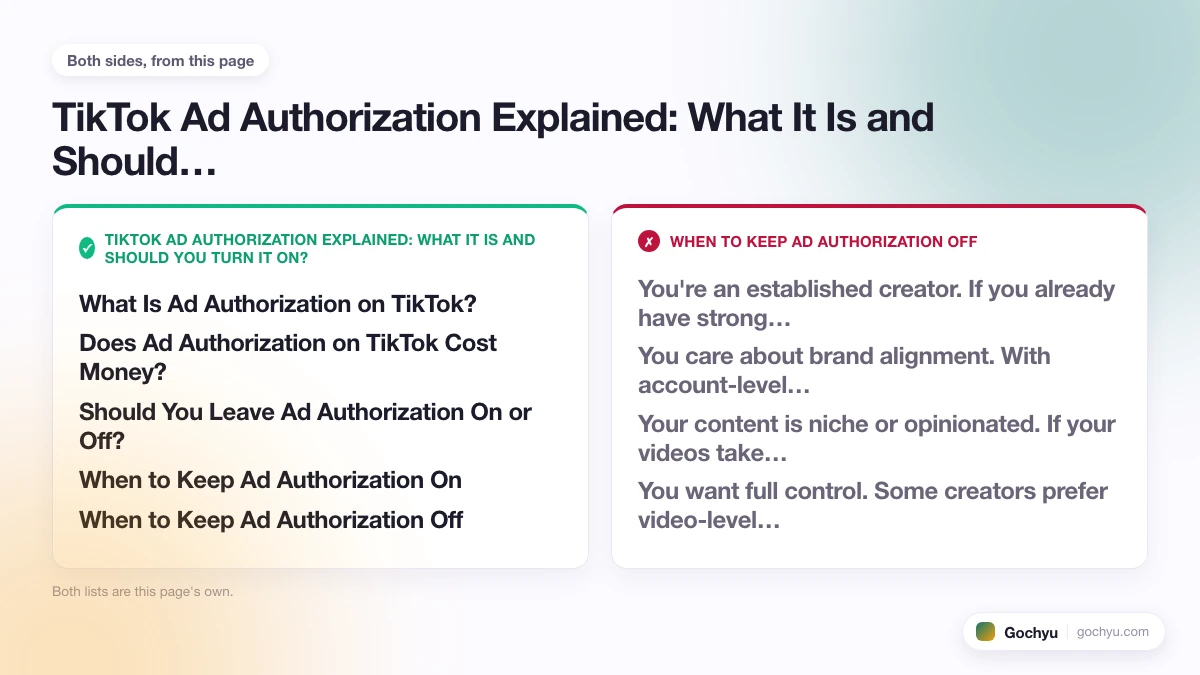
TikTok ad authorization is a privacy setting that controls whether brands can use your videos in their paid Spark Ad campaigns. When you turn it on, advertisers can promote your content to a wider audience while your original post stays on your profile. It's completely free. Brands pay TikTok for the ad placement, not you. You can turn ad authorization off at any time to revoke access.
What Is Ad Authorization on TikTok?
Ad authorization is a TikTok privacy setting that controls whether brands can use your videos in their paid ad campaigns. The ad authorization TikTok meaning is simple: it's a permission toggle that lets advertisers request your content as a Spark Ad, a paid promotion format that runs your original video as an ad while keeping it linked to your profile. The brand pays TikTok for the ad placement, not you.
This is different from a brand reposting or stealing your content. With ad authorization, the ad links back to your profile, your username is displayed, and engagement (likes, comments, shares) flows back to your original post. You retain full ownership of the video and can revoke authorization at any time.
TikTok introduced this feature to make it easier for brands to partner with creators for TikTok ad campaigns using authentic, user-generated content rather than polished studio ads, which typically perform worse on the platform.
Does Ad Authorization on TikTok Cost Money?
No. Enabling ad authorization is completely free. You are never charged for turning it on, and brands cannot deduct money from your account. The cost is entirely on the advertiser's side. They pay TikTok to run the Spark Ad using your content. You do not pay anything, and you do not receive direct payment from the brand through this feature alone (though you may be able to negotiate separate creator deals).
This is the most common misconception about ad authorization. The word "ad" makes people assume money is involved on their end. It is not. It is purely a permission toggle.
Should You Leave Ad Authorization On or Off?
The answer depends on where you are as a creator. Turning ad authorization on or off is not permanent. You can switch it any time. It is worth thinking about what you gain and what you give up in either direction.
When to Keep Ad Authorization On
- You're growing your account. If you have under 10,000 followers, the free exposure from Spark Ads can bring real follower growth at zero cost to you.
- You want engagement bumps. Likes, comments, and shares from a Spark Ad all count toward your original post. A single well-funded ad campaign can give a video thousands of extra interactions.
- You're open to brand deals. Brands are more likely to reach out for paid collaborations if they see your content performing well as a promoted ad. It can be a stepping stone to making money as a TikTok creator.
- You post general content. If your videos aren't tied to controversial topics or personal opinions you wouldn't want associated with random brands, the risk of unwanted brand association is low.
When to Keep Ad Authorization Off
- You're an established creator. If you already have strong engagement and brand interest, keeping authorization off lets you negotiate paid Spark Ad partnerships instead of giving content away for free.
- You care about brand alignment. With account-level authorization on, any brand can request any of your videos. You have no say over which brands use your content or what products they're selling.
- Your content is niche or opinionated. If your videos take specific stances (political, health, lifestyle), having them promoted alongside unrelated products could confuse your audience or attract negative comments.
- You want full control. Some creators prefer video-level authorization (covered below) so they pick exactly which videos get used and for how long.
How Does Ad Authorization Work on TikTok?
The process works through TikTok's Spark Ads system. When you enable ad authorization, you generate an authorization code for a specific video (or allow blanket authorization for all your content). A brand enters that code in their TikTok Ads Manager to use your video as a Spark Ad. The ad runs as a promoted version of your original post, not a copy or reupload.
There are two levels of authorization:
- Account-level authorization: Any brand can request to use any of your videos. You toggle this in your privacy settings. This is the broadest option and requires the least effort on your part.
- Video-level authorization: You generate a unique code for a specific video, valid for 30, 60, or 365 days. Only the brand with that code can use that video during that window.
Video-level authorization gives you more control and is the recommended approach if you want to selectively allow specific brands to use specific content. It's also important to be aware of TikTok's content guidelines. Content that violates TikTok's advertising policies cannot be used as a Spark Ad regardless of authorization status. This includes adult and NSFW ads on TikTok, which are prohibited across all Spark Ad formats with no exceptions.
What Brands Look for Before Using Your Video as a Spark Ad
Most guides explain how ad authorization works from the creator's side. What they skip is the brand's perspective: even with account-level authorization turned on, brands don't use every video they're technically allowed to access. They screen for specific performance signals before spending ad budget on your content.
Here is what brand marketers and media buyers actually look at when evaluating a creator's authorized video for Spark Ad use:
- Completion rate above 75-80%. If viewers aren't watching your video through to the end organically, it signals the content won't retain paid audiences either. Brands want videos that hold attention, not just attract it.
- Like-to-view ratio above 2-3%. A video with 50,000 views and 200 likes is a red flag. That ratio suggests the content triggered views without genuine interest. Brands look for videos where a meaningful portion of viewers actively engaged.
- Comments that signal real connection. Comment quality matters more than comment quantity. Brands look for comments that indicate the audience trusts or relates to you, not just reaction comments triggered by an algorithm push.
- Video length between 15-45 seconds. Longer videos often see drop-off that tanks completion rate for ad purposes. Short, tight videos tend to perform better as Spark Ads because TikTok's ad auction rewards completion rate heavily.
- No music that blocks ad use. Many trending sounds on TikTok are licensed for personal use only and cannot be used in paid advertising. Brands must use your video as-is, including its audio. If your video uses a restricted sound, it can't be run as a Spark Ad regardless of authorization status.
Understanding these criteria is useful even if you never negotiate a direct brand deal. If you consistently post videos with high completion rates and strong engagement ratios, the brands who find your content through ad authorization are more likely to actually use it, and your organic metrics improve in the process.
Ad Authorization vs. TikTok Creator Marketplace: What's the Difference?
Many creators confuse ad authorization with TikTok Creator Marketplace (now called TikTok One). These are completely separate systems that serve different purposes.
- Ad authorization is a passive permission toggle. You flip it on and any qualified brand can request to use your content without any direct negotiation or payment to you. You don't know who uses your videos unless you track it yourself.
- TikTok Creator Marketplace / TikTok One is an active collaboration platform. Brands find creators, pitch campaigns, agree on deliverables, and pay creators directly for the work. You have full visibility into who's working with you and what you'll earn.
The practical difference: ad authorization can happen quietly in the background and earns you nothing directly. A Creator Marketplace deal is a formal paid partnership. Some brands use both: they find a creator on Creator Marketplace, agree on a fee, create the content together, then use the creator's ad authorization code to run the video as a Spark Ad for broader paid reach. In that scenario, you get paid for the creative work AND get the organic engagement boost from the Spark Ad campaign running on top of it.
Things to Know Before You Authorize a Video
Before you flip the switch on ad authorization, there are a few things most guides skip that are worth knowing:
- You cannot edit your caption after authorization. Once a video is authorized for Spark Ads, TikTok locks the caption. If you need to update the text, you'll have to revoke authorization first, edit, then re-authorize with a new code. The brand's existing campaign would also lose access during the gap, so coordinate with them before making changes.
- Review your content first. Brands will see exactly what's in your video. If it includes anything you wouldn't want associated with a paid ad (profanity, inside jokes, controversial takes), think twice before authorizing it.
- Ad authorization and TikTok Shop authorization are different settings. If you sell through TikTok Shop, there's a separate "authorize affiliate videos for Shop Ads" toggle. Regular ad authorization controls Spark Ads only. It does not affect your Shop product videos unless you enable that separately.
- Brands can add a CTA button. When a brand runs your video as a Spark Ad, they can attach a call-to-action button (like "Shop Now" or "Learn More") that links to their landing page. Your video itself stays unedited, but the ad wrapper includes their button.
- Authorization codes expire. If you use video-level authorization, the code has a set lifespan (30, 60, or 365 days). Once it expires, the brand loses access automatically. You don't need to manually revoke it.
Does TikTok Ad Authorization Increase Views?
When a brand runs your authorized video as a Spark Ad, the engagement from that ad merges with your original post's metrics. This means:
- Views increase. Every person who sees the Spark Ad counts as a view on your original video. A well-funded campaign can add tens of thousands of views.
- Likes, comments, and shares go up. All interactions from the ad audience are added to your post. This can make your video appear more popular organically, which may trigger TikTok's algorithm to push it further.
- Profile visits and follows may spike. Since the ad links to your profile, you'll often see a bump in profile visits and new followers during the campaign period.
- Your analytics dashboard won't separate ad traffic. TikTok does not give creators a breakdown of which views or engagement came from organic reach versus Spark Ad promotion. You'll see the combined total, so keep track of when brands are running ads with your content if you want to understand your true organic performance.
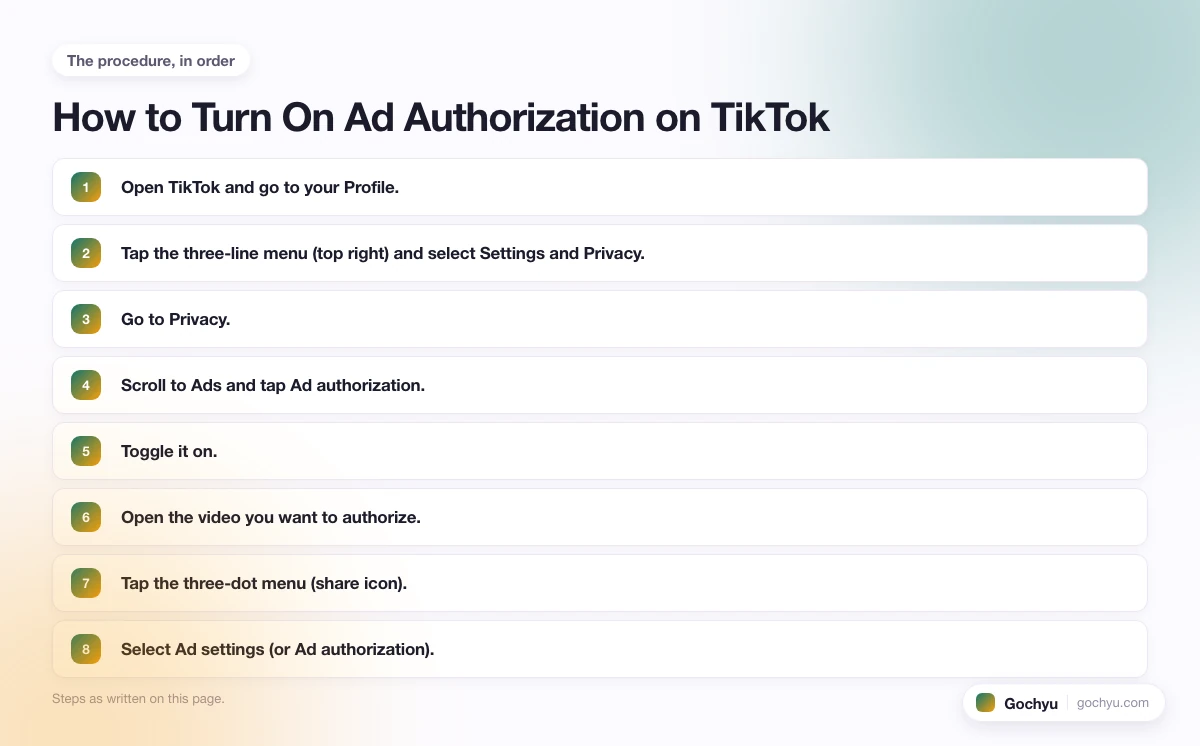
How to Turn On Ad Authorization on TikTok
To enable account-level ad authorization:
- Open TikTok and go to your Profile.
- Tap the three-line menu (top right) and select Settings and Privacy.
- Go to Privacy.
- Scroll to Ads and tap Ad authorization.
- Toggle it on.
To generate a video-level authorization code:
- Open the video you want to authorize.
- Tap the three-dot menu (share icon).
- Select Ad settings (or Ad authorization).
- Toggle authorization on for that video.
- Set the authorization duration (30, 60, or 365 days).
- Copy the generated code and share it with the brand.
Note: if your TikTok app is set to Spanish, the setting appears as Autorización de anuncios under Privacy. On Indonesian-language accounts, it's listed as Otorisasi Iklan (also referred to as "mengotorisasi TikTok" in Indonesian). The steps are identical regardless of language, so if you see "otorisasi iklan" or similar wording in your settings, that is the same ad authorization toggle.
How to Turn Off Ad Authorization on TikTok
To turn off account-level ad authorization:
- Open TikTok and go to your Profile.
- Tap the three-line menu (top right) and select Settings and Privacy.
- Go to Privacy.
- Scroll to Ads and tap Ad authorization.
- Toggle it off.
This revokes blanket permission for brands to request your content going forward.
Important: turning off account-level authorization does not immediately stop active Spark Ad campaigns. If a brand already has a video-level authorization code that hasn't expired yet, their campaign continues running until that code's expiration date. To stop a specific campaign immediately, you need to revoke that video's authorization directly:
- Open the specific video on your profile.
- Tap the three-dot menu and go to Ad settings.
- Toggle ad authorization off for that video.
This invalidates the authorization code immediately, and any active Spark Ad using that video will be paused. If multiple brands have codes for the same video, all of them lose access at once. A Spark Ad paused by an expired authorization code is one of the less obvious reasons a campaign shows "Active" in Ads Manager while spending has stopped. See our guide on TikTok ads active but not spending for a full checklist of all causes.
How to Tell If a Brand Is Currently Running Your Video as a Spark Ad
TikTok does not send you a notification when a brand activates an authorization code and starts running your video as a Spark Ad. You won't receive an email, in-app message, or any direct alert. Many creators only discover a campaign is running by noticing a sudden spike in views, likes, or profile visits.
There are a few indirect signals to watch for:
- Unusual view spikes on a specific video. If a post that normally gets a few hundred views suddenly jumps to tens of thousands, it's likely being promoted as a Spark Ad.
- A wave of comments from unfamiliar audiences. Spark Ads reach people outside your normal follower base, so the comment tone or demographics may shift noticeably.
- Profile visit spikes without a viral video. If you see profile visits climb but no single video is trending organically, an active Spark Ad is a likely explanation.
- Ask the brand directly. If you gave a brand a video-level authorization code, you can ask them whether the campaign is live. They're not obligated to tell you, but most brands will confirm if you ask.
If you want to avoid this ambiguity altogether, use video-level authorization codes only. Only issue them to brands you've agreed to work with. That way you always know exactly who has access and for how long.
Ad Authorization vs. Paid Spark Ad Deals: What Creators Actually Earn
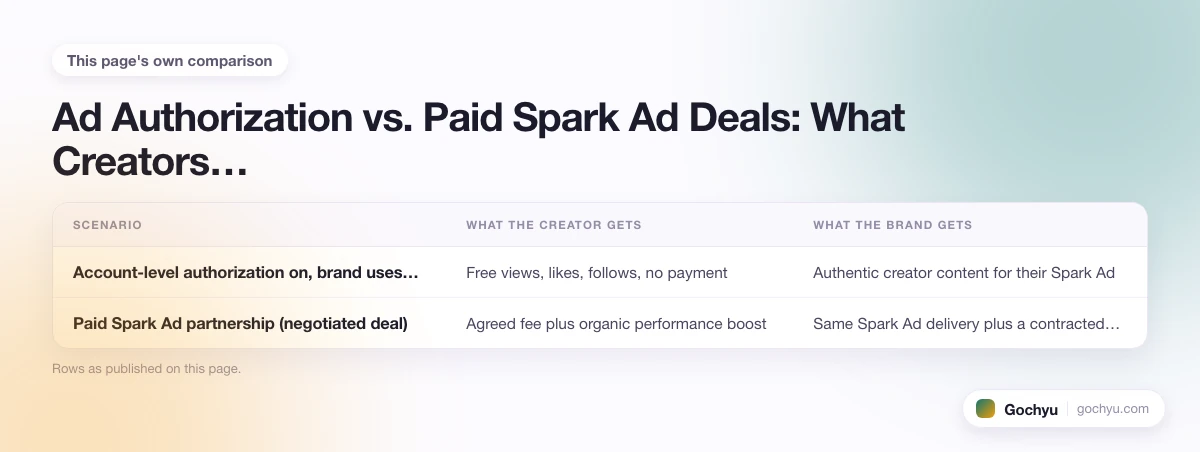
One thing creators often ask: if a brand runs your video as a Spark Ad, do you get paid? The short answer is no, not automatically. Ad authorization is a permission toggle, not a payment agreement. The brand pays TikTok to run the ad, and you receive nothing from that transaction unless you separately negotiate a creator deal.
Here is how the two paths compare:
| Scenario | What the creator gets | What the brand gets |
|---|---|---|
| Account-level authorization on, brand uses video | Free views, likes, follows, no payment | Authentic creator content for their Spark Ad |
| Paid Spark Ad partnership (negotiated deal) | Agreed fee plus organic performance boost | Same Spark Ad delivery plus a contracted creator |
| TikTok Creator Marketplace / TikTok One campaign | Flat fee or revenue share, direct from brand | Managed campaign with full creator collaboration |
If you have substantial reach and a brand is actively promoting your content, that is leverage. Many established creators keep ad authorization off specifically so they can negotiate paid Spark Ad deals, using the authorization code as a deliverable in the contract. That way they get paid for the creative work and the brand still gets the Spark Ad placement they want.
If you are under 50,000 followers, the free exposure is usually worth more than the negotiating position. Above that threshold, it is worth evaluating whether the organic engagement boost is worth more or less than a flat fee from the same brand.
The Bottom Line on TikTok Ad Authorization
TikTok ad authorization is a straightforward permission setting that lets brands use your content as Spark Ads. It costs nothing to enable, gives you free exposure and engagement, and can be turned off at any time. The main risk is brand association: your content could promote something you don't endorse. For most creators, especially those building an audience, the trade-off favors turning it on. For established creators with strong commercial value, negotiating paid Spark Ad deals directly is often the better play.
For a deeper look, see our complete guide to TikTok Shop Explained: Your E-Commerce Edge.
* read the rest of the post and open up an offer

