Shopify and Webflow both let you sell online, but they come at ecommerce from opposite ends of the room. Shopify is an ecommerce engine first, with a site builder wrapped around it, tuned for stores that want to add products, take orders, and grow to millions in revenue without swapping platforms. Webflow is a visual design tool first, with an ecommerce module added later, tuned for designers and agencies who want pixel-level control over every page and are willing to accept a smaller ecommerce toolkit in exchange.
The short version: pick Shopify when the site is a store that also has content, pick Webflow when the site is a brand or portfolio that also sells a small number of products. The rest of this guide walks through the exact pricing, product limits, design trade-offs, SEO differences, and the migration cost that most Shopify vs Webflow reviews leave out.
Shopify vs Webflow: At a Glance
Both platforms produce a functioning online store, but they target different buyers. Here is how they line up on the dimensions that actually matter when the store is the point.
- Built for: Shopify is built for ecommerce. Webflow is built for visual design with ecommerce added as one feature.
- Cheapest ecommerce plan: Shopify Basic at $29/mo. Webflow Standard at $29/mo (ecommerce tier, separate from the CMS site plans).
- Platform transaction fees: Shopify charges 0% with Shopify Payments (2% with third-party processors on Basic). Webflow charges 2% on Standard, 0% on Plus and Advanced.
- Product limit: Shopify has no product cap. Webflow caps you at 500 items on Standard, 5000 on Plus, 15000 on Advanced.
- Design flexibility: Webflow offers full pixel-level control with no template restriction. Shopify uses a section-based theme editor with fixed block positions.
- App ecosystem: Shopify App Store has 8,000+ apps. Webflow has a small marketplace of about 50 official apps plus Zapier and Make workflows.
- Templates: Shopify has 13 free and around 240 paid themes tuned for stores. Webflow has 2,000+ templates for general sites and about 50 built for ecommerce specifically.
- Multi-channel selling: Shopify syncs natively with Amazon, eBay, TikTok Shop, Instagram, and Facebook. Webflow supports Facebook and Instagram catalogs via integrations, no first-party marketplace sync.
- POS: Shopify POS runs on iOS and Android with dedicated hardware. Webflow has no POS system.
- Best for: Webflow is best for designers, agencies, portfolios, and brand sites that sell fewer than 100 SKUs. Shopify is best for real ecommerce and anything that expects to scale past five figures a year.
Pricing: What You Actually Pay Each Month
The plan pricing looks close at first glance, but the two platforms structure their fees differently. Webflow separates its site plans from its ecommerce plans, which means you may end up paying for both. Here is the real breakdown.
For a Webflow-first store, the design layer starts with a marketplace template - our roundup of the best Webflow templates covers ecommerce picks like Bella and Apparel X alongside portfolio and blog templates.
Shopify Plans (as of 2026)
- Basic ($29/mo yearly, $39/mo monthly). 2% transaction fee on third-party processors, 0% on Shopify Payments. Unlimited products. 2 staff accounts.
- Shopify ($79/mo). 1% third-party fee, 0% on Shopify Payments. Better shipping discounts. 5 staff accounts.
- Advanced ($299/mo). 0.5% third-party fee. Custom reports. 15 staff accounts.
- Plus (from $2,300/mo). Enterprise tier with custom checkout and unlimited staff.
The full plan-by-plan breakdown, including hidden app fees and payment processing math, is in our complete Shopify pricing guide.
Webflow Plans (as of 2026)
Webflow charges two separate subscriptions: a site plan (for hosting and CMS) and an ecommerce plan (for the store). You need both to run a store.
- Standard ecommerce ($29/mo). 500 items, 2% platform transaction fee, $50k annual sales cap.
- Plus ecommerce ($74/mo). 5,000 items, 0% platform fee, $200k annual sales cap.
- Advanced ecommerce ($235/mo). 15,000 items, 0% platform fee, unlimited sales.
Every Webflow ecommerce plan also includes the underlying CMS site hosting, so the sticker price is the total. But note the annual sales cap on Standard: once you cross $50,000 in sales, Webflow forces you to upgrade to Plus regardless of catalog size. Shopify has no equivalent revenue cap.
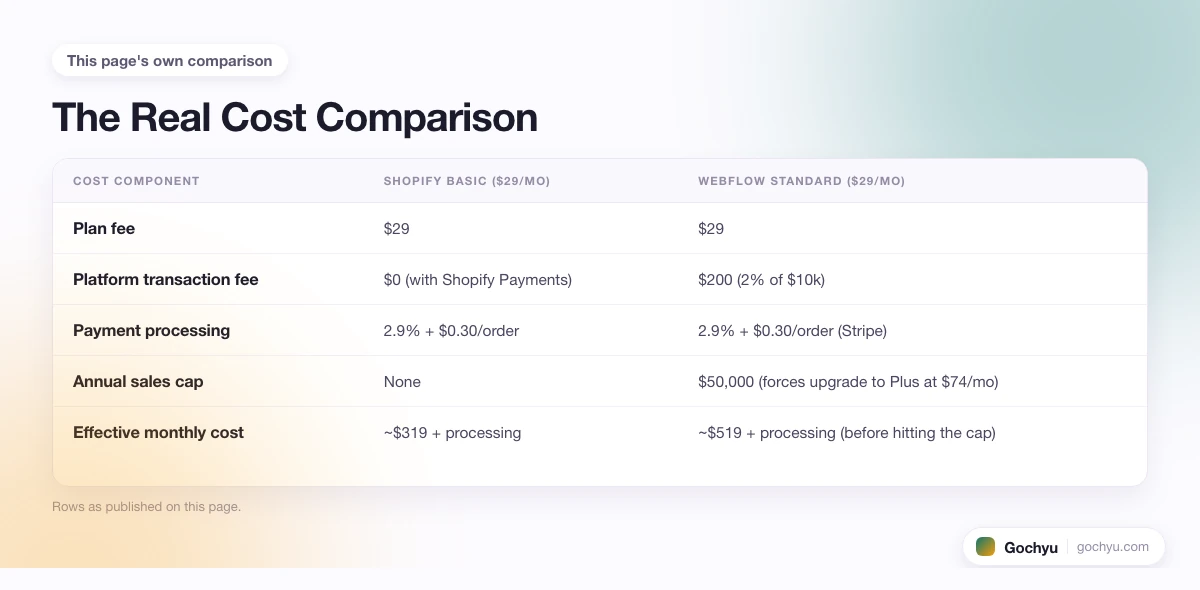
The Real Cost Comparison
If you process $10,000 a month in sales on the entry ecommerce plan, here is what each platform actually costs.
| Cost component | Shopify Basic ($29/mo) | Webflow Standard ($29/mo) |
|---|---|---|
| Plan fee | $29 | $29 |
| Platform transaction fee | $0 (with Shopify Payments) | $200 (2% of $10k) |
| Payment processing | 2.9% + $0.30/order | 2.9% + $0.30/order (Stripe) |
| Annual sales cap | None | $50,000 (forces upgrade to Plus at $74/mo) |
| Effective monthly cost | ~$319 + processing | ~$519 + processing (before hitting the cap) |
Two things stand out in the math. First, the 2% platform fee on Webflow Standard costs you $200 a month at $10k in sales, which Shopify with Shopify Payments does not charge. Second, at $50k in annual sales Webflow forces you off Standard, which lifts the base from $29 to $74/mo and shifts the total closer to Shopify's higher tiers even without the platform fee.
Ease of Use: Visual Freedom vs Section-Based Editing
This is where Webflow's identity comes through most clearly. Webflow is closer to a code editor with a visual layer on top than to a drag-and-drop builder. You are still working with real HTML div structure, CSS classes, and flex or grid layouts. The interface just gives you buttons instead of typing. For someone who understands the box model, this is a superpower. For someone who does not, the learning curve is steep. Expect a few weekends of tutorials before your first page looks the way you want.
Shopify's theme editor takes the opposite approach. You pick a theme, then reorder pre-built sections (hero, product grid, image with text, testimonials) down the page. You cannot drop an element at arbitrary coordinates. You cannot layer components without writing Liquid. What you can do, in about an hour of clicking, is set up a working store that looks polished on both desktop and mobile, with no coding vocabulary required.
The trade-off is real in both directions. Webflow gives you a portfolio-ready homepage that can outclass every stock ecommerce theme, but you pay for it in setup time. Shopify hands you a workable store in an afternoon, but the ceiling on visual customization is lower unless you hire a Liquid developer.
A practical test: if you can name specific typography, spacing, and animation choices you want and would enjoy tuning them yourself, Webflow is worth the ramp. If you want a store live this week and do not care whether the hero section slides in from the left or fades up from below, Shopify wins on time-to-first-sale.
Ecommerce Features: Where the Gap Is Real
Both platforms let you sell, but the depth of the ecommerce feature set is not close. If you sort by "what will I need at 1,000 orders a month," Shopify has almost everything and Webflow has the basics.
Checkout Conversion
Shopify Checkout is the most-tested ecommerce checkout in the world, backed by billions of dollars in conversion data. Shop Pay accelerated checkout (a one-tap payment option that pulls saved cards, addresses, and contact info from a shared network) lifts conversion by 9% to 18% on stores that turn it on, per Shopify's own data, and works even when the customer has never shopped that specific store before. Webflow's checkout is clean and modern but generic. It does not have a shared cross-store payment network, and it does not carry the same optimization history.
Inventory and Catalog
Shopify handles serious catalog complexity: multi-location inventory, automated collections by tag or vendor or price, variants with per-variant images, warehouse transfers, custom pricing groups. Webflow supports variants (up to five per product with up to three options each) and manual categories, but has no multi-location inventory, no automated collections, and no per-variant image swapping. If you sell more than a few dozen SKUs with color and size options, this shows up quickly in the daily workflow.
Multi-Channel Selling
Shopify treats Amazon, eBay, TikTok Shop, Instagram, and Facebook as first-class sales channels with native inventory sync and unified order management. Webflow has no native marketplace integration. You can push a product catalog to Facebook or Instagram Shop via a third-party feed, but there is no back-sync of orders and no eBay or Amazon path without a custom Zapier setup.
Apps and Extensibility
Shopify's App Store has more than 8,000 apps covering subscriptions, print-on-demand, upsells, loyalty, B2B pricing, wholesale, dropshipping, and every specialized ecommerce need. Webflow's official marketplace has around 50 apps, most of them design or CMS tools rather than store features. For extensibility beyond what Webflow ships, you rely on custom code embeds, Zapier, and Make workflows, which cover common integrations but not the depth of native Shopify apps.
A quick sanity check for anyone still weighing this: search the Shopify App Store for whatever specialized feature your store might need in year two. If Shopify returns 30 options and Webflow has zero, the answer is already in the numbers.
SEO Capabilities: Both Are Solid, Webflow Has an Edge on Blogging
Both platforms produce clean, crawlable HTML with editable meta tags, canonical URLs, robots.txt, and automatic sitemaps. Both ship with SSL. The differences are subtle but worth knowing.
- URL structure. Shopify forces product URLs into
/products/[slug]and collection URLs into/collections/[slug]. You cannot remove the prefix without a redirect app. Webflow lets you set arbitrary URL paths for any CMS collection. - Page speed. Both platforms score well on Core Web Vitals when you build with attention to image sizes. Webflow tends to produce slightly leaner HTML because you control every element. Shopify themes ship pre-optimized, so out of the box performance is comparable.
- Schema markup. Shopify themes include product, breadcrumb, and review schema by default. Webflow requires you to add JSON-LD manually in the head embed for each template, which is powerful (you can customize any schema type) but takes work.
- Blog and content SEO. Webflow's CMS is genuinely excellent for content sites. You can define custom collection fields, reference other collections, and build any content type as a first-class object. Shopify's built-in blog is functional but lightweight, and most content-heavy Shopify stores proxy a separate blog or use a headless setup.
- 301 redirects. Both platforms support redirect management in the admin. Shopify's redirect UI is slightly better for bulk imports.
The net: for pure store SEO, Shopify's built-in schema and URL conventions match what Google expects and get you ranking faster with less setup. For blog SEO or a store with heavy editorial content, Webflow's CMS is the stronger tool.
Templates and Design
Webflow has more than 2,000 templates in its marketplace, including about 50 built specifically for ecommerce, ranging from free to around $79 one-time. All are fully editable at the class and element level, so you can start from a template and change anything about it without breaking the layout. This is genuinely different from most platforms: Webflow templates are starting points, not locked designs.
Shopify has 13 free themes and around 240 paid themes ($150 to $400 one-time), all hand-built for ecommerce. The total count is smaller, but every option is designed for product browsing, cart flow, and checkout conversion. The floor is high: even the free themes look professional out of the box and handle mobile responsively without extra work.
One under-discussed practical difference: Webflow templates favor visual expression, so you often get stunning hero sections and portfolio-style product galleries. Shopify themes favor conversion, so you get well-structured product pages, sensible cart drawers, and trust signals in the right places. Both approaches are legitimate. Which one wins depends on whether the site is meant to convince or convert.
If you want to see what themes a specific Shopify or Webflow store is running, our free Theme Detector identifies the theme and installed apps in a few seconds. It is a fast way to reverse-engineer stores you admire before you pick your own build.
Best For: Who Should Pick Which
Webflow is best for
- Designers and design-led brands where the site is part of the product and every pixel needs to be intentional.
- Agencies building sites for clients who want handoff-ready, editable projects with real design systems.
- Portfolios and brand sites that sell a small line of merch or digital products alongside their main content.
- Content-first sites with a strong blog or magazine section and a limited product catalog under 100 items.
- Founders comfortable with the box model who want direct control over HTML class structure and CSS layout without hiring a developer.
Shopify is best for
- Dedicated stores where 80%+ of the visitor intent is shopping or product research.
- Growing brands that expect to cross $100,000 in revenue within 18 months and want the platform to scale without a rebuild.
- Multi-channel sellers that need one source of truth across a store, Amazon, Instagram, TikTok Shop, and physical retail.
- Stores with large catalogs (500+ SKUs, multiple variants, multi-location inventory).
- Founders who plan to use apps heavily for subscriptions, loyalty, upsells, or international expansion. The step-by-step path to a working store is documented in our Shopify store setup guide.
The Migration Cost Most Comparisons Skip
Pick the wrong platform now and switching later is not free. This is the most overlooked variable in Shopify vs Webflow comparisons.
Moving from Webflow to Shopify typically costs $1,000 to $5,000 in agency fees plus 30 to 80 hours of your own time for a small store. You lose your custom design (Webflow layouts do not export to Shopify's section format), your URL structure unless you build careful redirects, your CMS content unless you export it via API and remap it, and any Webflow-native interactions or animations. Product data and customer records export cleanly via CSV, but everything else is a rebuild.
Moving from Shopify to Webflow is rarer but similarly expensive. Most stores that grow past Webflow's 5,000 or 15,000 item ceilings move to Shopify or a headless setup, not back to a general design platform.
The practical takeaway: if you are 70% confident you will be doing serious ecommerce within two years, start on Shopify. If you are 70% confident the site is and will remain design-led with a modest product line, start on Webflow. The middle case (a real store that also cares about design) is where the decision gets hard, and where "start on Shopify and pay a designer for a custom theme" usually beats "start on Webflow and hope the ecommerce catches up."
Common Scenarios Quick-Hit
A few cases where the choice gets tighter:
- Subscription box business. Shopify. Recharge, Bold, and Skio integrations are years ahead of anything you can build on Webflow.
- Print-on-demand drop shipper. Shopify. Native Printful, Printify, and Gelato integrations sync inventory and orders automatically.
- Design agency selling client sites. Webflow. The client handoff workflow and editor mode are unmatched.
- Photographer selling prints. Webflow. Visual freedom for the portfolio matters more than checkout depth for a low-volume shop.
- SaaS company with a merch line. Webflow for the main marketing site plus a Shopify subdomain for the store, or Shopify with a strong custom theme if the merch is a real business rather than a side project.
- Restaurant with ecommerce catering. Shopify. The ecommerce checkout and shipping tools handle catering orders better than Webflow's basic cart.
- Course creator with 5-20 courses. Webflow works if the courses are hosted elsewhere (Teachable, Podia) and the site is the marketing layer. Shopify is better if you want everything under one roof.
Verdict: Which Should You Choose?
If you are building a real online store, choose Shopify. The checkout conversion, the 8,000-app ecosystem, the native marketplace channels, the catalog depth, and the absence of platform transaction fees on Shopify Payments all add up. The price difference at small volume is real but small, and the migration cost of switching from Webflow to Shopify later is much larger than the savings of starting on Webflow.
If you are building a brand site, a portfolio, or a design-led company page that happens to also sell a small line of products, choose Webflow. The visual freedom is genuine, the CMS is deep enough to run editorial content, and you are not paying for ecommerce features you will not use.
If you are leaning Shopify, the next step is the step-by-step Shopify setup guide or a free Shopify trial to feel the editor before you commit. If you are leaning Webflow, spend an hour with the Webflow designer and see whether the box model feels natural or foreign, because that is the honest test.
Conclusion: Shopify vs Webflow
Both platforms work. The question is what you are actually building. Shopify wins for ecommerce stores that plan to grow, that need multi-channel selling, or that expect to cross $50,000 in sales within a year. Webflow wins for design-first brands, agencies, and portfolios where the store is a small part of a bigger content or brand site. If you are still weighing whether Webflow is even the right fit for your project overall, our complete Webflow guide for beginners covers who Webflow is best for beyond just ecommerce. And you can inspect any live Shopify or Webflow store with the free Theme Detector to see how the sites you admire are actually built before you commit to your own stack.
* read the rest of the post and open up an offer