
To promote OnlyFans on TikTok without getting banned, you need to keep all posted content clean, never mention OnlyFans by name in your videos or captions, and drive traffic indirectly through a link-in-bio service like Linktree. TikTok's strict advertising policies prohibit adult content entirely, but that doesn't mean OnlyFans creators can't build a following there. Tens of thousands of creators use TikTok as their main funnel for new subscribers. The key is treating TikTok purely as an audience-building platform and letting your bio link do the selling.
Here's exactly how to do it.
Setting Up Your TikTok Account for OnlyFans Promotion
Before posting a single video, get your account infrastructure right:
- Username: Use the same name as your OnlyFans so fans can find you across platforms. Avoid words like "fans," "adult," or "exclusive" in your TikTok username, as these can trigger automated review.
- Bio: Keep it vague but intriguing. Something like "content creator | link below" works. Don't mention OnlyFans directly: this is a known ban trigger.
- Link in bio: TikTok only allows one link, so use a link aggregator (Linktree, Beacons, or Stan Store) that routes visitors to your OnlyFans page. This keeps your TikTok profile compliant while still directing traffic.
- Profile photo: Use a face-forward, non-explicit photo. TikTok profiles with suggestive thumbnails get restricted from the For You page.
What Gets OnlyFans Creators Banned on TikTok
Understanding what to avoid is as important as knowing what to post. These specific actions get accounts flagged or banned:
- Saying "OnlyFans" directly in a video or caption: even once can flag the account for review
- Posting sexually suggestive thumbnails or profile photos
- Using phrases TikTok's moderation has learned to flag: "link in bio for more," "18+ content," "exclusive content," "subscribe for the real stuff"
- Linking directly to OnlyFans in your bio (without a redirect service)
- Using TikTok Live to mention or advertise adult content
The algorithm catches repeat offenders through automated content review and user reports. A single borderline video won't always result in a ban, but a pattern of them will. When an account gets a strike, TikTok typically restricts For You page distribution first before a full ban. If your videos stop getting views overnight, that's the warning sign.
How to Link to OnlyFans from TikTok
TikTok doesn't allow direct OnlyFans links in bios on most accounts. The workaround: a link-in-bio page that acts as a middleman. Set up a free Linktree, Beacons, or Stan Store page with your OnlyFans link, then put that link in your TikTok bio. In your videos, say "link in bio" to direct viewers there.
Some creators also funnel TikTok followers to Instagram first (where OF links are more accepted), then to OnlyFans from Instagram. This two-step approach reduces the risk of TikTok flagging your account while still capturing the audience.
10 TikTok Content Ideas for OnlyFans Creators
TikTok isn't exactly OnlyFans-friendly. The platform's strict community guidelines ban explicit content and prohibited products, so if you're an OnlyFans performer, you've got to play it smart. Here are 10 creative and safe content approaches that work:
-
Focus on Personality
-
Showcase Your Interests
- Film a cooking or baking video, showing off a simple recipe.
- Share a makeup tutorial or beauty transformation video.
- Post a clip of a fitness routine or yoga flow.
-
Post Teasers
- Create a short, glam video with a caption like, "What's your favorite vibe."
- Use text overlays to hint at your content, such as, "What do you think my side hustle is."
- Post a playful video with the caption, "The energy I bring to everything I do."
-
Create Behind-the-Scenes Content
- Show how you set up for a photoshoot, keeping it professional and clean.
- Film a timelapse of editing content or organizing your workspace.
- Share clips of packing orders or prepping for the week.
-
Use Link in Bio Strategically
- Post a video with text like, "Curious about what's in my bio."
- Share a casual video with a call to action, "Check out the link for the full story."
- Use a popular sound with a caption hinting at your bio link.
-
Hop on Trends
- Use a trending sound to create content that fits TikTok's current vibe.
- Participate in a viral dance or challenge that resonates with your style.
- Add your unique spin to a trending meme or trend format.
-
Promote Your Instagram
- Post a teaser video with a caption like, "Find the rest on my Instagram."
- Highlight curated content from your Instagram feed in a TikTok reel.
- Share a short clip pointing viewers toward your Instagram stories.
-
Post Fitness or Wellness Content
- Share part of a workout routine or stretch session.
- Post a calming morning routine featuring self-care habits.
- Show progress or transformation over time, such as before and after moments.
-
Answer Questions or Post Tips
- Answer a common question like, "How do I stay confident" in a concise video.
- Share three tips about productivity, creativity, or motivation.
- Use TikTok's Q&A feature to engage followers and create content from their questions.
-
Use Humor to Your Advantage
- Create a video like, "When they ask what my job is and I say accountant."
- Post a meme-style video about being a content creator.
- Share a POV video poking fun at people stalking your profile to figure out what you do.
Can You Say OnlyFans on TikTok?
Technically, the word "OnlyFans" is not banned on TikTok. But saying it in a video or caption significantly raises your risk of automated flagging. TikTok's content moderation system is trained to associate the word with adult content. Accounts that mention it repeatedly, especially alongside suggestive visuals or hashtags, get restricted from the For You page or banned outright. The safest approach: never say it out loud in a video, avoid it in captions, and refer to it indirectly as "my subscription platform," "where I post exclusive content," or "what's in my bio."
Can You Promote OnlyFans on TikTok in 2026?
Yes, but only indirectly. TikTok has not removed the ability to drive traffic to subscription platforms, but it has tightened enforcement since 2023. In 2026, the most reliable method is still the link-in-bio workaround: post clean, personality-driven content, build an audience, and funnel them to a Linktree or similar page that leads to your profile. Direct promotion of adult subscription content violates TikTok's community guidelines regardless of how it's framed.
A notable shift in 2025-2026: TikTok increased enforcement through AI-driven shadowbanning. Accounts don't get notified when their For You page reach drops. If your video views fall sharply without explanation, check your account standing under "Creator Tools" in your profile settings.
What to Do If Your TikTok Gets Shadowbanned or Restricted
A shadowban is one of the most frustrating things that can happen to an OnlyFans creator using TikTok. Your account stays active, but TikTok's algorithm silently stops showing your videos on the For You page. Views drop to near zero with no notification and no clear explanation.
Here is how to confirm a shadowban and recover from it:
How to Tell If You're Shadowbanned
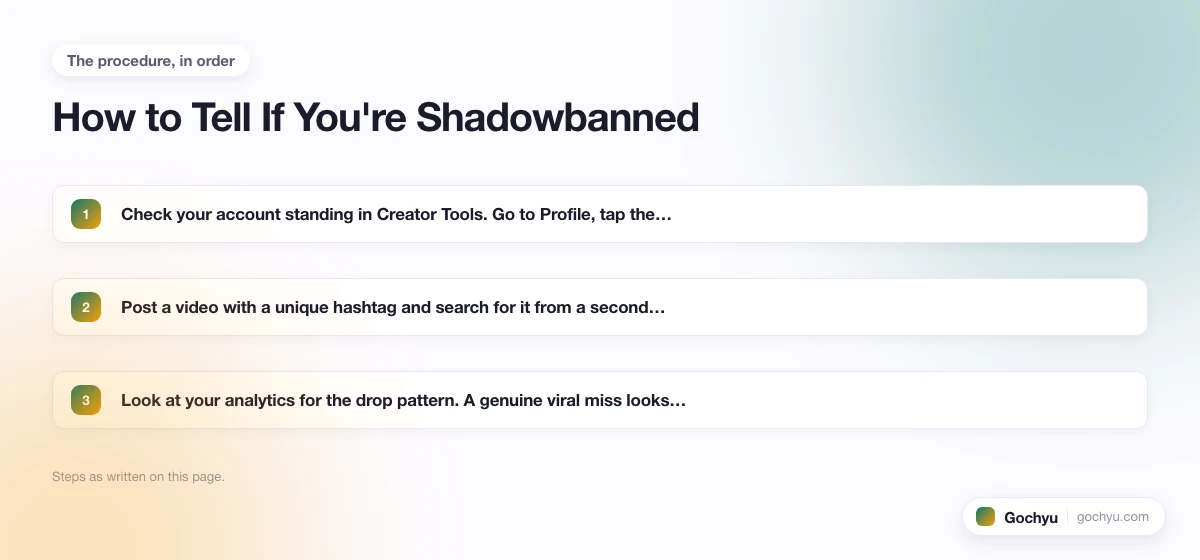
- Check your account standing in Creator Tools. Go to Profile, tap the three-line menu, then Creator Tools, then Account Standing. Any violations or restrictions are listed here. A clean account standing alongside zero views suggests a soft algorithmic suppression rather than a formal violation.
- Post a video with a unique hashtag and search for it from a second account. If the video doesn't appear in the hashtag feed within a few hours, your content is being suppressed from discovery.
- Look at your analytics for the drop pattern. A genuine viral miss looks different from a shadowban. Shadowbans typically create a sudden cliff in views across all recent videos at once, not just one underperforming post.
Recovery Steps
- Stop posting for 2-3 days. Continuing to post during an active suppression can deepen it. A short pause gives the system time to reassess your account.
- Remove any videos that may have triggered the restriction. Review your recent posts for anything that mentions OnlyFans directly, includes flagged phrases, or has received multiple reports. Deleting problem content is one of the few direct signals you can send to TikTok's moderation system.
- Submit a support request through the Help Center. Go to Settings and Privacy, then Help and Support, then Report a Problem. Describe the drop in reach without admitting to any policy violation. Many soft shadowbans are reversed within 48-72 hours after a support request, especially on accounts without formal strikes.
- Return with clean content and rebuild engagement. Post 3-5 strong videos with high completion rate potential (short, clear, personality-driven). Early engagement in the first 30 minutes of a new post signals to TikTok that your audience is still active, which helps restore For You page distribution.
As a backup measure, always maintain a second TikTok account on a different device or with a different email address. If your main account takes a hard ban, a backup account keeps your content strategy running while you work through the appeal process.
TikTok OnlyFans Strategy: What Actually Converts Followers to Subscribers
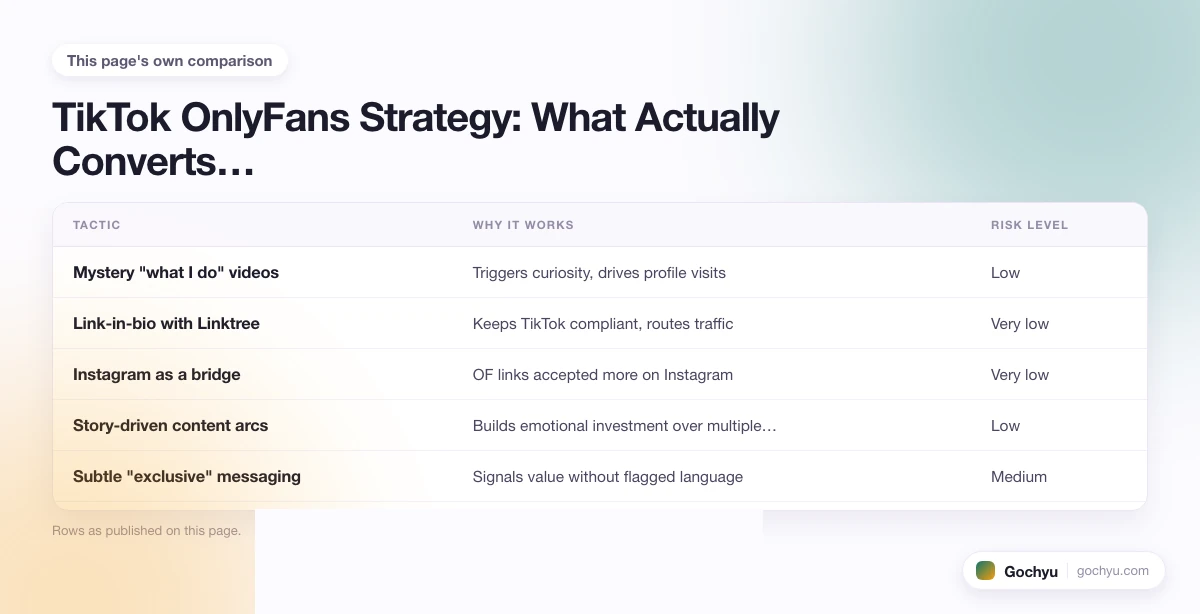
Getting followers on TikTok is the easy part. Converting them to paying OnlyFans subscribers requires a deliberate strategy. Here's what works based on how successful creators approach it:
| Tactic | Why It Works | Risk Level |
|---|---|---|
| Mystery "what I do" videos | Triggers curiosity, drives profile visits | Low |
| Link-in-bio with Linktree | Keeps TikTok compliant, routes traffic | Very low |
| Instagram as a bridge | OF links accepted more on Instagram | Very low |
| Story-driven content arcs | Builds emotional investment over multiple videos | Low |
| Subtle "exclusive" messaging | Signals value without flagged language | Medium |
| Direct OF mentions in video | High engagement potential but high ban risk | High |
The highest-converting creators on TikTok don't sell subscriptions directly. They sell curiosity. The goal of every video is not to explain your OnlyFans, but to make a viewer want to know more about you specifically. That conversion happens in the bio, not the video itself.
Best Hashtags for OnlyFans Promotion on TikTok
Hashtags on TikTok work differently than Instagram. The algorithm uses them as context signals, not discovery drivers. A video with no hashtags can still go viral if the content is strong. That said, the right hashtags help TikTok understand your niche and surface your content to relevant audiences.
For OnlyFans creators, the challenge is that direct OF hashtags are suppressed or shadowbanned. Avoid any hashtag that directly references OnlyFans or adult content. Instead, use these categories of hashtags:
- Creator economy hashtags: #contentcreator, #creatortips, #sidehustle, #onlinebusiness, #passiveincome. These signal creator identity without referencing adult content.
- Niche content hashtags: If your content angle is fitness, use #fitnessjourney, #workoutroutine. If it's lifestyle, use #dayinmylife, #lifestyleblogger. Match the hashtag to the actual video content.
- Trend-based hashtags: Attach to trending sounds and challenges with their associated hashtags. Trending content gets more For You page distribution regardless of your follower count.
- Curiosity hashtags: #secretlife, #whatidoforaliving, #mysteryoccupation. These play into the mystery angle many successful OnlyFans TikTok creators use.
Use 3-5 hashtags per video, not 20. TikTok's internal data suggests a small, focused hashtag set performs better than a wall of tags. Never repeat the same hashtags across every video. Vary them based on the specific content of each post.
How to Track Whether Your TikTok Strategy Is Actually Working
Most OnlyFans creators post consistently on TikTok but never know whether it's actually driving subscribers. Without tracking, you're flying blind. Here is how to measure whether the effort is paying off:
- Use Linktree or Beacons analytics. Both platforms show how many people click through from TikTok to your link page, and how many then click onward to OnlyFans. Check this weekly. If your TikTok follower count grows but link clicks stay flat, something in the funnel is breaking, typically the bio text or the Linktree landing page.
- Add UTM parameters to your OnlyFans link. If OnlyFans's analytics are limited, use a URL shortener that appends UTM tags (e.g., ?utm_source=tiktok&utm_medium=social) before putting the link in Linktree. This lets you see TikTok-sourced traffic separately in any analytics tool that supports UTM tracking.
- Correlate posting spikes with subscriber spikes. Track the dates of your best-performing TikTok videos (by views) alongside your OnlyFans subscriber intake. If there's a consistent lag of 1-3 days between a viral video and a subscriber spike, TikTok is driving conversions. If the two are unrelated, the content isn't connecting the audience to your subscription.
- Watch profile visit rate, not just view count. A video with 100,000 views but 200 profile visits is entertainment content, not funnel content. You want videos that make people curious enough to check your profile. A 0.5-1% profile visit rate on a video means it's doing its job in the funnel; below 0.1% means the video entertains but doesn't convert.
The goal is a clear line from TikTok post to profile visit to link click to subscription. Tracking each step tells you exactly where the funnel breaks down so you can fix the specific weak point rather than guessing.
How to Grow Faster as an OnlyFans Creator on TikTok
Getting your videos seen consistently comes down to understanding how TikTok distributes content. The algorithm prioritizes watch time and completion rate above all else. A 15-second video watched all the way through signals more value than a 60-second video watched halfway. This means shorter, tighter videos perform better when you're building a following.
Practical tactics that work for creators in restricted niches:
- Post at peak hours. For most creators, 6-9pm in the primary audience's timezone generates the strongest initial engagement. The first 30 minutes after posting determine whether TikTok pushes the video to a wider audience.
- Post consistently, not constantly. 1-2 videos per day is the sweet spot for most creators. More than 3 videos per day often splits your own views across posts. Quality and consistency matter more than volume.
- Reply to every comment in the first hour. Early engagement signals boost distribution. Responding to comments quickly increases the comment count and keeps the video active in TikTok's attention window.
- Use TikTok's duet and stitch features. Stitching a viral video with your own reaction or commentary borrows that video's audience reach. This is particularly effective for content creators who want exposure without starting from zero.
- Post a "what I do for a living" video early. These videos consistently perform well across all niches and generate the curiosity that drives link-in-bio clicks. Don't answer directly. Let the mystery do the work.
The creators who grow fastest on TikTok treat it as a personality platform, not an ad network. Build genuine interest in who you are, keep your content entirely clean, then let your link-in-bio do the selling. Keep growing your TikTok following with quality content and let curiosity do the heavy lifting.
For anyone building a broader creator business, understanding how TikTok Shop works for creators is worth the time since many OnlyFans creators also sell physical or digital products alongside their subscription content.
For a deeper look, see our complete guide to TikTok Shop Explained: Your E-Commerce Edge.
If you are considering running paid promotions to grow your TikTok audience faster, our guide to TikTok ad costs breaks down what different budgets actually deliver in views and followers, and how to avoid paying Apple's service fee on in-app purchases.
* read the rest of the post and open up an offer

