Webflow and WordPress both let you build a real website, but they come at the job from opposite directions. Webflow is a visual design tool with hosting and a CMS baked in, sold as one closed product where the interface is the whole platform. WordPress is open-source software you install on your own host, extended by 60,000 plugins and 12,000 themes built by a global community. That single split, closed all-in-one versus open plugin ecosystem, explains almost every difference below.
The short version: pick Webflow when the site's look is the point and you want one editor to do everything. Pick WordPress when the site needs flexibility over time, when you want to own every file, or when the budget rules out ongoing platform fees. The rest of this guide walks through the real pricing, learning curve, ecosystem depth, ecommerce trade-offs, and SEO differences that shape the decision.
Webflow vs WordPress: At a Glance
Both platforms produce a working, professional website, but they target different builders. Here is how they line up on the dimensions that matter most before you commit.
- Type of platform: Webflow is a hosted, closed platform. WordPress is open-source software you host yourself.
- Starting cost: Webflow Basic site plan at $14/mo (annual). WordPress software is free, but you pay $5 to $30/mo for hosting.
- Ecosystem size: Webflow has around 100 official apps and roughly 4,000 templates. WordPress has 60,000+ plugins and 12,000+ themes in the official directories.
- Design flexibility: Webflow offers pixel-level control with real CSS class structure, no template lock-in. WordPress design depends on the theme, though block themes and Elementor-style builders close much of the gap.
- Learning curve: Webflow rewards designers who understand HTML box model and CSS layout, even if they never write code. WordPress rewards patient generalists who accept a fragmented setup in exchange for near-total control.
- Content management: Webflow's CMS is clean but capped (2,000 CMS items on Basic, 10,000 on CMS, 20,000 on Business). WordPress has no post ceiling on any host that can serve them.
- Ecommerce: Webflow has a small native ecommerce module capped at 500 items on Standard. WordPress runs WooCommerce, which powers roughly 22% of all online stores worldwide with no product limit.
- Ownership: WordPress files, database, and content are yours. You can move to any host. Webflow projects live inside Webflow, and exporting a static copy loses the CMS and forms.
- SEO: Both produce clean HTML and full meta control. WordPress has more SEO tooling through plugins like Yoast, Rank Math, and All in One SEO. Webflow ships strong on-page fundamentals but needs manual work for advanced schema.
- Best for: Webflow is best for designers, agencies, and brand or portfolio sites. WordPress is best for blogs, content sites, membership sites, and any project that needs to keep options open long term.
Pricing: What You Actually Pay Each Month
The sticker price is where most Webflow vs WordPress comparisons stop, but the real cost picture requires adding up hosting, themes, plugins, and the value of your own time. Here is the honest breakdown.
Webflow Plans (as of 2026)
Webflow separates its plans into site plans (for hosting the design and CMS) and ecommerce plans (for selling products). For a plain content site, you only need a site plan.
- Basic ($14/mo yearly, $18/mo monthly). No CMS. 250 form submissions/mo. Suits a small marketing site with static pages only.
- CMS ($23/mo yearly, $29/mo monthly). 2,000 CMS items, 1,000 form submissions/mo. The realistic starting tier for a blog or content site.
- Business ($39/mo yearly, $49/mo monthly). 10,000 CMS items, 2,500 form submissions/mo. For content-heavy sites and small businesses.
- Enterprise (custom). Higher CMS limits, SSO, dedicated support.
Webflow's price is the total. Hosting, SSL, CDN, and forms are included, and there is no separate charge for the visual editor. You can add a custom domain from any registrar and point it to Webflow at no extra cost.
WordPress Costs (as of 2026)
WordPress software itself costs nothing, but you assemble the rest. A realistic monthly total for a solid WordPress site sits between $10 and $50/mo, depending on how much you buy versus build.
- Shared hosting ($3 to $15/mo). Bluehost, SiteGround, or DreamHost. Fine for new sites under 20,000 monthly visits.
- Managed WordPress hosting ($20 to $50/mo). Kinsta, WP Engine, or Cloudways for sites that grow past 50,000 monthly visits and want daily backups plus staging.
- Domain ($10 to $15/year). Namecheap, Cloudflare, or GoDaddy.
- Theme ($0 to $89 one-time, or subscription). Astra, Kadence, and GeneratePress have strong free versions. Premium themes like Divi or Blocksy Pro range $50 to $89 one-time or an annual subscription.
- Plugins ($0 to $300/year in aggregate). Most sites run 15 to 25 plugins. Yoast Premium, WP Rocket, and a form builder like Gravity Forms sit in the $50 to $99/year range each.
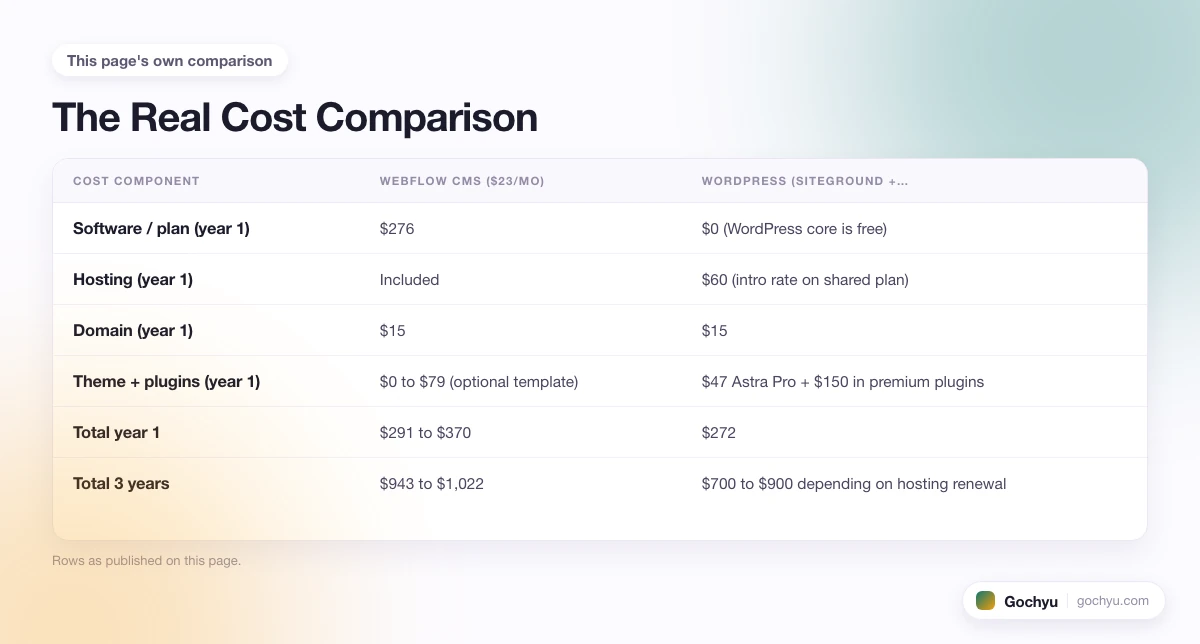
The Real Cost Comparison
For a typical marketing or content site with a blog, here is what each platform costs over three years.
| Cost component | Webflow CMS ($23/mo) | WordPress (SiteGround + Astra Pro + 3 premium plugins) |
|---|---|---|
| Software / plan (year 1) | $276 | $0 (WordPress core is free) |
| Hosting (year 1) | Included | $60 (intro rate on shared plan) |
| Domain (year 1) | $15 | $15 |
| Theme + plugins (year 1) | $0 to $79 (optional template) | $47 Astra Pro + $150 in premium plugins |
| Total year 1 | $291 to $370 | $272 |
| Total 3 years | $943 to $1,022 | $700 to $900 depending on hosting renewal |
Two things stand out. First, the three-year totals are close, closer than the "WordPress is free" framing usually suggests. Second, Webflow's cost is fixed and predictable, while WordPress lets you push the total up or down by choosing free themes and plugins or paying for premium versions. The real gap is time: WordPress takes more hours to configure, secure, and maintain, and those hours have a cost too.
Ease of Use: Visual Editor vs Assembly Job
This is where the two platforms feel most different. Webflow is one editor. You log in, pick a template or start from a blank canvas, and everything from typography to animations to the CMS lives inside the same interface. There is a learning curve because Webflow exposes real HTML class structure and CSS box model, but once you understand div blocks, flex, and grid, the whole platform clicks. Expect one or two weekends of official Webflow University tutorials before your first page looks right.
WordPress is closer to an assembly job. You pick a host, install WordPress (most hosts do this in one click), pick a theme, then decide which page builder or block editor to build with. Do you want the native Gutenberg block editor, or Elementor, or Bricks, or Divi? Each takes the interface in a different direction. The core admin is easy for adding a blog post, but the setup phase includes decisions Webflow makes for you: security plugin, caching plugin, backup plugin, form plugin, SEO plugin. This is why "just install WordPress" is a misleading description of what actually happens on day one.
The trade-off is real in both directions. Webflow gives you a professional site fast, with fewer knobs but a lower ceiling on flexibility. WordPress gives you total control after the ramp, with every choice up to you. If you are a designer or agency, Webflow's editor will feel like a superpower. If you are a writer, marketer, or business owner who wants to publish and move on, WordPress plus a simple block theme takes about the same time to learn and gives you a more replaceable stack afterwards.
A practical test: if you can already picture the site's design and want to build it yourself, Webflow rewards the effort. If you want to hire a freelancer next year to redo the header, WordPress makes that hire easier, because the number of WordPress developers dwarfs the Webflow talent pool.
Design Flexibility: Webflow's Real Edge
Webflow is the winner on visual freedom, and it is not close on the axis it cares about most. The editor gives you real CSS positioning, flexbox, grid, transforms, transitions, and page-level interactions without touching code. You can build custom hero animations, scroll-linked timelines, and hover states that most WordPress themes cannot match without a heavy page builder and custom CSS. Because Webflow templates are fully editable at the class level, you start from a template and change anything without breaking the layout.
WordPress design flexibility depends heavily on the theme and builder you choose. A default block theme like Twenty Twenty-Five plus the native block editor gives you decent control but nothing close to Webflow's precision. Add Elementor Pro, Bricks, or Divi and the gap narrows: you get drag-and-drop with responsive breakpoints, custom widgets, and theme builder features that let you rebuild every template. Add a purpose-built block theme like Kadence or GeneratePress and the code output stays lean.
The honest summary: Webflow's design ceiling out of the box is higher than any WordPress theme's floor. But a Webflow-quality WordPress site is achievable with Bricks or a well-configured Elementor Pro build, and it will run on any hosting you want to migrate to later. The question is whether you would rather pay Webflow to keep your design working or pay a WordPress developer to rebuild similar polish inside a builder.
Ecosystem and Flexibility: WordPress Wins Decisively
The plugin and theme ecosystem is where WordPress's 20-year head start shows up. There are more than 60,000 free plugins in the official WordPress directory and thousands more premium plugins, covering every category a website could need: membership gates, learning management systems, event registration, forum software, real estate listings, restaurant reservations, appointment booking, translation, custom post types, and every SEO tool the market has produced.
Webflow's app marketplace lists roughly 100 official apps, most of them lightweight design or CMS add-ons rather than deep functional extensions. For anything Webflow does not natively support, you rely on custom code embeds, Zapier, Make, or a third-party service. This is workable for common cases (adding a chat widget, an email capture form, a booking calendar) but it hits limits when you need real feature depth.
Some concrete examples that illustrate the gap:
- Membership sites. WordPress has MemberPress, Paid Memberships Pro, and Restrict Content Pro. Webflow's Memberships feature exists but is basic, with no tiered permissions or drip content.
- Learning platforms. WordPress runs LearnDash, LifterLMS, and TutorLMS, powering millions of course sites. Webflow requires embedding a third-party LMS.
- Forums. bbPress or BuddyPress on WordPress. Webflow has no native forum solution.
- Real estate and directory sites. WordPress has purpose-built themes and plugins with search filters, map integrations, and lead capture flows. Webflow can approximate this with CMS collections and custom code but takes significant work.
- Advanced custom fields. ACF Pro on WordPress lets you build any custom post type with any field structure. Webflow's CMS collections are cleaner but capped at fewer field types and lower item ceilings.
For anything close to a standard website (marketing pages, blog, portfolio, small store), both platforms cover the essentials. Once the requirements list gets specific, WordPress's plugin depth becomes the deciding factor for most non-design use cases.
Ecommerce: WooCommerce Beats Webflow at Scale
Both platforms sell online, but the ecommerce depth is not close once you get past the basics. Webflow's native ecommerce module handles up to 500 products on Standard, 5,000 on Plus, and 15,000 on Advanced, with a 2% platform transaction fee on Standard that drops to 0% on higher tiers. It is fine for a small brand-led store selling under 100 SKUs.
WordPress runs WooCommerce, the most-used ecommerce platform in the world by store count, sitting on roughly 22% of all online stores. WooCommerce has no product ceiling, no annual sales cap, no platform transaction fee, and an extension ecosystem that covers subscriptions (WooCommerce Subscriptions), bookings, memberships, dynamic pricing, multi-currency, B2B wholesale, and every payment gateway you can name. For a full breakdown of what WooCommerce is and how it fits the WordPress stack, see our WooCommerce guide for beginners.
The trade-off is that WooCommerce needs configuration. You install the plugin, pick shipping zones, set tax rules, connect a payment gateway, and pick a compatible theme. Webflow's ecommerce is more turnkey: a few clicks and you have products, cart, and checkout. If your store is small and design-led, Webflow's shorter setup can be worth the item cap. If you plan to grow past a few dozen products, or you sell subscriptions or memberships, WooCommerce on WordPress is the stronger long-term platform. Our Shopify vs WooCommerce comparison covers where WooCommerce fits against the other big ecommerce contender.
Content Management: Both Are Good, Different Strengths
Webflow's CMS is genuinely excellent for a hosted platform. You define collections (posts, case studies, team members, whatever the site needs), set custom fields including reference fields to other collections, and the editor pulls data through templates you design visually. It is one of the cleanest CMS experiences on the market for content sites where design consistency matters. The catch is the CMS item cap: 2,000 items on the CMS site plan, 10,000 on Business. Once you cross those numbers, you upgrade or start deleting.
WordPress has no post ceiling. You can run a site with 500,000 posts on the right hosting. Custom post types, taxonomies, and metadata are extensible without limit through core WordPress features or plugins like Advanced Custom Fields. The editor experience varies: the native block editor (Gutenberg) has improved dramatically since 2022 and now feels close to modern block-based tools, though it still trails Webflow's visual precision. For pure text writing and long-form content, WordPress remains the default choice, which is why most large publishers still run it.
A useful frame: Webflow's CMS is best for content sites where the design of each post type matters and the total post count stays under 10,000. WordPress is best for high-volume publishing, complex content models, or any site where you want unlimited custom fields.
SEO Capabilities: Fundamentals Even, Depth to WordPress
Both platforms produce clean HTML with editable meta titles, meta descriptions, canonical URLs, robots.txt, and automatic sitemaps. Both support SSL by default. On the fundamentals, they are close.
The differences show up in advanced SEO tooling and community depth:
- SEO plugins. WordPress has Yoast, Rank Math, All in One SEO, and SEOPress, each with hundreds of thousands of installs and continuous updates. Webflow has native meta fields and an SEO panel per page, but no equivalent tool for content scoring, internal link suggestions, or schema builders.
- Schema markup. WordPress plugins ship article, product, FAQ, breadcrumb, review, and organization schema with UI configuration. Webflow requires manual JSON-LD in the head embed for each template, which is powerful but adds work.
- URL structure. Both let you set clean URL paths for any collection or page. WordPress permalink control is slightly more flexible for large sites with nested taxonomies.
- Redirect management. WordPress has Redirection (free plugin) with import/export and pattern matching. Webflow has a redirect UI in the site settings that covers the basics.
- Page speed. Webflow scores well out of the box because it controls the whole stack. WordPress speed depends heavily on hosting, theme, and caching setup, but a well-configured Kinsta or Cloudways site with a lean block theme easily matches Webflow's Core Web Vitals scores.
- Content SEO learning resources. WordPress has an enormous SEO community. Every question has 20 tutorials. Webflow's SEO documentation is good but the community is smaller and more design-focused.
The net: for a site where the SEO stack is simple (meta tags, sitemap, decent speed), both platforms are fine. For a site where SEO is a core function (a niche site, an affiliate site, a content marketing engine), WordPress's plugin ecosystem gives you tools Webflow does not match.
Ownership, Portability, and the Migration Trap
This is the most overlooked variable in Webflow vs WordPress comparisons, and it usually decides the choice for anyone thinking past the next 12 months.
WordPress files and database are yours. You can back up the whole site with a plugin, download it, and restore it on any host that supports PHP and MySQL. The theme, plugins, content, and users all move together. You can change hosts, hire a different developer, or move to a headless setup without rebuilding.
Webflow is a closed platform. Your CMS content lives in Webflow's database. The visual editor is proprietary. You can export a static HTML/CSS/JS copy of the pages, but the export drops the CMS, forms, ecommerce, and any dynamic content. If Webflow raises prices, changes the plan structure, or discontinues a feature you rely on, your options are limited. If you want to leave Webflow later, you rebuild.
Moving from Webflow to WordPress typically takes 40 to 100 hours or $2,000 to $8,000 in agency work for a small content site, more if the design is complex. You lose the exact layouts (Webflow interactions do not translate to WordPress builder syntax), the CMS structure needs remapping, and URL redirects must be built one by one. Product data and blog content export cleanly, but everything else is a fresh build.
The takeaway is not "Webflow is bad." It is that Webflow is a hosted design tool, and hosted tools always involve a lock-in trade. If the site is a marketing brochure that will look the same in three years, that trade is fine. If the site is a business that needs to keep options open, WordPress's portability matters more than most builders assume on day one.
Best For: Who Should Pick Which
Webflow is best for
- Designers and design-led brands where the site is part of the product and every pixel needs intentional control.
- Agencies building sites for clients who want an editor mode and a strong visual system.
- Portfolios and brand sites that show off work and sell a small line of products or services.
- Marketing sites for a SaaS product or startup where design polish signals credibility to enterprise buyers.
- Founders with visual instincts who want direct control over layout, animation, and typography without hiring a developer.
If Webflow sounds like a fit, the complete Webflow guide for beginners covers who Webflow is best for, what the CMS handles, and where the ecommerce module falls short.
WordPress is best for
- Blogs and content sites where publishing volume, editorial workflow, and SEO tooling matter more than design polish.
- Membership and course sites that need tiered access, drip content, or LMS features.
- Ecommerce stores past 100 products that want no product cap, no platform fees, and the depth of WooCommerce extensions.
- Affiliate and niche sites where advanced SEO plugins, schema builders, and internal linking tools compound over time.
- Any project where portability matters, including client sites where the client might switch developers or hosts later.
- Directory, real estate, restaurant, and specialty vertical sites where WordPress has purpose-built themes and plugins.
For a fuller picture of what WordPress is and what it powers, our WordPress explainer walks through core concepts, plugins, themes, and the free-plus-hosting cost model.
Common Scenarios Quick-Hit
Some cases where the choice gets tighter and the right answer flips:
- Startup marketing site. Webflow if the founding team has a designer. WordPress with Astra or Kadence if the team is engineering-heavy and wants to iterate content fast.
- Personal blog. WordPress. The ecosystem, cost, and post ceiling all favor it, and the block editor is now good enough for most writers.
- Design portfolio. Webflow. The design flexibility is the whole point.
- Local business site with 5 pages. Either. Webflow ships faster if design matters. WordPress on cheap hosting wins on total cost of ownership.
- Membership community. WordPress. MemberPress or Paid Memberships Pro give you tiered access, drip content, and gated forums that Webflow cannot match.
- Online course business. WordPress with LearnDash or LifterLMS. Webflow requires a third-party LMS and juggles two admins.
- Niche affiliate content site. WordPress. Yoast or Rank Math, structured data plugins, and Amazon affiliate tools make the SEO grind easier.
- Restaurant site with an online menu. Either. Webflow if design is the priority. WordPress with a restaurant theme if you want reservations, gift cards, and delivery integrations.
- Real estate agency site with property listings. WordPress. Purpose-built themes like Houzez plus IDX integrations handle MLS feeds Webflow cannot.
- SaaS documentation and blog. WordPress for the documentation depth. Webflow if the docs are light and the marketing site is the focus.
Verdict: Which Should You Choose?
If the site is a brand or design-led marketing site and you value visual polish above ecosystem depth, choose Webflow. The editor is a real design tool, the CMS is enough for a content section, and the hosting-plus-tool integration removes a class of maintenance headaches. You accept a hosted lock-in in exchange for a shorter path to a good-looking, fast site.
If the site is content-heavy, functional, or expected to change over the next several years, choose WordPress. The plugin ecosystem, the ownership of your files, the lower long-term cost, and the sheer size of the developer pool make WordPress the safer bet for anything that is not primarily a design showcase. It takes more setup effort up front, but the platform will not paint you into a corner.
If you are leaning Webflow, spend an hour inside the Webflow designer and see whether the box model feels natural or foreign, because that is the honest test. If you are leaning WordPress, pick a host, install WordPress, install a block theme, and publish one post. Whichever platform feels like less friction after that first hour usually stays the right choice.
Still not sure whether Webflow or WordPress is even the platform question you should be asking, or whether Shopify or Squarespace fits the goal better? Our guide on how to choose the right platform for your business walks through the decision framework in more detail.
Conclusion: Webflow vs WordPress
Both platforms build real websites. The question is what you are optimizing for. Webflow wins on design freedom, editor polish, and time to a good-looking site. WordPress wins on ecosystem depth, ownership, cost flexibility, and long-term portability. For designers and brand sites, Webflow's trade-offs make sense. For content, ecommerce past a few dozen products, membership sites, and anything meant to grow over years, WordPress is the stronger foundation. If the choice is still close, revisit our complete Webflow guide for beginners and weigh what you actually want to spend time on: designing, or publishing. That answer usually decides it. And if you want to see whether a live site you admire runs on Webflow or WordPress, our free Theme Detector identifies the platform in a few seconds so you can reverse-engineer real examples before you commit.
* read the rest of the post and open up an offer