Choosing the right ecommerce platform shapes everything that happens after launch: what you can sell, how fast checkout feels, which apps you can plug in, and how much money is left after fees. Most store owners pick on hype or a friend's recommendation, then spend the next year fighting their tools. This guide cuts that risk by walking you through the six factors that actually matter, a quick decision matrix, and a clear-eyed look at the platforms worth considering in 2026.
If you want the short answer: most new sellers with a real product to sell should start on Shopify. The deeper answer, with honest exceptions for designers, content-led brands, marketplace sellers, and high-volume operators, is below. There is no single best platform, only the best platform for your situation.
What Picking the Wrong Platform Actually Costs You
The cost of a bad platform choice is not the monthly fee. It is the rebuild. Stores that outgrow a builder typically face one of three painful options: stay and lose sales to a slow or rigid system, hire a developer to bolt on missing features at three to five thousand dollars a fix, or migrate. A full migration moves product data, customer accounts, order history, URLs, email templates and SEO redirects to a new platform. Done well it takes four to eight weeks and a few thousand dollars in tools and freelancer time. Done badly it tanks rankings for six months while customers email you about broken links.
That risk is why platform choice deserves a real evaluation, not a coin flip. Get it right the first time and you spend your energy on products, marketing and customers. Get it wrong and you spend it on rescue work.
The Six Factors That Should Drive Your Decision
Ignore feature checklists for a moment. The fit between your situation and a platform comes down to six questions. Answer these honestly and the right platform usually picks itself.
1. Your Budget (Now and in 24 Months)
Most platforms start at fifteen to thirty dollars a month. The real cost shows up two ways: transaction fees on every sale, and required apps that turn a thirty-dollar plan into an eighty-dollar plan. Shopify charges zero transaction fees if you use Shopify Payments, but each app you add lands between five and forty dollars a month. WooCommerce has no platform fee at all because it is free WordPress software, but you pay for hosting, themes, plugins and a developer when things break. Project costs over two years, not one month.
If you want a careful breakdown of one major platform's true costs, our complete Shopify pricing guide shows how the monthly plan, transaction fees, app subscriptions and theme costs stack up at different revenue levels.
2. Your Technical Comfort Level
Be brutally honest here. Can you set up email forwarding for a custom domain without Googling? Have you ever touched a CSS file? Do you know what a webhook does? If two of those make you uneasy, stay in the hosted-platform world (Shopify, Squarespace, Wix, BigCommerce). If you answered yes to all three, WooCommerce or Webflow give you more freedom in exchange for owning the maintenance.
Hosted platforms handle hosting, security patches, PCI compliance, backups and uptime. Self-hosted platforms hand you the keys and the bill. Neither is better in the abstract. They suit different operators.
3. What You're Actually Selling
Product type changes the platform calculus more than people realize.
- Physical products with variants (clothing, shoes, accessories): Shopify is purpose-built for this. WooCommerce works too. Squarespace and Wix struggle once you cross 100 SKUs. If clothing is your product category, our guide to starting an online clothing business from home covers sourcing, startup costs, and which model suits your budget.
- Digital downloads, courses, memberships: WooCommerce with the right plugins is the strongest choice. Shopify handles digital products but charges per app.
- Services and bookings: Squarespace and Wix have native scheduling. Shopify needs a paid app.
- Subscription boxes or recurring billing: Shopify has the best native subscription apps. WooCommerce is a close second.
- High volume, low margin (commodity goods): BigCommerce charges zero transaction fees at any tier, which adds up at scale.
- Heavily curated, one of a kind items: Squarespace's design quality sells the product. Etsy may make more sense if discovery is your problem.
4. Where Your Customers Find You
Are you building a brand customers search for by name, or are you selling commodity products customers find on Amazon? An owned store on Shopify makes sense when you can drive traffic through SEO, social, email or paid ads. A marketplace presence on Amazon or Etsy makes sense when the platform's audience is the product. Our breakdown of Shopify vs Amazon walks through which model fits which seller, and many sellers run both side by side.
5. How Fast You Plan to Grow
A stable side hustle and a venture-backed brand need different infrastructure. If you expect to do twenty orders a month for a while, almost any platform works. If you plan to scale to one thousand orders a month within a year, you need a platform that handles checkout under load, integrates with shipping carriers, supports tax automation across regions, and gives you real inventory tools out of the box. Shopify, BigCommerce and WooCommerce all handle that. Squarespace and Wix will not.
6. What You're Already Locked Into
Existing tech stacks change the math. If your blog already runs on WordPress, WooCommerce is a natural extension. If you already use Squarespace for a portfolio site, adding commerce there beats spinning up a separate Shopify store. If you have a Wix marketing site humming along, switching to Shopify for products and routing buyers across two domains adds friction. Compatibility with what you already run beats raw feature counts.
Quick Decision Matrix: Match Your Situation to a Platform
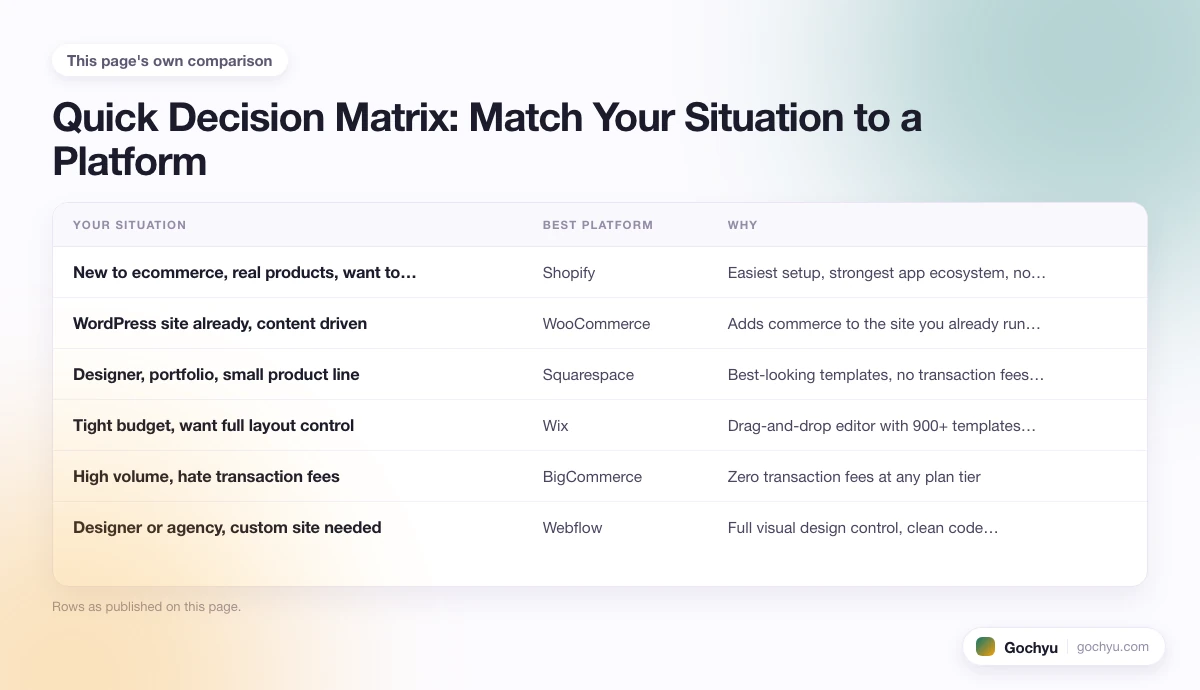
The table below maps the most common starting situations to a default platform recommendation. These are starting points, not absolutes, and the platform comparisons later in this post drill into edge cases.
| Your Situation | Best Platform | Why |
|---|---|---|
| New to ecommerce, real products, want to scale | Shopify | Easiest setup, strongest app ecosystem, no hosting headaches |
| WordPress site already, content driven | WooCommerce | Adds commerce to the site you already run, no new platform to learn |
| Designer, portfolio, small product line | Squarespace | Best-looking templates, no transaction fees on Commerce plans |
| Tight budget, want full layout control | Wix | Drag-and-drop editor with 900+ templates, low starting price |
| High volume, hate transaction fees | BigCommerce | Zero transaction fees at any plan tier |
| Designer or agency, custom site needed | Webflow | Full visual design control, clean code output |
| Commodity goods, audience problem | Amazon or Etsy | Marketplace traffic beats building one yourself for fungible items |
| Brick and mortar wanting online presence | Square Online | Native POS sync with the Square hardware you already use |
The Platforms Worth Considering
Seven platforms cover ninety-five percent of new stores. The honest take on each, including who should avoid them, is below.
Shopify: The Default for Most New Stores
Shopify is the platform most stores should pick first and only switch away from if they hit a specific wall. The reason is not that Shopify wins on every feature, but that it loses on the fewest. Checkout is fast and high-converting. The app store has eight thousand options for almost any need. Inventory, shipping, taxes, multi-channel selling and reporting all work out of the box. It runs at any scale from one product to one million.
The trade-offs are real. Plans start at twenty-nine dollars a month and apps add up quickly. The default theme customization is template-based rather than free-form. International selling on the standard plan has limits that push larger sellers toward Shopify Plus. On the SEO side, Shopify handles the technical basics automatically (sitemaps, canonical URLs, SSL, and schema markup in Shopify 2.0 themes), though it has fixed URL structure and robots.txt is only editable on Shopify Plus. See our breakdown of what Shopify's built-in SEO actually includes if that matters for your decision. For an honest take on whether the platform earns its price tag, our Shopify review walks through both sides. To start with the platform, you can try Shopify free and see the dashboard for yourself before paying anything.
WooCommerce: The Power-User Pick
WooCommerce is free open-source software that turns a WordPress site into a store. Anyone running WordPress for content is the obvious customer. It is the most flexible platform on this list and the cheapest at the platform level, since the core plugin costs zero dollars. The hidden cost is everything around it: hosting at five to twenty dollars a month, a theme at fifty to two hundred dollars once, security and backup plugins, and a developer for anything beyond stock features.
For a comparison of where Shopify and WooCommerce diverge, our Shopify vs WooCommerce breakdown covers cost, ease and scale side by side. For the fuller WooCommerce story, see what WooCommerce actually is and how it works under the hood.
Squarespace: The Design-First Choice
Squarespace makes the best-looking websites on this list with the least effort. If your store is small, your products are visual, and aesthetics matter more than scale, Squarespace earns its slot. The Commerce plans charge zero transaction fees, which is unusual at this price point. The editor is intuitive and the typography defaults beat the other hosted builders.
Where Squarespace breaks down: large catalogs (past a few hundred SKUs), heavy marketing automation, and complex shipping rules. It is a great fit for a coffee roaster selling six SKUs and a poor fit for a clothing brand with three hundred. Our Squarespace vs Wix comparison covers how it stacks up against the other major design-led builder.
Wix: The Drag-and-Drop Flexible Option
Wix is the most layout-flexible builder on this list. The drag-and-drop editor lets you place any element anywhere, which is liberating until it becomes the reason your store does not look polished. Templates start at zero transaction fees and prices begin at seventeen dollars a month. The platform suits stores that want full layout control and do not mind doing some of the design work themselves.
Wix struggles at scale the way Squarespace does, and SEO performance has historically lagged Shopify and WooCommerce. For shoppers weighing Wix against the dedicated ecommerce option, our Shopify vs Wix breakdown goes through where each one earns its slot.
BigCommerce: The Built-in Pro Option
BigCommerce charges zero transaction fees on every plan and includes more features in the base tier than Shopify does. The catch is that the base plan has a revenue ceiling, after which you are automatically upgraded to the next tier. The dashboard feels slightly less polished than Shopify's and the app store is smaller, but the platform handles high SKU counts and complex catalogs better than most.
BigCommerce is the right pick when transaction fees would meaningfully cost you (typically over one hundred thousand dollars in annual revenue) or when you sell complex products that need multiple variants, options and rules per item.
Webflow: The Designer's Dream
Webflow is what you pick when the site itself is part of the product. It gives you near-total visual control over layout, animation and interactions, and outputs clean code. The ecommerce features are basic compared to Shopify, but for stores where brand and design quality win the sale (fashion, art, luxury goods), the trade can make sense. Webflow is best suited to designers, agencies and brands willing to invest in a custom build.
If the product is generic and the design will not change conversion much, Webflow is overkill. If the product needs storytelling and a one-of-a-kind site, it is the best tool here. For a full breakdown of what Webflow does, what it costs, and where it falls short, see our complete guide to Webflow.
Amazon and Etsy: When Marketplaces Beat Owned Stores
For commodity goods (think phone cases, beauty samples, generic homewares) the audience problem dominates the platform problem. You can have the best-designed Shopify store in the world and still not get traffic if customers search for your product on Amazon instead of Google. In those cases, a marketplace listing brings free buyer intent that an owned store cannot match. The trade-off is fees of fifteen to thirty percent and zero control over branding. Many successful sellers run an owned store and one or two marketplace channels in parallel.
The Recommended Path for Most People (Yes, It's Shopify)
If you skipped the analysis above and just want a recommendation, here it is. Start on Shopify with the Basic plan. Pick one of the free Dawn-based themes. Add only the apps you genuinely need (most stores use three to five, not the twenty new owners install in week one). Use Shopify Payments to avoid transaction fees. Plan to spend forty to seventy dollars a month all in for the first six months. Our step-by-step guide to starting a Shopify store walks through the setup in detail.
Why this default works: Shopify wins on the dimension that matters most for a new store, which is time-to-first-sale. Every hour spent fighting your tools is an hour not spent on products, photos, marketing or customers. Shopify minimizes that fight better than anything else for the median user.
When You Should Consider Alternatives Instead
The Shopify default breaks for a handful of clear cases. If you fit one of these, look elsewhere.
- You already run WordPress and your content is the marketing. Add WooCommerce. Do not maintain two sites.
- You sell digital products, courses or memberships as the core offering. WooCommerce with the right plugins beats Shopify's app-heavy approach.
- Your store is small and the design has to be exceptional to sell the product. Squarespace or Webflow earn their slot here.
- You sell at very high volume on thin margins. BigCommerce's zero transaction fees compound at scale.
- Your products are commodity goods. Lead with Amazon or Etsy and add an owned store later for repeat customers.
- You already have brick-and-mortar with Square POS. Square Online syncs inventory natively.
How to Test a Platform Before Committing
Free trials are not just for kicking the tires. Use them properly and you can avoid the costly mistake of choosing on marketing copy alone. Three steps to validate a platform in under a week:
- Load real products, not demo data. Use ten to fifteen actual SKUs with photos, descriptions and variants. The difference between "looks great with one product" and "feels manageable with fifteen" shows up fast.
- Walk through checkout on mobile. Half of ecommerce traffic is mobile. If checkout feels slow or clunky on your phone, prospective customers will feel it too.
- Try the support channel you will rely on most. Email a question to support. Open a live chat. See what response time looks like and whether the answer actually helps. Bad support during a free trial is bad support during a launch.
Once you have run that drill on two or three contenders, the choice is usually obvious. Trust the platform that felt right in actual use over the one that ranked highest in a comparison article.
Conclusion: How to Choose the Right Ecommerce Platform for Your Business
The right platform depends on six honest answers: your budget, your skills, your products, your audience, your growth plans, and your existing tools. Most new stores selling physical products should start on Shopify and move only if they hit a specific wall. WooCommerce, Squarespace, Wix, BigCommerce and Webflow each earn their slot in specific cases, and Amazon or Etsy can beat owned stores for commodity goods. The biggest cost of picking wrong is the migration, so spend a week testing the top two with real products before committing. For more on the wider category, our guide to the best website builders for ecommerce covers the same field from a builder-first angle.
* read the rest of the post and open up an offer

