Squarespace and Wix are the two website builders most non-developers actually pick from. They cover the same job (drag-an-editor, hosting, templates, a built-in store) but in opposite styles. Squarespace is the curated, design-first option where every theme already looks good and the editor keeps you on rails. Wix is the open-ended sandbox where the editor will let you put anything anywhere, including a lot of bad ideas.
The short version: pick Squarespace when you want your site to look great with minimal effort, pick Wix when you want pixel-level design freedom or a feature Squarespace does not have. The rest of this guide breaks down the pricing math, the editor differences that matter, the ecommerce gap, and the honest answer about which platform fits your project.
Squarespace vs Wix: At a Glance
The two platforms target different buyers, even when the surface pitch sounds identical. Here is how they line up on the dimensions that matter when you are picking a builder for the next three years.
- Design floor: Squarespace templates are uniformly polished. Wix templates range from excellent to dated.
- Editor model: Squarespace uses section-based blocks (consistent, mobile-safe). Wix uses pixel-level drag-and-drop (free-form, fragile on mobile).
- Cheapest paid plan: Wix Light at $17/mo. Squarespace Personal at $25/mo (annual).
- Cheapest ecommerce plan: Wix Core at $29/mo. Squarespace Commerce Basic at $36/mo.
- Transaction fees: Wix charges 2.9% + $0.30 on every paid plan. Squarespace charges 3% on Business plans, 0% on Commerce plans.
- Templates: Squarespace has around 180 templates, all hand-curated. Wix has 900+ templates plus 50+ ADI (AI-built) starting points.
- App ecosystem: Wix App Market has roughly 500 apps. Squarespace has a smaller curated set of extensions plus a tighter built-in feature set.
- Blog: Both are strong. Squarespace's is slightly more refined editorially; Wix's has more layout options. For a full breakdown of what Squarespace includes, see our guide to blogging on Squarespace.
- Mobile editing: Squarespace auto-adapts. Wix forces you to maintain a separate mobile layout.
- Best for: Squarespace fits portfolios, restaurants, weddings, small service businesses, and anyone who wants the site to look professional with minimal taste decisions. Wix fits ambitious one-off designs, small product stores with unusual features, and content sites with deep blog needs.
Pricing: What You Actually Pay Each Month
Headline prices are close on the surface and diverge once you factor in transaction fees, what the cheapest tier actually includes, and the add-ons each platform charges for. Here is the real breakdown.
Squarespace Plans (as of 2026)
- Personal ($16/mo annual, $25/mo monthly). No ecommerce. Unlimited bandwidth. Basic templates and metrics. 2 contributors.
- Business ($23/mo annual, $36/mo monthly). Light ecommerce with a 3% transaction fee. Custom CSS and JS. Promotional popups. Unlimited contributors.
- Commerce Basic ($28/mo annual, $40/mo monthly). Real ecommerce. 0% transaction fee. Customer accounts. Point-of-sale.
- Commerce Advanced ($52/mo annual, $72/mo monthly). Abandoned cart recovery, subscriptions, gift cards, advanced shipping rules.
The fuller plan-by-plan breakdown including current pricing, transaction fees, and the hidden costs most reviewers skip is in our complete guide to Squarespace pricing.
Wix Plans (as of 2026)
- Light ($17/mo). No ecommerce. Personal sites only.
- Core ($29/mo). Basic ecommerce. 50 GB storage. Wix Stores enabled.
- Business ($36/mo). Standard ecommerce. 100 GB storage. Subscriptions and multi-currency.
- Business Elite ($159/mo). Unlimited storage, advanced shipping, dropshipping with Modalyst.
For the deeper Wix cost analysis including the hidden charges around premium apps and email marketing, see our Wix pricing breakdown.
The Real Cost Comparison
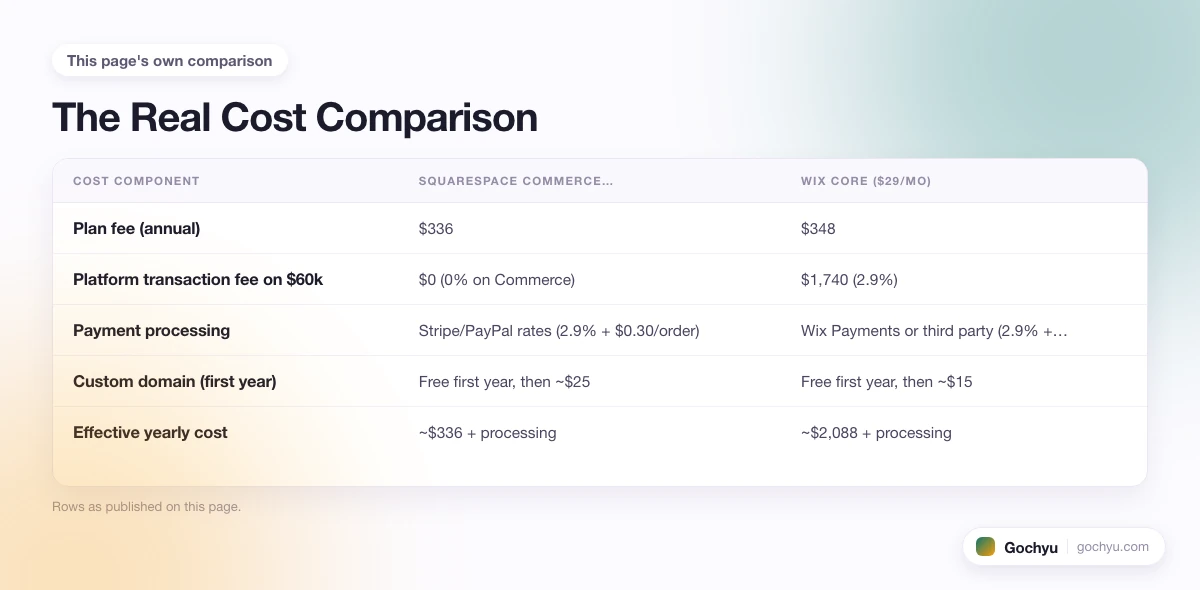
If you process $5,000 a month in sales on the entry ecommerce plan, here is what each platform actually costs across a year.
| Cost component | Squarespace Commerce Basic ($28/mo annual) | Wix Core ($29/mo) |
|---|---|---|
| Plan fee (annual) | $336 | $348 |
| Platform transaction fee on $60k | $0 (0% on Commerce) | $1,740 (2.9%) |
| Payment processing | Stripe/PayPal rates (2.9% + $0.30/order) | Wix Payments or third party (2.9% + $0.30/order) |
| Custom domain (first year) | Free first year, then ~$25 | Free first year, then ~$15 |
| Effective yearly cost | ~$336 + processing | ~$2,088 + processing |
That 2.9% platform fee Wix charges on top of payment processing is the line most comparisons skip. On $60,000 in annual revenue, it adds $1,740 a year that Squarespace Commerce stores do not pay. The Wix Business plan does not remove the fee; you keep paying it across every tier. Squarespace's Business plan charges 3%, but the moment you move to Commerce Basic ($28/mo annual) that drops to zero.
The big caveat: if your store is doing under $1,000 a month in sales, the absolute dollar difference is small either way ($30/year). Above $20,000 a year in sales, Squarespace Commerce starts winning the cost math by hundreds to thousands of dollars a year.
Design Quality: The Biggest Practical Difference
This is where Squarespace pulls ahead and stays ahead. Every Squarespace template is hand-built by an in-house team, with consistent typography, white space, image treatments, and grid systems. You can launch a Squarespace site with the default template settings and it will look professional. The downside is that all Squarespace sites have a recognizable "Squarespace look" because the design language is shared across the template library.
Wix templates range from genuinely impressive to dated and over-decorated. The newest Wix Studio templates are competitive with Squarespace on visual quality. Older templates and many of the industry-specific ones look like they were designed several years ago. The variance is the issue: on Wix you have to actually pick the right template, and most people pick badly. On Squarespace it is harder to choose a bad template because the floor is high.
Two practical implications. First, if you do not have design instincts or do not want to develop them, Squarespace gives you a better-looking site with less effort. Second, if you do have design instincts and want to push past template defaults, Wix's pixel-level editor gives you more headroom to build something genuinely custom without writing code.
For a sense of what the modern Wix template library actually offers, see the 10 best Wix templates. If you are building a blog specifically, the best Wix blog templates covers the top picks by niche. If you are building a store, the best Wix eCommerce templates breaks down the top picks by retail niche. For nonprofit organizations specifically, the best Wix nonprofit templates covers 8 cause-specific options reviewed for donation features, volunteer sign-ups, and mobile performance. For Squarespace's curated lineup, the best Squarespace templates roundup walks through the strongest options by use case.
Ease of Use: Two Different Definitions
Both platforms are friendly to non-developers. The difference is what kind of friendly.
Wix is easier for free-form design
Wix's editor is a true canvas: click anywhere, drag any element, layer images and text however you want. There is no other site builder with this level of visual freedom at this price. For someone with a clear visual idea who wants to place a button exactly 32 pixels below an image and overlap them slightly with a third element, Wix will let you do it in 10 minutes.
The cost: Wix's mobile editor is a separate environment you have to maintain. Move a desktop element and the mobile layout often breaks. You manually drag mobile versions of every page section, and changes do not always sync between editors.
Squarespace is easier for consistent results
Squarespace uses section blocks: you pick a section type (gallery, text and image, product grid, form), drop it on the page, and customize within the constraints of that section. You cannot put an element at an arbitrary pixel coordinate. You cannot overlap two images without using Fluid Engine, the newer drop zone editor that adds some Wix-style freedom but still snaps to a grid.
The payoff: your site auto-adapts to mobile with no extra work. Section-based editing produces faster, lighter pages because the components are pre-optimized. And you spend less time fighting the editor and more time writing copy.
A practical test: if you can describe the look you want with words like "a hero image, then three product columns, then a newsletter signup," Squarespace handles it natively and beautifully. If you describe it with words like "the headline overlaps the hero image, there's a decorative shape behind both, and the navigation floats over the photograph," you want Wix.
Ecommerce Features: Where the Cost Math Shifts
Both platforms have built-in stores. The depth and the cost structure are different.
Checkout and Conversion
Squarespace's checkout is clean and conversion-tested, with native customer accounts on Commerce plans and a one-page flow that performs well across devices. It supports Apple Pay, Google Pay, PayPal, and Stripe out of the box. Wix's checkout works but is generic, with more friction in the form fields and fewer native one-tap pay options. Neither platform has anything close to Shopify's Shop Pay accelerated checkout.
Catalog and Inventory
Squarespace handles standard product catalogs well: variants, categories, inventory tracking, simple bundles. It does not handle multi-location inventory or large catalogs (10,000+ SKUs) gracefully. Wix Stores covers similar ground with marginally better filtering and search options for shoppers, and the same upper limits.
For stores that need real catalog complexity (multi-warehouse inventory, faceted search, B2B pricing), neither platform is the right answer; both stop short at the small-to-midsize store level.
Subscription and Recurring Revenue
Squarespace's Commerce Advanced plan has native subscription support, including recurring billing, customer portals, and email reminders. Wix supports subscriptions on Business and above through Wix Stores. The implementations are close on capability; Squarespace's customer-facing experience is slightly more polished.
Apps and Extensions
Wix wins on app count: roughly 500 apps in the Wix App Market versus a much smaller curated set on Squarespace. For specialized needs like print-on-demand integrations, loyalty programs, or unusual shipping rules, Wix has more options. For most stores the default Squarespace feature set covers more out of the box, which means fewer apps to manage in the first place.
SEO Capabilities: Closer Than Their Reputations Suggest
The old narrative was that Squarespace had cleaner SEO and Wix produced unreadable pages. Both platforms have improved enough that the technical fundamentals are now roughly equivalent. Both produce clean, crawlable HTML, server-side rendered, with proper title tags, meta descriptions, canonical URLs, editable robots.txt, automatic XML sitemaps, and HTTPS by default.
Where they actually differ in 2026:
- URL structure. Squarespace forces blog and shop URLs into prefixed paths (/blog/[slug], /shop/[slug]) and the prefixes cannot be removed without redirects. Wix lets you set arbitrary URL paths, which is more flexible but rarely material for ranking.
- Page speed. Squarespace pages tend to be lighter and faster out of the box. Wix sites can be made fast but performance is sensitive to which apps and widgets you add.
- Schema markup. Squarespace ships product, article, and breadcrumb schema by default. Wix supports schema but you enable it per content type in the SEO panel.
- Blog SEO tooling. Both are strong. Wix's SEO Wiz walks you through targeted tasks (titles, descriptions, alt text). Squarespace's tooling is more minimal but produces clean output without much intervention.
- Image optimization. Both serve responsive image formats. Squarespace's defaults are slightly better tuned; Wix offers more granular controls.
For most sites SEO is not the deciding factor between these two. Either will rank if the content and links are right.
Best For: Who Should Pick Which
Squarespace is best for
- Portfolios for photographers, designers, illustrators, and visual creatives where image quality and curated aesthetics matter most.
- Restaurants and hospitality sites where the templates already nail the genre (menus, reservations, location pages, mobile-first design).
- Wedding planners, event venues, and bridal services where Squarespace has unusually strong template depth.
- Professional service businesses (lawyers, consultants, designers) where the site needs to look credible immediately and there is no time for design iteration.
- Small ecommerce stores selling 10 to 500 SKUs where the Commerce Basic plan's 0% transaction fee meaningfully beats Wix's 2.9% over a year.
- Owners who do not enjoy fiddling with editors and want a launch in a weekend.
Wix is best for
- Sites that need a specific feature a competitor does not have (specialized booking, niche restaurant ordering, custom forum, unusual integration).
- Content-first sites where the blog does the heavy lifting and you want fine control over post layouts.
- Small stores with under $20k a year in sales where the transaction-fee math has not yet shifted to Squarespace's favor.
- Owners with strong design opinions who want pixel-level placement and are willing to maintain the mobile layout separately.
- Anyone needing a multilingual site at the entry tier, where Wix's multilingual support is broader than Squarespace's.
- Service businesses with complex booking or scheduling needs, where Wix Bookings is more capable than Squarespace's Acuity integration at lower price tiers.
The Switching Cost Most Comparisons Skip
Pick the wrong platform now and migrating later is not free. This is the single most overlooked factor when people compare Squarespace and Wix.
Moving from Wix to Squarespace typically costs $500 to $2,500 in agency time plus 15 to 50 hours of your own work for a small site. You lose your design (templates do not transfer between platforms), most URL structure (you set up redirects to preserve SEO equity), and any custom-built page layouts. Product and customer data export cleanly as CSVs but third-party app data (reviews, loyalty points, custom fields) usually does not survive. For a complete breakdown of each step, including building your redirect map and what happens to your SEO rankings during the transition, see our step-by-step Wix to Squarespace migration guide.
Moving from Squarespace to Wix is similar. The two platforms are mutually exclusive once you have built more than a handful of pages.
Practical implication: if you are 70% sure you want a portfolio, restaurant site, wedding site, or any project where design polish matters more than feature breadth, start on Squarespace. If you are 70% sure you want unusual features or pixel-level design freedom, start on Wix. Before you commit, check any site you admire using our Wix detector to confirm the platform in seconds - knowing which builder your favorite sites actually use is a useful data point before you sign up. The first three months on the wrong platform saves a small amount of money and costs a large amount of pain later.
Quick-Hit Edge Cases
A few specific scenarios where the choice gets tighter:
- Photographer selling prints. Squarespace. The gallery layouts and image rendering are better and the 0% transaction fee on Commerce Basic helps margins.
- Restaurant with online ordering. Wix. The Wix Restaurants module is purpose-built and cheaper than Squarespace plus third-party ordering.
- Wedding planner or venue. Squarespace. The template depth in this category is unmatched.
- Personal blog with strong design ambitions. Tie. Squarespace is faster to set up; Wix gives more layout control once you put in the time.
- Yoga studio with class booking. Wix. Wix Bookings handles recurring classes, instructor schedules, and packages better than Squarespace's Acuity integration at the entry price.
- Multilingual site. Wix. Wix Multilingual works at the Light tier; Squarespace's multilingual support is third-party and weaker.
- Course or membership site. Squarespace. Member Areas are cleaner than Wix's equivalent.
- Content blog with ad monetization. Squarespace. Once you hit 10,000+ monthly visitors, adding Google AdSense or Ezoic is straightforward via code injection. See the full breakdown of running ads on Squarespace for setup steps. For a guide to all 7 ways to earn from Squarespace, including services, memberships, digital products, and templates, see our guide to making money on Squarespace for setup steps and realistic earnings by niche.
Verdict: Which Should You Choose?
If you want a great-looking site with minimal taste calls and you are mostly building a portfolio, service business, restaurant, or small store, choose Squarespace. The template floor is higher, the editor stays out of your way, and the 0% transaction fee on Commerce plans saves real money once your store is moving. Start a Squarespace free trial if you want to test the editor before committing. Before you sign up, see exactly what the Squarespace free trial includes and what you cannot do until you pay.
If you want pixel-level design control, a specialized feature Squarespace does not have, or a content-heavy site with deep blog tooling, choose Wix. The editor flexibility is the genuine selling point, the template breadth covers more niches, and the App Market gives you more extension options. Explore the Wix builder and try one of the templates from the best Wix templates roundup.
If you are planning a real ecommerce store as the main purpose of the site (more than 100 products, multi-channel selling, growing past $100k a year), neither platform is the right answer; our Shopify vs Wix comparison covers why a dedicated ecommerce platform fits that case better.
Conclusion: Squarespace vs Wix
Both builders work. The right answer depends on what you are building and how much design time you are willing to spend. Squarespace wins for polish-with-minimum-effort, design-led sites, and small stores past $20k a year in revenue. Wix wins for editor freedom, specialty features, and projects where you want fine-grained control. If you are still working through the broader website-builder choice, the parent best website builders for ecommerce roundup walks through the rest of the field. Both Wix and Squarespace also offer AI-generated website setup that can get you from zero to a working design in minutes; see our full breakdown of the best AI website builders to compare how their AI features stack up. And once a site is live, the free Squarespace template detector identifies which template powers any Squarespace site, and the CMS detector confirms the platform on any site instantly. If you are still weighing builders against true ecommerce platforms, our guide on how to choose the right ecommerce platform for your business covers when Shopify or WooCommerce beat a design-first builder.
* read the rest of the post and open up an offer

