Squarespace pricing in 2026 runs from $25 a month on the Basic plan up to $139 a month on Advanced if you pay monthly, or from $19 to $99 a month if you commit to annual billing. The right plan depends on whether you sell anything, how many products, and whether you need features like abandoned cart recovery or carrier-calculated shipping that only show up at the top two tiers.
This guide breaks down every Squarespace plan in current pricing, what is actually included at each tier, the real annual cost once domain and transaction fees are factored in, and how Squarespace compares to Shopify if you are choosing between the two. If you have not used the platform before, our guide to using Squarespace walks through the setup before you commit to a paid plan.
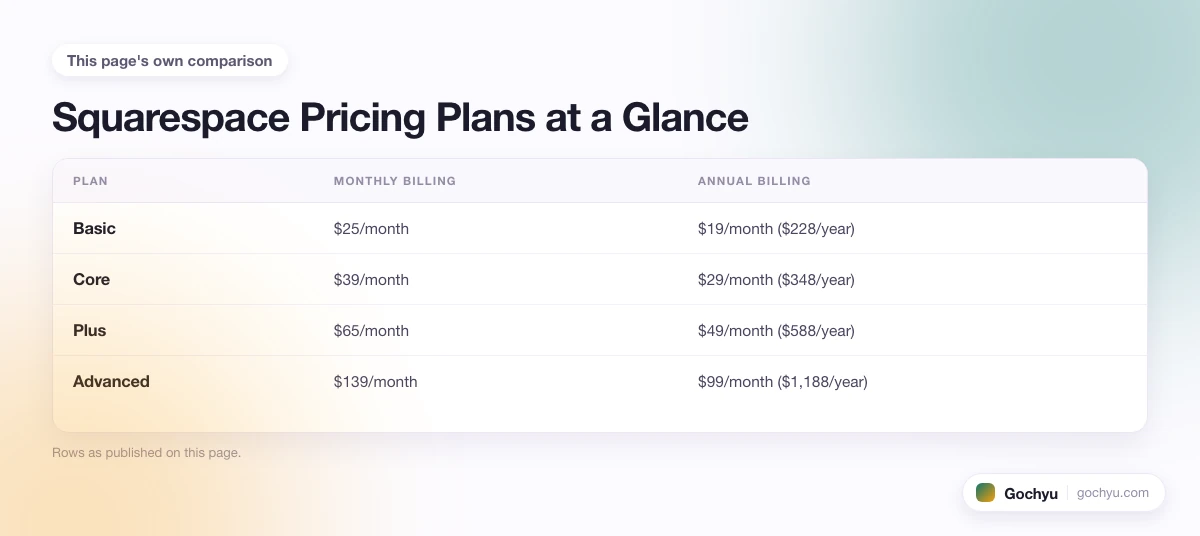
Squarespace Pricing Plans at a Glance
Squarespace currently offers four subscription tiers. All four include the full design editor, mobile-optimised templates, SSL, unlimited bandwidth and storage, and 24/7 support. The differences are commerce features, analytics depth, and the per-transaction fees Squarespace takes on payments.
| Plan | Monthly billing | Annual billing | Best for |
|---|---|---|---|
| Basic | $25/month | $19/month ($228/year) | A simple portfolio, brochure site, or a store testing the waters with up to a handful of products. |
| Core | $39/month | $29/month ($348/year) | A real store with no transaction-fee drag, customer accounts, and the code injection most agencies need. |
| Plus | $65/month | $49/month ($588/year) | A store doing real volume that needs abandoned cart recovery, subscriptions, and advanced shipping. |
| Advanced | $139/month | $99/month ($1,188/year) | A store at the upper end of what Squarespace handles, with zero transaction fees on every product type. |
The annual savings on each tier work out to roughly 24 percent (Basic), 26 percent (Core), 25 percent (Plus), and 29 percent (Advanced). That alone is reason enough to pick annual if you have any conviction the site will run past three months.
What Each Squarespace Plan Includes
Basic ($25 / $19 per month)
Basic is the entry tier, and it is more capable than the price suggests. You get the full template library, unlimited pages, the AI Squarespace Blueprint setup tool, mobile-optimised editing, SSL on a custom domain, unlimited bandwidth, and 24/7 customer support. Email and chat support are included. You can sell products on Basic, but with a 2 percent transaction fee on every sale and a 7 percent fee on digital content and memberships, the commerce side is really only viable for low-volume use.
What is NOT in Basic: customer accounts (so shoppers have to enter details on every order), abandoned cart recovery, code injection, the advanced analytics dashboard, point-of-sale support, and selling subscriptions. If you plan to run a real store, the leap to Core is almost certainly worth it on month one.
Core ($39 / $29 per month)
Core is where Squarespace becomes a credible commerce platform. The 2 percent transaction fee on Basic drops to zero on physical products and 5 percent on digital content. You get customer accounts so returning shoppers do not have to re-enter shipping and payment details. Premium analytics turns on (conversion funnels, traffic sources, sales by product), code injection becomes available for custom scripts and integrations, and point-of-sale gets bundled in for sellers running in-person events.
For most small stores under $5,000 a month in revenue, Core is the right answer. The annual price ($29/month) is $120 a year more than Basic annual, and even a single $200 sale per month saves more than that in transaction fees alone.
Plus ($65 / $49 per month)
Plus is where the conversion-focused features arrive. Abandoned cart recovery (the automated email Squarespace sends shoppers who left items in the cart) is the headline feature, and it typically recovers 5 to 10 percent of otherwise-lost orders. Subscriptions and recurring products become available, advanced shipping rules (carrier-calculated rates, weight-based pricing) turn on, and the digital content transaction fee drops further from 5 percent to 1 percent.
Plus is the right pick for a store that has product-market fit and is trying to optimise conversion. The $240 a year jump from Core annual usually pays back inside the first month if you are doing serious volume, especially if abandoned cart recovery wins back even a few mid-priced orders.
Advanced ($139 / $99 per month)
Advanced is the top tier and the only plan with zero transaction fees on every product type, including digital content and memberships. You get every commerce feature in the catalogue (advanced discounts, custom checkout, point-of-sale, subscriptions, abandoned cart, carrier-calculated shipping), the deepest analytics, and priority support routing.
Advanced is hard to justify for most stores. The $51 a month jump over Plus annual mostly buys zero transaction fees on a small slice of revenue. If you sell a lot of digital content or memberships at scale, the math flips fast. For mostly-physical-product stores doing under $20,000 a month, Plus is usually the better deal even after the fee differential.
Annual vs Monthly Billing: Which Should You Pick?
Annual billing is almost always the right call. The discount alone (24 to 29 percent off depending on the plan) is significant, and annual plans include one year of free domain registration for a new site, which would otherwise cost around $20 a year. Squarespace also bills annually upfront, so if cash flow is tight, monthly is a way to spread the cost, but the trade-off shows up as soon as you do the math.
The case for monthly is short: testing for the first month or two before committing, building a client site you will hand off, or running a seasonal store that genuinely shuts down after a campaign. For most ongoing sites, monthly billing costs more for the same product and leaves you paying for a domain you would otherwise get free. Our detailed guide on whether you can pay Squarespace monthly covers the full breakdown of when monthly makes sense.
Hidden Costs: Domains, Extensions, and Add-Ons
The plan price is not the whole cost. Most stores end up paying for at least one of these on top of the subscription.
Custom Domain
An annual plan gets one year of free custom domain registration. After year one, renewal is typically $20 to $40 a year depending on the TLD (.com is usually $20, niche extensions like .store or .shop can be $40 to $60). Monthly plans do not include a free domain at all, so factor in $20 for year one on top of the monthly fee. If you already own a domain at GoDaddy, Namecheap, or another registrar, you can bring it into Squarespace instead of registering a new one. See our guide to transferring your domain to Squarespace for exact costs by TLD and step-by-step instructions.
Premium Templates
Squarespace's template library is fully included in every plan. There are no premium templates that cost extra (unlike Wix or Shopify, where bestselling premium themes can run $100 to $400). This is a real saving compared to either of those platforms once you factor it in over a few years. If you spot a Squarespace site you like and want to know which template it uses, the Squarespace template detector identifies it from a URL in seconds.
Acuity Scheduling
Squarespace owns Acuity Scheduling, but it is a separate product with its own pricing ($20 to $61 a month). If your business needs appointment booking, factor it in as an extra. Squarespace has built-in appointment booking on some plans, but Acuity is the more capable tool and is what service businesses end up using.
Squarespace Email Campaigns
Email marketing through Squarespace is a separate paid add-on, starting at $7 a month for up to 500 emails per month and scaling up from there. If you plan to run a real email programme, factor that in or budget for a competitor like Klaviyo or Mailchimp instead.
Transaction Fees
Already mentioned but worth flagging again. On Basic, 2 percent of every sale goes to Squarespace on top of the payment processor's fee (Stripe or PayPal, both around 2.9 percent plus 30 cents). That means a $50 sale on Basic costs you $3.95 in fees ($1 to Squarespace, $1.75 to the processor, plus 30 cents). On Core or higher, the Squarespace cut drops to zero on physical products, leaving only the processor fee.
Squarespace also compares interestingly against self-hosted platforms. WordPress is technically free but adds hosting, plugin, and maintenance costs that Squarespace absorbs. For a side-by-side on where each one wins, see our WordPress vs Squarespace comparison.
Squarespace Pricing vs Shopify Pricing
The platform comparison most Squarespace shoppers want to see is against Shopify. Here is the headline difference: Squarespace is cheaper at the entry tier and the design experience is more polished, while Shopify is cheaper at the volume tier and has a deeper commerce feature set.
Shopify's plans (Basic at $39, Shopify at $105, Advanced at $399 on monthly billing in 2026) are all priced higher than the Squarespace equivalents, but Shopify includes commerce features in its Basic plan that Squarespace gates behind Core or Plus (abandoned cart recovery is in Shopify Basic; in Squarespace it requires Plus). The Shopify app ecosystem is also much larger, with 8,000-plus apps versus Squarespace's smaller integration library.
The honest rule of thumb: if the site is primarily a brand site or portfolio with some commerce on the side, Squarespace wins on design, ease of use, and price. If the site is primarily a store with brand content on the side, Shopify wins on commerce depth, app ecosystem, and scaling headroom. Our full breakdown of Shopify vs Squarespace walks through the comparison in detail with examples of each type of business.
Squarespace Pricing vs Wix Pricing
Wix is the closer head-to-head competitor for Squarespace on price. Wix has a free plan with Wix branding, a paid Light tier at around $17 a month, and commerce plans starting at $29 a month for Core, $36 for Business, and $159 for Business Elite. The entry pricing is similar to Squarespace, but Wix is more aggressive with discounts (often 50 percent off the first year) and runs a larger template library.
The trade-off is design opinion. Wix gives you total layout freedom (drag-and-drop anywhere), which is freeing for some and paralysing for others. Squarespace's templates are more constrained and arguably more polished as a result. For a deeper look at how they compare across pricing, design, and commerce features, our Squarespace vs Wix comparison covers each dimension.
How to Pick the Right Squarespace Plan
Match the plan to what the site actually does. A portfolio or brochure site for a freelancer or small business goes on Basic and stays there. For a full breakdown of which plan enables each income stream, and how long each method takes to generate real returns, see our guide to making money on Squarespace. A real store with under 100 products and modest volume should go straight to Core to skip the transaction fees and turn on customer accounts. A store running ads or doing volume that wants every cart-recovery dollar should pay for Plus. A high-volume store, a digital-content business, or a membership site with real revenue is the only profile where Advanced makes sense.
One more practical filter: start on a Basic monthly plan for the first two weeks to evaluate the platform, then commit to annual on whichever tier matches the site's actual scope. The 14-day free trial covers most of the testing you need (our Squarespace free trial guide has a full checklist of what to test and what you cannot do), but a single month of monthly billing buys breathing room to load real products and run a few transactions before you lock in for a year. If you plan to run more than one website, note that Squarespace has no limit on how many sites per account, but each site needs its own separate subscription at full price. For a walkthrough of how to add sites and manage everything under one login, see the guide to multiple websites on Squarespace.
Conclusion: Squarespace Pricing in 2026
The honest summary: Squarespace is fairly priced for what it delivers. Basic at $19 a month is one of the best value entry tiers in the website builder market. Core at $29 is competitive with anything else for a small store. Plus at $49 is where serious commerce features arrive. Advanced at $99 is for the small slice of stores that genuinely need every commerce feature in the catalogue.
If you are still deciding which Squarespace plan to start on, the framework above (match the tier to what the site does, not what you hope it might do) is the cleanest filter. For everything else about running a site on the platform, the guide to using Squarespace covers setup, templates, content, and the design workflow that makes the platform worth the subscription. For a breakdown of what you can sell on each plan, see the guide to selling things on Squarespace.
* read the rest of the post and open up an offer

