You can have as many websites as you want on one Squarespace account. There is no limit on how many Squarespace websites you can create per account, each site runs on its own subscription plan, billed independently, with its own domain and content. Whether you need 2 sites or 20, the only constraints are your budget and your time to manage them.
If you're asking because you want to run separate businesses from one login, manage client sites as an agency, or just keep a personal blog separate from a portfolio, this guide breaks down exactly how multiple Squarespace websites work per account, including billing, per-site costs, free trials, site duplication, and management tips.
How Many Websites Can You Have on Squarespace?
Squarespace places no cap on the number of websites per account. You can create unlimited sites under a single login. Each website is treated as a separate entity with its own:
- Subscription plan: Each site is on its own plan, Basic, Core, Plus, or Advanced. Plans are independent of each other, so one site can be on Basic while another is on Advanced.
- Billing date: Each site's billing cycle runs from the date it was activated, not a shared renewal date. This means you may have multiple billing dates spread across the month.
- Domain and content: Every site has its own domain, templates, pages, and settings. Changes to one site never affect another.
- 1,000 page limit: Every Squarespace website, regardless of plan, supports up to 1,000 pages. This includes blog posts, gallery pages, product pages, and standard content pages.
One thing to note: pointing multiple domains at a single Squarespace site does not count as multiple websites. If you have three domains all going to the same site, you only pay for one subscription. You only need a second subscription when you want a completely separate site with its own design and content.
How Much Does It Cost to Have Multiple Squarespace Websites?
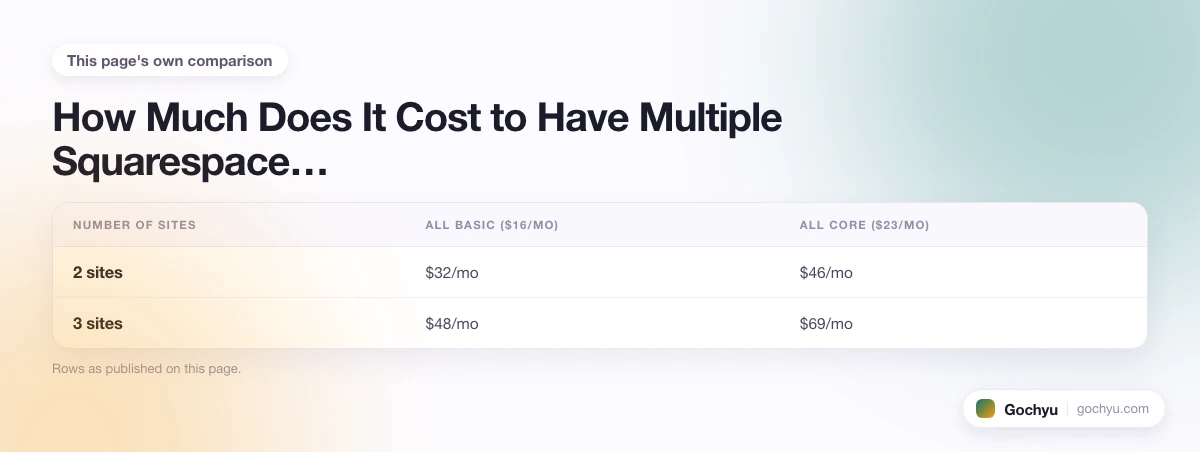
Since each Squarespace website requires its own plan, the cost of running multiple sites adds up. Squarespace does not offer multi-site discounts or bundle pricing. Here is what each site costs as of 2026 (billed annually):
- Basic, $16/month: Best for simple sites like a personal blog or single-page portfolio. Includes a free custom domain for the first year.
- Core, $23/month: Adds basic eCommerce (up to a certain transaction fee) and more customisation. Good for small businesses.
- Plus, $39/month: Lower transaction fees, advanced analytics, and more marketing tools. Suited for growing online stores.
- Advanced, $99/month: Full eCommerce features with the lowest transaction fees, advanced shipping, and API access.
If you pay monthly instead of annually, prices are higher, typically 30-40% more. For a clearer picture of what running multiple sites actually costs, here are the totals for common multi-site configurations:
| Number of Sites | All Basic ($16/mo) | All Core ($23/mo) | Mixed (Basic + Core + Plus) |
|---|---|---|---|
| 2 sites | $32/mo | $46/mo | $39/mo (Basic + Core) |
| 3 sites | $48/mo | $69/mo | $78/mo (Basic + Core + Plus) |
| 5 sites | $80/mo | $115/mo | Varies by plan mix |
There is no way to get a volume discount from Squarespace for running multiple websites. Each subscription is completely standalone.
Each New Site Gets Its Own Free Trial
One benefit that makes Squarespace stand out for running multiple websites: every new site you create gets its own free trial period, currently 14 days. This applies even if you already have paid sites on the same account.
Most competing website builders, including Wix and Shopify, tie the free trial to your account, meaning you only get one. With Squarespace, you can spin up a test site, build it out during the trial, and decide whether to keep it without spending anything upfront. This makes it easy to experiment with new ideas or test a concept before committing to another subscription.
Squarespace vs. Competitors for Multiple Websites
If you are deciding between platforms for running several sites, here is how Squarespace compares to the main alternatives:
| Platform | Multi-site limit | Per-site trial | Multi-site discount | Separate billing per site |
|---|---|---|---|---|
| Squarespace | Unlimited | Yes (14 days each) | No | Yes |
| Wix | Unlimited | No (one trial per account) | No | Yes |
| Shopify | Unlimited | No (one trial per account) | No | Yes |
| WordPress.com | Unlimited | Free tier available | No | Yes |
| Webflow | Unlimited | Free tier (limited) | No | Yes |
The per-site trial on Squarespace is a genuine differentiator for agencies and multi-site builders. No other major website builder offers it. It lets you build and test client sites fully before they need to commit to a subscription.
Who Uses Multiple Websites on Squarespace?
Several types of users benefit from running multiple Squarespace websites from a single account:
- Agencies and web designers: Agencies use one Squarespace account to build and manage multiple client websites. When a client project ends, Squarespace allows you to transfer the website ownership to the client directly, they take over the subscription, the domain, and all content without any migration needed.
- Affiliate marketers: Affiliate-focused publishers sometimes build separate niche websites, each targeting a distinct audience or product category, under one account. This allows revenue diversification without cross-contaminating audiences.
- Multi-brand businesses: Some businesses operate distinct brands that need separate websites. A holding company might run a hospitality brand and a retail brand as separate Squarespace sites under one account, keeping the admin centralised.
- Portfolio and personal/professional separation: Creatives sometimes maintain a professional portfolio site and a personal or experimental site under one login, on different plan tiers. For creatives specifically, see our guide to the best Squarespace templates for artists to find the right design for a portfolio site.
What Is Squarespace Circle and How Does It Help Agencies?
If you are managing multiple client websites on Squarespace, Squarespace Circle is worth knowing about. It is a free program for web professionals, designers, developers, and agencies, who build three or more Squarespace sites per year. Circle membership gives you:
- Extended client trials: New sites you create for clients get a 6-month trial instead of the standard 14 days. This gives you time to build and hand off a site before the client needs to start paying.
- 20% discount for new clients: You can offer clients a 20% discount on their first year subscription, useful as a selling point or a way to absorb some of the cost when pitching new projects.
- Priority support: Circle members get a dedicated support channel with faster response times than standard Squarespace support.
- Early access to new features: Squarespace often gives Circle members access to new tools before they are released to the general public.
Squarespace Circle membership is free and requires no minimum spend. You qualify once you have built three paid Squarespace sites under your account. For agencies managing a portfolio of Squarespace sites, it reduces the per-project cost and makes client handoffs smoother.
Can You Add the Same Contributor to Multiple Squarespace Sites?
Squarespace contributor access is managed per site, not per account. If you want to give a team member or client access to multiple Squarespace websites, you must add them as a contributor on each site individually, there is no global contributor management that applies across all sites in a single action.
Each site's permissions are set under Settings > Permissions > Invite Contributor. You can assign different roles (Admin, Editor, Content Editor, etc.) on different sites for the same person. This means a contractor could be a full Admin on a staging site but only a Content Editor on a live client site.
How Does Billing Work for Multiple Squarespace Websites?
Each Squarespace website is billed independently. Here is what that means in practice:
- Each site renews on the anniversary of its individual activation date, there is no shared billing date for multiple sites.
- You can pay annually or monthly for each site independently. Annual billing gives you a discount per site (typically equivalent to getting two months free compared to monthly billing).
- Squarespace charges each plan to the payment method on your account. If you have 5 sites, you will see 5 separate charges, potentially on different dates.
- Cancelling one site does not affect others. Each subscription is managed independently under Settings > Billing for that specific site.
If you manage websites for clients and want them to handle their own billing, the site transfer feature moves the subscription responsibility to the client's Squarespace account entirely.
Can You Duplicate a Squarespace Website?
Yes. Squarespace lets you duplicate an existing site to use as a starting point for a new one. This is useful when you want multiple websites with similar designs or layouts, for example, an agency building sites for clients in the same industry, or a business launching a second brand with a similar look and feel.
To duplicate a site, go to your Squarespace dashboard, find the site you want to copy, and select the option to duplicate it. The duplicated site becomes its own separate website with its own plan and billing. You can then customise the content, domain, and design without affecting the original.
Keep in mind that duplication copies the design and page structure but does not transfer third-party integrations, connected domains, or payment processor settings. You will need to set those up again on the new site.
How to Manage Multiple Squarespace Websites
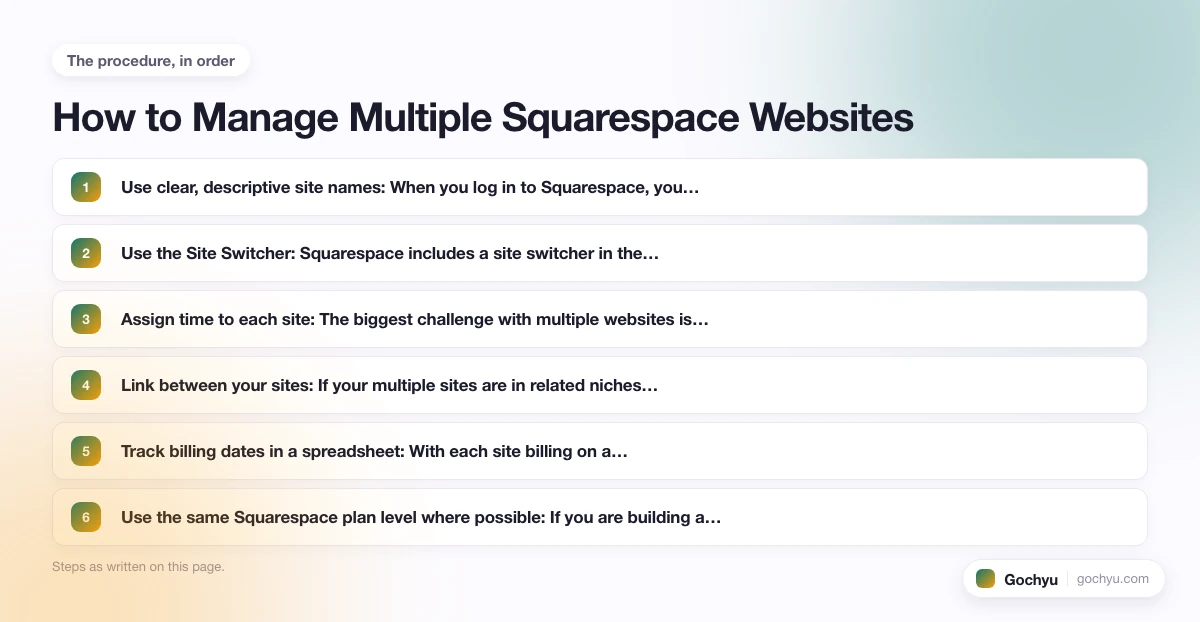
Managing Squarespace multiple websites from one account is straightforward but requires some organisational discipline:
- Use clear, descriptive site names: When you log in to Squarespace, you see a dashboard listing all your sites. Giving each a clear name (e.g., "Client: Smith Bakery" or "Project: Travel Blog") prevents confusion when you have many sites on the account.
- Use the Site Switcher: Squarespace includes a site switcher in the dashboard that lets you jump between sites quickly. You do not need to log out and back in, all sites are accessible from one login.
- Assign time to each site: The biggest challenge with multiple websites is content maintenance. The more time you can dedicate to each site, even an hour per week, the better its performance. Sites left without updates for months tend to lose search rankings.
- Link between your sites: If your multiple sites are in related niches, cross-linking them helps with SEO and drives traffic between properties. Each link functions as a signal to search engines about topic relevance.
- Track billing dates in a spreadsheet: With each site billing on a different date, it is easy to lose track of charges. A simple spreadsheet listing each site, its plan, billing date, and annual cost keeps your expenses visible.
- Use the same Squarespace plan level where possible: If you are building a portfolio of sites, standardising on one plan tier simplifies what features are available across each site and makes it easier to compare performance.
Can You Transfer a Squarespace Website to Someone Else?
Yes. Squarespace allows you to transfer a website from one account to another. This is commonly used by agencies handing finished sites to clients, or by individuals selling a website they have built. The transfer moves the site, all its content, the subscription, and any connected domains to the receiving account. The receiving person needs their own Squarespace account to accept the transfer.
To initiate a transfer, go to Settings > Permissions > Transfer Site within the specific site you want to move. The recipient receives an email invitation to accept the transfer.
Squarespace Page Limit and Storage: What Every Site Has
Every Squarespace website, regardless of plan tier, shares the same hard limit of 1,000 pages. This ceiling covers all page types combined: standard content pages, blog posts, gallery pages, product pages, cover pages, and event pages. If your site has 400 blog posts, 200 product pages, and 50 standard pages, you have used 650 of your 1,000 available pages on that site.
Storage and bandwidth are effectively unlimited on all paid Squarespace plans. Squarespace does not charge based on traffic or file storage size. You can upload video, images, and files without worrying about hitting a data cap.
| Limit type | Basic | Core | Plus | Advanced |
|---|---|---|---|---|
| Pages per site | 1,000 | 1,000 | 1,000 | 1,000 |
| Storage | Unlimited | Unlimited | Unlimited | Unlimited |
| Bandwidth | Unlimited | Unlimited | Unlimited | Unlimited |
| Contributors | 2 | Unlimited | Unlimited | Unlimited |
| Sites per account | Unlimited | Unlimited | Unlimited | Unlimited |
The 1,000-page limit rarely becomes an issue for most users, but content-heavy sites (blogs with thousands of posts, large product catalogues) can approach it. If you need more pages, the only option is to split your content across two separate Squarespace sites, each with its own subscription.
How Many Squarespace Sites Can You Have? The Short Answer
There is no limit to how many Squarespace websites you can have, you can create as many as you need under one account. Each site operates independently with its own plan, billing, and content. The practical constraints are your time to manage them and your budget for multiple subscriptions, which range from $16 to $99 per month per site.
If you are building a portfolio of sites or managing multiple client websites, Squarespace handles it without requiring separate logins. Just be mindful of the billing spread across multiple renewal dates, and take advantage of the free trial on each new site before committing. Agencies managing three or more client sites should also look at Squarespace Circle for the extended trial periods and client discounts.
Looking for more on what Squarespace can do? Check out templates for specific use cases like eCommerce and blogging to see how different sites can be built on the same platform. For practical tips on managing multiple Squarespace websites day to day, including billing organisation, contributor access, and how Squarespace compares to competitors for multi-site use, see our dedicated guide.
For a deeper look, see our complete guide to How to use Squarespace.
* read the rest of the post and open up an offer

