Squarespace has invested heavily in its eCommerce capabilities in recent years. Today, the platform offers purpose-built templates for online stores that handle product listings, secure payments, inventory, and shipping, all in one place. If you're looking for Squarespace eCommerce templates that are fast, conversion-optimized, and SEO-friendly, here are ten of the best.
What to Look for in Squarespace eCommerce Templates
Before choosing a template, it helps to understand what you can sell on Squarespace and which Commerce plan you need. The template choice should match your product type and selling requirements.
Not every Squarespace template is built equally for selling. When evaluating Squarespace shop templates, prioritize these features:
- Built-in commerce pages: Product pages, cart, checkout, and order confirmation, all template-native, not added as workarounds.
- Speed and clean code: Google uses page speed as a ranking signal. Squarespace templates with lightweight code load faster. Galapagos and Almar are particularly strong here. For every second of load time improvement, expect a measurable uptick in conversions.
- SEO structure: Good Squarespace SEO templates have clean heading hierarchies, customizable meta titles, and structured data support. Squarespace handles many SEO basics automatically, but the template's HTML structure still matters.
- Conversion elements: Quick View, featured product placements, call-to-action buttons, and trust signals all lift conversion rates. Look for templates that include these natively rather than requiring custom code.
- Mobile optimization: Over 60% of ecommerce traffic comes from mobile. Every template on this list is fully responsive.
| # | Name | Image | |
|---|---|---|---|
| 1 |

|
More Info | |
| 2 |
|
More Info | |
| 3 |

|
More Info | |
| 4 |
|
More Info | |
| 5 |

|
More Info | |
| 6 |
|
More Info | |
| 7 |
|
More Info | |
| 8 |
|
More Info | |
| 9 |

|
More Info | |
| 10 |

|
More Info |
* read the rest of the post and open up an offer
Best Squarespace Templates for eCommerce - Here's Our List:
Momentum
Momentum is one of the strongest all-round Squarespace eCommerce templates for stores that want to feature both products and content. The full-screen imagery and video slideshows make it particularly effective for fashion, beauty, and lifestyle brands where visual storytelling drives purchase decisions.
The template puts genuine focus on your products with video portfolio support and full-screen image slideshows with automatic transitions. These visual elements build credibility and help move visitors from browsing to buying.
Beyond product display, Momentum includes a full blogging feature, which matters for long-term traffic. Brands that publish consistently attract more organic visitors and tend to see stronger sales over time.
Momentum Highlights:
- Video slideshows with automatic image transitions for a dynamic storefront experience.
- Full-screen imagery that puts your products front and center on every page.
- Native product listings with direct purchase support built into the template.
- Customizable design that adapts to your brand colors, fonts, and layout preferences.
Kent
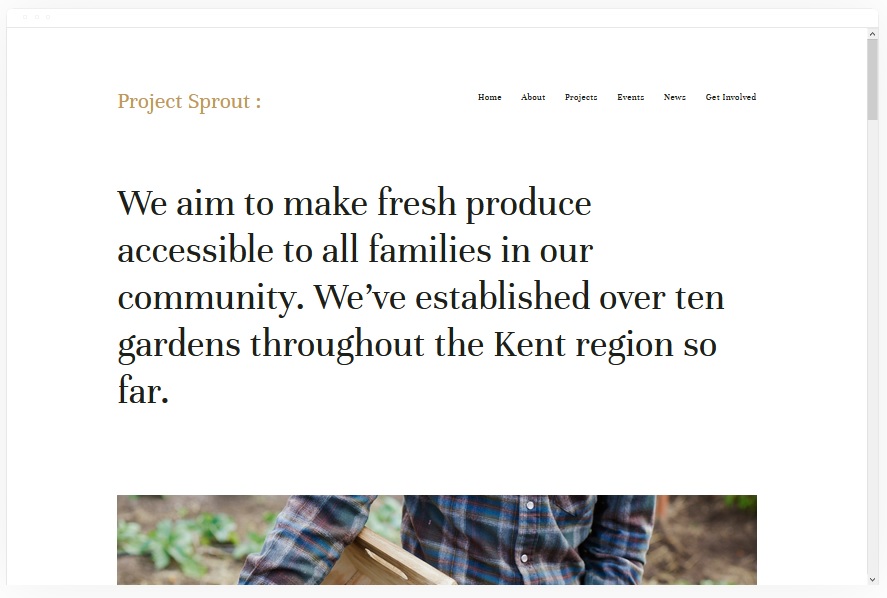
Kent is a clean, professional Squarespace eCommerce template that excels for service-based businesses selling products alongside portfolio work. It handles YouTube video hosting natively, keeping your site fast while showcasing brand content.
Portfolio pages with compelling headlines give you a strong visual hook for first-time visitors. Because videos are hosted on YouTube rather than served directly from your domain, the template stays fast even with heavy video content.
Kent supports a wide range of page types: events, cover pages, album pages, and a blog, giving you flexibility to build out a varied content strategy alongside your product catalog. Adding products and enabling payments is straightforward from the Squarespace backend.
Kent Highlights:
- Portfolio and blog pages with native YouTube video embedding that keeps load times down.
- Direct product selling with Squarespace's integrated payment system.
- Support for events, albums, and cover pages alongside standard shop pages.
- Clean HTML structure that works well with Squarespace's built-in SEO settings.
Bedford
Bedford is one of the most versatile Squarespace templates available, working across blogging, eCommerce, and portfolio niches equally well. Its scrolling homepage and sidebar navigation make it particularly user-friendly for stores with diverse product ranges.
Featured product placements on the homepage let you direct visitors' attention to key items, seasonal picks, or bestsellers. Full-page banners and embedded video add visual weight without slowing the template down significantly.
Call-to-action buttons are fully customizable in Bedford, which is useful when you want to test different phrasing or direct traffic to specific landing pages. The sidebar navigation also reduces the number of clicks it takes to find products, which typically improves time on site.
Bedford Highlights:
- Featured product placements on the homepage to spotlight priority items.
- Full-page banners and video support for high-impact visual merchandising.
- Customizable call-to-action buttons across multiple page sections.
- Sidebar navigation that reduces friction for shoppers browsing a large catalog.
Hester
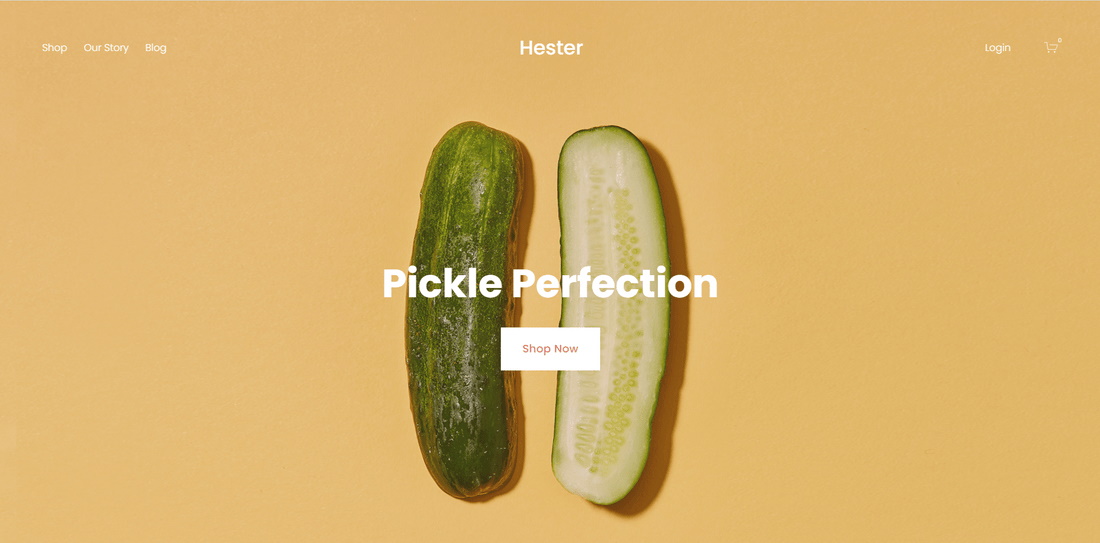
Hester was designed specifically for product-focused Squarespace stores. Its bold typography and prominent "Shop Now" CTAs on the homepage make it a strong choice for stores with a focused product lineup that needs to convert homepage visitors quickly.
The bold, clearly defined type style makes content easy to scan at a glance. Visitors who can quickly read pricing, product names, and key selling points are more likely to add items to their cart before losing interest.
The "Shop Now" homepage buttons work well for directing visitors to featured or discounted products without requiring them to navigate deeper into the site first. An About Us page and a built-in blog round out the template's long-term traffic potential. A mailing list signup form supports email re-engagement campaigns that bring previous visitors back to buy again.
Hester Highlights:
- Bold homepage typography that makes product names and prices immediately readable.
- "Shop Now" CTAs that route visitors directly to featured or discounted items.
- Mailing list signup form for building an email list and running re-engagement campaigns.
- Built-in blog section to support organic search traffic growth over time.
Wells
Wells is built for high-image-count stores (think art, photography, prints, or handmade goods) where product imagery is the primary conversion driver. Linked high-resolution images send customers directly to product purchase pages, minimizing navigation friction.
The template supports direct payment collection and works for a wider range of product types than many image-forward templates: physical goods, event tickets, lessons, and services are all manageable from the same storefront.
Embedded product videos are particularly effective for Wells storefronts. YouTube and Vimeo URLs paste directly into the template; Squarespace handles the rest. Customers who watch a product video before buying tend to convert at higher rates than those who only see static images.
Wells Highlights:
- High-resolution image galleries that link directly to individual product pages.
- Embedded YouTube and Vimeo product videos with no custom code required.
- Support for physical products, digital downloads, event tickets, and lessons.
- Image-first layout that works particularly well for art, prints, and handmade goods.
Galapagos - eCommerce Squarespace Template
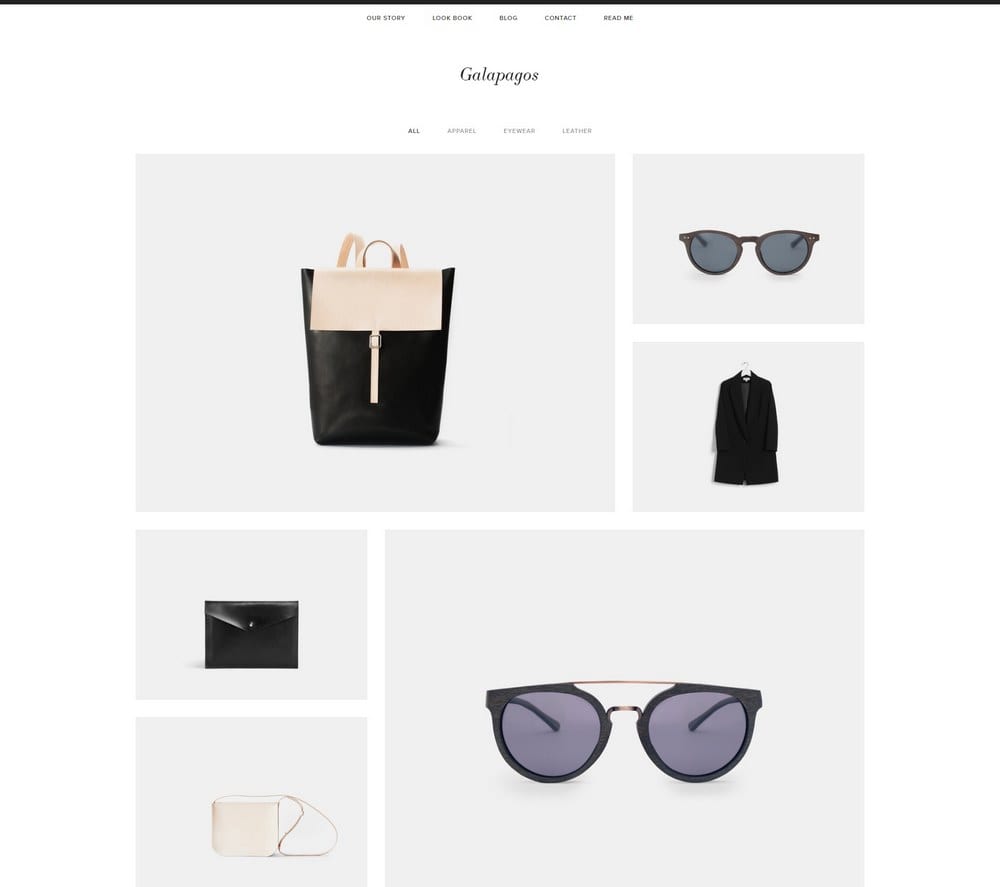
Galapagos is one of the fastest-loading Squarespace eCommerce templates thanks to its minimalist design. That minimalism isn't a limitation: it includes Quick View (letting customers inspect products without leaving the shop page), integrated payments, and dual navigation menus. For stores that prioritize Google rankings and site speed, Galapagos is a standout option.
The integrated Squarespace shopping cart system handles secure payments without redirecting customers to third-party pages, which tends to reduce cart abandonment. Navigation is split across a top menu for site-wide links and a footer menu for secondary pages, keeping the main interface uncluttered.
Galapagos - eCommerce Squarespace Template Highlights:
- Quick View feature that lets shoppers inspect products without navigating away from the shop grid.
- Minimalist code structure that contributes to fast load times and better Core Web Vitals scores.
- Integrated Squarespace payment system with secure checkout built in.
- Dual navigation (top and footer) for clean, clutter-free product browsing.
Alameda
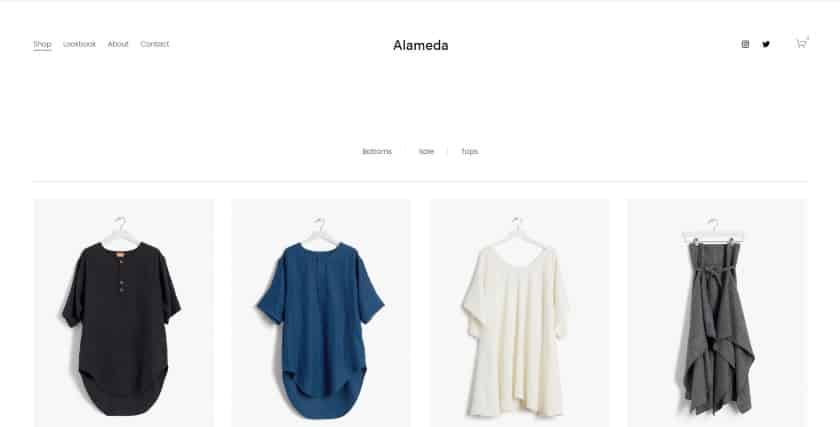
Alameda is the go-to Squarespace eCommerce template for smaller catalogs. It's built for the current version of Squarespace (a good sign for ongoing support), features lazy loading for faster product page speed, and includes a Quick View and cross-sell recommendations, conversion features that typically only appear on more complex store setups.
The homepage is structured to spotlight key products immediately on arrival, reducing the number of steps between a first visit and a purchase. Quick View keeps shoppers in the product grid rather than pulling them into individual product pages and back again. Recommended products on product pages increase average order value through cross-selling.
Alameda Highlights:
- Lazy loading for faster product page speeds, especially on image-heavy catalogs.
- Quick View and cross-sell product recommendations built into the template natively.
- Homepage structured to feature priority products above the fold.
- Built on the current version of Squarespace for ongoing compatibility and support.
Suffolk
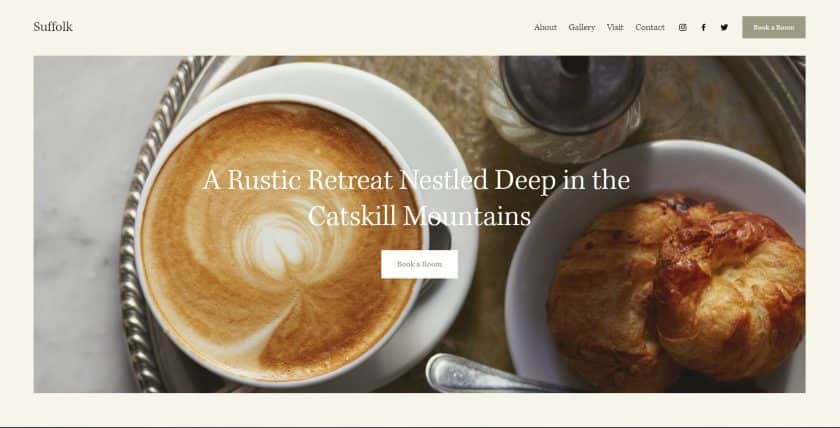
Suffolk is a versatile Squarespace template with a proven track record across hotels, rentals, salons, and retail stores. Its sticky navigation menu, hero image with dual CTA buttons, and booking-capable structure make it one of the most commercially useful templates on this list, particularly for service businesses that also sell products.
The sticky menu keeps navigation accessible as visitors scroll, which reduces bounce rates on longer pages. Booking and appointment features are built in, so service businesses don't need to add third-party scheduling tools. The hero section's dual CTA buttons let you split traffic between a shop and a booking calendar from the same homepage.
Suffolk Highlights:
- Sticky navigation menu that stays accessible as visitors scroll through long pages.
- Hero section with dual CTA buttons for directing traffic to both shop and bookings.
- Built-in booking and appointment features for service-based businesses.
- Works across retail, hospitality, salon, and rental business types without customization.
Almar
Almar combines eCommerce-ready design with exceptional load speed, making it one of the best-performing Squarespace templates for Google rankings. It handles both large and small catalogs well, with appointment booking, featured product placements, and clear CTAs built in.
Featured product sections and special deal placements appear natively in the template, so you don't need custom code to highlight promotions. An appointment booking system is also included, making Almar suitable for businesses that sell both products and services from the same site. Social media integration is straightforward, with built-in link placement that doesn't require third-party apps.
Almar Highlights:
- Among the fastest-loading Squarespace templates, which directly supports Google rankings and conversion rates.
- Native appointment booking for businesses mixing product sales with services.
- Featured product and special deal placements built into the homepage layout.
- Works equally well for small boutique catalogs and large product ranges.
Myhra
Myhra is an underrated Squarespace eCommerce template that frequently gets overlooked in favor of flashier options. It's highly adaptable, suitable for physical gifts, live event tickets, digital products, and more. It comes with blogging features that support long-term organic traffic growth through content marketing.
Customization is quick: brand colors, fonts, and layouts can be adjusted from the Squarespace style editor without touching code. The template also supports multiple revenue streams within the same storefront, so businesses with a mix of product types don't need to build separate sites.
Myhra Highlights:
- Works across physical products, digital downloads, event tickets, and services without modification.
- Built-in blog for organic traffic growth through content marketing.
- Multiple revenue stream support within a single storefront.
- Quick to customize with Squarespace's style editor, no custom code needed.
Real Squarespace eCommerce Examples: What These Templates Look Like in Practice
One of the most common questions from people choosing a Squarespace template is: what do actual stores built on these templates look like? The honest answer is that the same template can look very different depending on the business, but there are patterns worth knowing.
Fashion and Apparel Stores
Stores built on Momentum and Hester typically greet visitors with a full-width hero image or video that spans the entire browser window. Product grids below the fold show 3 to 4 items per row with clean white backgrounds, uniform photo cropping, and minimal text. Navigation sits at the top in a thin bar, often with a cart icon on the right. The overall impression is editorial, closer to a magazine than a marketplace.
Art and Photography Stores
Wells-based stores lean heavily on image density. The homepage usually opens with a tightly packed grid of prints or photographs, each one clickable through to a product page. There's little text on the homepage itself; the images do the selling. Product pages include a large image on the left, pricing and size options on the right, and an "Add to Cart" button that stays above the fold on desktop. These stores often skip a traditional navigation menu in favor of a single "Shop" link and a search bar.
Small Specialty Product Stores
Alameda and Galapagos stores typically feature a curated product selection with 6 to 20 items rather than hundreds. The homepage spotlights 3 to 6 hero products with short descriptions and direct buy buttons. Quick View pop-ups let shoppers check sizing, pricing, and variants without leaving the shop grid. Checkout flows are short: cart, address, payment, confirmation. These stores rank well because their page structure is simple and fast to load.
Service Businesses with Add-On Products
Suffolk and Kent power a lot of salons, studios, consultants, and boutique hotels that also sell products or gift cards. A typical example would open with a full-screen hero image, a "Book Now" button, and a "Shop" button side by side. Scrolling down reveals service descriptions, a testimonials section, and then a small product grid for retail items or gift card purchases. This dual-track layout (services above, products below) works because both CTAs appear before the visitor has to scroll, and the sticky navigation keeps both options visible the whole time.
Enhancing eCommerce Success with Squarespace
Squarespace offers a range of features that make eCommerce practical for small business owners who don't have development resources. While every template inherently supports eCommerce, certain designs excel in functionality, aesthetics, and user experience.
Which Squarespace Templates Are Best for SEO?
Squarespace handles a meaningful chunk of technical SEO automatically: sitemaps are generated and updated, SSL is enabled by default, canonical URLs are set correctly, and mobile responsiveness is built into every template. That baseline removes common technical SEO problems before you've done any optimization work.
Where templates differ is page speed. Galapagos and Almar consistently outperform other Squarespace templates in speed benchmarks because both use minimal JavaScript and lean CSS. Galapagos in particular strips out decorative elements that other templates include by default, which shaves meaningful time from Time to First Byte and Largest Contentful Paint. These metrics now feed directly into Google's Core Web Vitals scores, which influence rankings for eCommerce pages.
Almar is slightly heavier than Galapagos due to its homepage feature sections, but it's still fast compared to most Squarespace templates. If you're choosing between the two purely on SEO grounds and your store has fewer than 50 products, Galapagos is the leaner pick. For larger catalogs where homepage merchandising matters, Almar's added features are worth the marginal difference.
Beyond speed, a good Squarespace SEO template should have a clean heading hierarchy (one H1 per page, logical H2 and H3 structure), product pages that don't duplicate content across variants, and internal link structures that let Google crawl the full catalog from the homepage within a few clicks. All ten templates on this list meet those criteria when set up correctly.
Enhancing User Experience
User experience directly affects how long visitors stay and whether they buy. Squarespace templates use negative space, color blocking, and predictable navigation patterns to reduce friction during the shopping process. The templates on this list were selected in part because their layouts guide visitors toward product pages and checkout without requiring custom code or third-party apps.
Streamlining Payment and Shipping
Squarespace provides multiple payment processing options (Stripe, PayPal, and Square, depending on your plan) and includes features for shipping label purchasing and printing. The checkout experience is consistent across all templates, so the template you choose doesn't affect how payments are processed. What it does affect is how many steps it takes to reach checkout in the first place, and templates like Alameda and Galapagos, with Quick View and minimal navigation, tend to shorten that path.
Squarespace's Unique eCommerce Offerings
Squarespace stands out in the eCommerce space with specific tools that address common selling scenarios beyond standard retail.
Subscription and Digital Content Sales
For businesses focused on digital content or subscription-based models, Squarespace offers specialized features including paywalls for exclusive content and management tools for recurring subscription services. These features work with all the templates on this list, though Myhra and Kent tend to pair best with content-heavy subscription models because of their strong blogging and portfolio sections.
Customization and Flexibility
The flexibility of Squarespace templates allows for significant customization through the style editor alone. Whether it's a small one-page store or a larger catalog, the platform offers templates that adapt to different brand styles and product types. Mobile optimization is automatic, with each template adjusting layout and font sizes for smaller screens without requiring a separate mobile design.
Cost-Effectiveness and Value
When considering overall value, Squarespace is a cost-effective option for eCommerce. Its pricing plans cover a range of business sizes, from new startups to more established operations. The absence of transaction fees on certain plans adds to its appeal compared to platforms that take a percentage of every sale.
For a deeper look, see our complete guide to how to use Squarespace.
Conclusion: 10 Best Squarespace Templates for eCommerce
When it comes to the best Squarespace templates for eCommerce, there are solid options across different niches and business types. Above are ten of the strongest picks for 2025. Galapagos and Almar lead on speed and SEO; Momentum and Hester lead on visual impact and conversion. Which one you choose depends on your product catalog, brand aesthetic, and how you plan to drive traffic. For artists and creatives selling original work, prints, or digital downloads, see our dedicated guide to the best Squarespace templates for artists for picks built around portfolio display and direct art sales. If you run a clothing store or fashion brand, see our dedicated comparison of the best Squarespace templates for clothing, which includes a full feature comparison table across 10 templates.