Upselling on Shopify means offering customers a better or more expensive version of what they're about to buy, before or just after they complete a purchase. Done well, it increases average order value without needing more traffic or more ad spend. Most Shopify merchants who implement even basic upsells see a 10% to 30% lift in AOV within the first month.
The Power of Upselling on Shopify
What Upselling Actually Does for Revenue
Upselling increases the revenue you earn per customer. If your store converts at 2% and you get 1,000 visitors per day, you're making 20 sales. Upselling doesn't change that number, it increases what each of those 20 customers spends. For most stores, a well-placed upsell adds $8 to $25 per order, depending on the product category and offer quality.
At scale, that adds up fast. A store doing 50 orders per day at a $50 average order value generates $2,500/day. If 15% of those orders accept a $20 upsell, that's an extra $150/day, $54,750 per year, with no additional traffic cost.
Upselling vs. Cross-Selling
For the full comparison, see our guide on the differences between upselling and cross-selling. In brief:
- Upselling offers a premium version of the same product (e.g., a larger size, extended warranty, or higher-tier model)
- Cross-selling suggests a related product that complements the purchase (e.g., a case for a phone, or a charger for a laptop)
Both increase order value, but they work through different mechanisms. Upsells are more effective when the customer hasn't decided on a specific variant yet. Cross-sells work best when the customer has committed to a product and is receptive to complementary items.
Where to Place Upsells in Your Shopify Store
Product Page Upsells
Product page upsells appear before a customer adds anything to their cart. Common formats:
- Variant upgrade: "Most customers choose the XL bundle, get 3x the amount for only $10 more."
- Premium version: Showing a higher-tier product with a side-by-side comparison of features
- Add warranty/protection: Extended warranty or product insurance offered directly on the product page
Product page upsells convert at lower rates than post-purchase upsells (typically 2% to 5%) because customers are still in evaluation mode. Keep offers here simple and clearly positioned as "more value for slightly more money."
Cart Page Upsells
Cart upsells target customers who have already committed to buying. At this stage, they're reviewing their order, psychologically, they've already decided to spend money. This makes them more receptive to "while you're at it" style offers.
Effective cart upsells:
- Adding a smaller accessory at a discount ("Add a spare [accessory] for $8, usually $15")
- Offering free shipping at a threshold ("You're $12 away from free shipping")
- Upgrading to a bundle ("Swap your single for the 3-pack and save 20%")
For implementation, apps like Shopify cart upsell apps handle the logic automatically. You set the trigger product and the upsell offer, and the app shows the right offer to the right customer.
Post-Purchase Upsells
Post-purchase upsells appear after the customer completes their first purchase, on the order confirmation page. This is the highest-converting upsell placement because:
- The sale is already done, there's no risk of abandoning the cart
- The customer is in a positive, just-purchased mindset
- They don't need to re-enter payment details (Shopify processes the additional charge to the same card)
Post-purchase upsells typically convert at 8% to 15%, significantly higher than product or cart page offers. The key is keeping the offer relevant to what was just purchased and priced at 25% to 50% of the original order value.
Best Shopify Upsell Apps in 2026
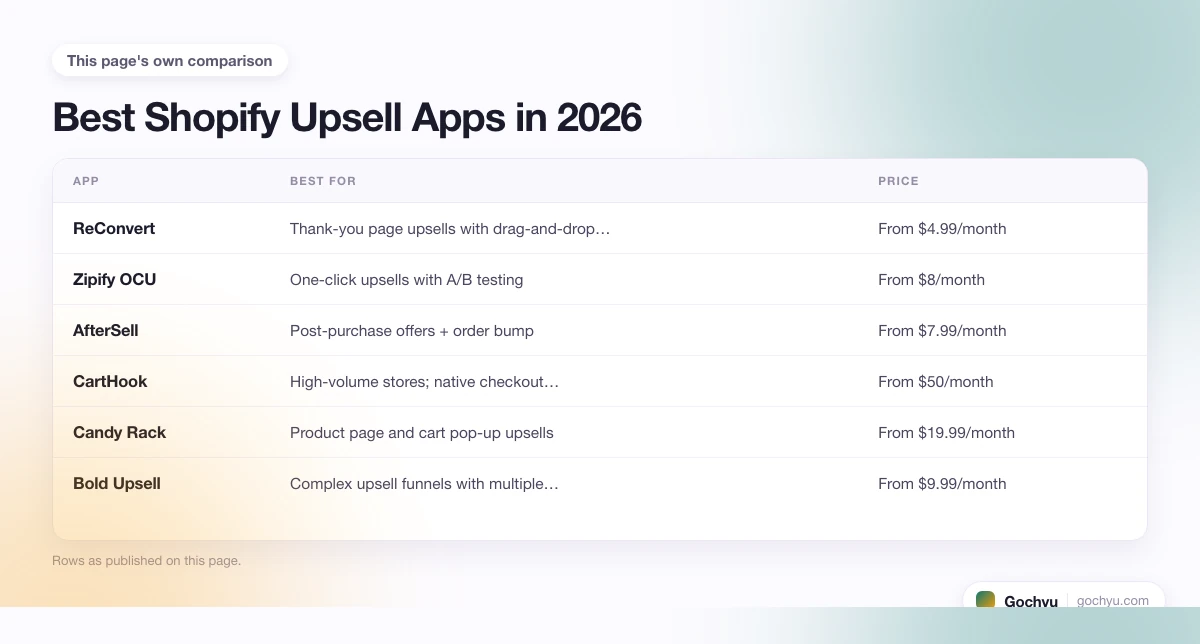
You need an app to run most upsell types on Shopify. Here's how the main options compare:
| App | Best For | Price | Post-Purchase Upsells? |
|---|---|---|---|
| ReConvert | Thank-you page upsells with drag-and-drop builder | From $4.99/month | Yes |
| Zipify OCU | One-click upsells with A/B testing | From $8/month | Yes |
| AfterSell | Post-purchase offers + order bump | From $7.99/month | Yes |
| CartHook | High-volume stores; native checkout integration | From $50/month | Yes |
| Candy Rack | Product page and cart pop-up upsells | From $19.99/month | No |
| Bold Upsell | Complex upsell funnels with multiple conditions | From $9.99/month | Yes |
For most Shopify stores under $50k/month in revenue, ReConvert or AfterSell offer the best value. For stores scaling above that, CartHook or Zipify OCU add more sophisticated testing and funnel control.
The apps above are specifically designed for upselling. For a broader set of conversion tools that cover social proof, urgency timers, and cart abandonment recovery, see our full roundup of Shopify apps to increase sales.
Upsell Timing and Pricing Guide
How to Price Your Upsell Offer
The pricing sweet spot for upsell offers is 25% to 50% of the original cart value. Offers outside this range underperform:
- Below 15%: customers may wonder if the offer is worth the friction of deciding
- Above 60%: customers see it as too large an additional commitment and decline
If someone buys a $40 product, an upsell priced at $10 to $20 tends to see the best acceptance rates. Discounting the upsell price (showing the original price crossed out) also increases conversion, even a small discount signals that the offer is exclusive to this moment.
Upsell vs. Cross-Sell Conversion Benchmarks
- Product page upsell: 2% to 5% average acceptance rate
- Cart page upsell/cross-sell: 5% to 10% average acceptance rate
- Post-purchase upsell: 8% to 15% average acceptance rate
- Email upsell (sent after purchase): 1% to 3% click-through rate
Best Practices for Upselling on Shopify
Keep Offers Relevant
The most important rule in upselling is relevance. An upsell for dog food accessories shown to someone who bought a cat toy is worse than no upsell, it signals that your store doesn't understand the customer. Always tie upsell offers to the product being purchased, either as a direct upgrade or a clearly complementary item.
Limit the Number of Offers
Showing multiple upsell offers at once reduces acceptance rates. Customers presented with one clear choice convert better than customers shown three options. If your app supports A/B testing, run tests with one offer vs. two to find the threshold that works for your audience.
Write Upsell Copy That Explains the Value
Don't just say "Add [product] for $X." Explain what the customer gets: "Add a matching [accessory], keeps your [product] protected and extends its life by 2 to 3 years." Value-focused copy outperforms price-focused copy in most upsell contexts.
Common Upselling Mistakes
- Offering irrelevant products. An upsell for a completely different category breaks the moment and damages trust.
- Pricing too high. Offers above 60% of the original cart value see sharp drop-off in acceptance.
- Too many offers at once. Decision fatigue is real. One great offer beats three mediocre ones.
- Not testing. Upsell copy, pricing, and timing all affect conversion. Run A/B tests before locking in a permanent setup.
- Ignoring mobile. Post-purchase upsells on mobile need to be thumb-friendly, large buttons, minimal text, clear price.
* read the rest of the post and open up an offer