Spotting the Shopify apps a store has installed takes about ten seconds with a detector tool, or two or three minutes if you want to confirm by reading the source yourself. Shopify apps almost always load their own scripts, stylesheets, and tracking pixels into the storefront, and those front-end fingerprints are exactly what an app detector reads. This guide covers the fast method, the manual method, and a cheat sheet of the most common apps and how to spot them by hand.
The use case is almost always competitive intelligence. Knowing a successful store uses a specific review widget, upsell pop-up, loyalty platform or email tool gives you a vetted shortlist instead of testing fifteen options from scratch. The steps below work on any public Shopify store, no login or account needed.
The Fast Way: Use a Shopify App Detector
The quickest route is the tool. Paste the store URL into our Shopify theme and app detector and it returns the theme plus the full list of detected apps in a single scan. Each app comes with a short description of what it does, so you do not have to look every one up by name.
This is the right starting point for almost every research task. A detector reads the same fingerprints you would search for by hand, but does it in one pass against a database of known apps that gets updated as new ones launch. The manual method below is the right tool when you want to verify a specific result, when the detector misses an app you suspect is there, or when you just want to understand what the detector is actually looking at.
How to Read the Page Source for App Clues
Shopify apps install in two ways. Some inject their own script tag (an app.js from the app's CDN), and some hook into the theme's Liquid templates by writing app-specific markup or class names into the page. Both leave clues in the rendered HTML, and both are findable with a browser and a search box.
Open the store, right-click anywhere, and choose "View Page Source" (Ctrl+U on Windows, Cmd+Option+U on Mac). The source loads in a new tab as raw HTML.
Search the source for cdn.shopify.com first. Asset URLs that point at that CDN are the theme's own files. Anything else you see in script or stylesheet URLs is almost certainly an app's domain. Scrolling through the source and noting every external domain that loads on a script tag is the simplest way to build an app list manually. Then take each unique domain and search it; the result is usually the app's name and Shopify App Store page.
You can also open browser dev tools (Cmd+Option+I on Mac, F12 on Windows), click the Network tab, and reload the page. The Network panel shows every request the store makes, grouped by domain. App requests stand out because they come from outside the Shopify CDN. This catches apps that load late or only on specific pages, which a one-pass source search would miss.
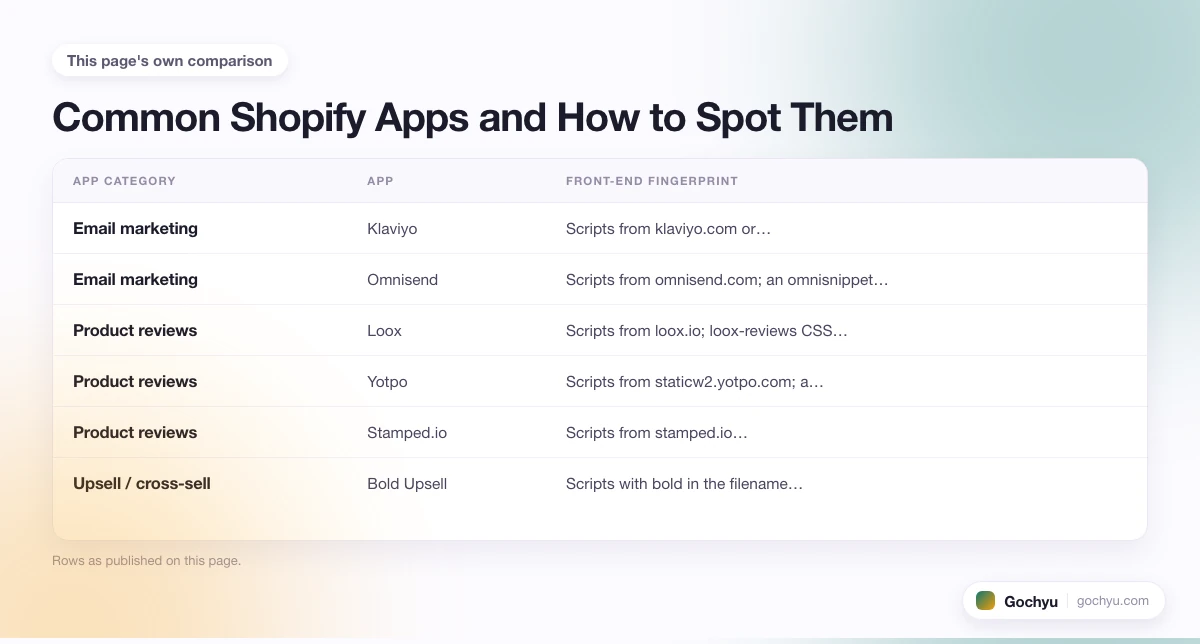
Common Shopify Apps and How to Spot Them
The table below covers the most common Shopify apps and the front-end signal each one leaves. One match is usually enough to confirm an app is installed.
| App category | App | Front-end fingerprint |
|---|---|---|
| Email marketing | Klaviyo | Scripts from klaviyo.com or static.klaviyo.com; a _learnq JavaScript global |
| Email marketing | Omnisend | Scripts from omnisend.com; an omnisnippet script tag |
| Product reviews | Loox | Scripts from loox.io; loox-reviews CSS classes on review widgets |
| Product reviews | Yotpo | Scripts from staticw2.yotpo.com; a yotpo-display-wrapper div on product pages |
| Product reviews | Stamped.io | Scripts from stamped.io; stamped-product-reviews-badge CSS classes |
| Upsell / cross-sell | Bold Upsell | Scripts with bold in the filename; bold-upsell CSS classes on the cart drawer |
| All-in-one optimisation | Vitals | Scripts from app.vitals.co; a vitals-app script tag near the closing body |
| Subscriptions | Recharge | Scripts from recharge.com; a rc_widget or shopify-rc identifier in the product page |
| Pop-ups and email capture | Privy | Scripts from privy.com; a privy-trigger CSS class on opt-in widgets |
| Pop-ups and email capture | Justuno | Scripts from justuno.com; a jucontainer div near the bottom of the page |
| Loyalty | Smile.io | Scripts from smile.io or sweettooth.io; a smile-launcher button container |
| Loyalty | LoyaltyLion | Scripts from loyaltylion.net; a loyaltylion div with member data |
| Page builder | Shogun | Scripts from getshogun.com; class names prefixed with shogun- in section markup |
| Page builder | PageFly | Scripts from pagefly.io; class names prefixed with pf- in section markup |
| Search and filter | Searchanise | Scripts from searchanise.com; a snize-instant-suggest dropdown in the search bar |
| Search and filter | Boost Commerce | Scripts from boostcommerce.net; a boost-pfs-filter sidebar on collection pages |
| Live chat | Tidio | Scripts from tidio.co; a tidio-chat iframe at the bottom of the page |
| Live chat | Gorgias | Scripts from gorgias.chat; a gorgias-web-messenger-container div |
| Shipping and tracking | AfterShip | Scripts from aftership.com; aftership-tracking CSS classes on order confirmation |
| Currency conversion | BEST Currency Converter | Scripts from currency-converter.net; a bcc-` prefixed dropdown in the header |
If a store loads scripts from a domain that does not appear on the list above, search the domain in your browser. The app name is almost always the first organic result, and the Shopify App Store listing is usually the second.
What the App Stack Tells You About a Store
The app list is often more informative than the theme. The same Shopify theme runs very different stores depending on what is bolted on top, and the app stack is where most of the business logic actually lives.
A store running Klaviyo plus Loox plus Vitals plus Recharge is built around a different model (subscription-led with strong reviews and lifecycle email) from a store running Omnisend plus Yotpo plus Bold Upsell (transactional with one-off promotions). The app choices tell you about the team's priorities long before the product range does.
For competitive research, mapping a competitor's full app stack is usually faster than reading their marketing pages. You see what they pay for monthly, which signals where they think their conversion or retention edge comes from. For a deeper read on what to do with that intel, our guide on how to detect what Shopify theme a store uses covers the sibling theme-detection question and how to combine both reads.
From Competitor App List to Your Own Shortlist
The point of the exercise is not just curiosity. Once you have a competitor's app list, the next step is the shortlist. If three or four stores you admire all run the same review app, that is a stronger signal than any review-app comparison post. For a curated starting point if you are picking apps from scratch, see our roundup of the best Shopify apps for new stores and the broader hub of the top Shopify apps for your store.
Common Issues and How to Fix Them
The detector returns no apps even though the store is clearly using some. The store likely uses apps that defer their script loading until after the initial render (lazy-loaded). Open the store, browse a product page or click into the cart, then run the detector again on the resulting URL. Apps that only load on the product or cart pages show up correctly that way.
You see a script domain but cannot find the app name. Some apps use a generic CDN (e.g. cdn.jsdelivr.net or a major cloud provider) and the script URL alone does not identify them. Open the script file in a browser; the first comment or namespace usually names the publisher.
The detector lists an app the store does not appear to use anywhere on the page. Apps often install a tracking pixel that fires on every page but only show their UI on specific pages (checkout, post-purchase, email capture trigger). The detector reports the install; the visible UI may not appear until a specific user action.
The store is behind Cloudflare and the source looks stripped. Cloudflare does not change app fingerprints, but it can defer or minify scripts in ways that make manual reading harder. The browser Network tab is more reliable than View Source in that case because it shows requests by the deferred and dynamically loaded scripts too.
Conclusion: How to Find What Shopify Apps a Store Is Using
Shopify apps leave clear fingerprints in the storefront's source, which is why detection works so well on Shopify compared with platforms where templates are stripped at build time. A detector reads those fingerprints in one pass; the manual method (searching the page source for script domains and inspecting the network panel) confirms the answer when you want a second opinion or the detector returns nothing.
One thing to keep in mind: not every app in the source belongs to a third-party developer. Shopify itself ships several apps directly, including the Shop App on Shopify, which powers order tracking and one-tap checkout for customers. These show up in detector results too, so knowing which apps are Shopify-native versus third-party helps you read the output accurately.
For platform-level detection of the underlying theme or for sites built on other platforms, see our pillar guide on how to find what theme a website is using.
* read the rest of the post and open up an offer

