Avada SEO Suite is a Shopify SEO app that consolidates image optimization, structured data markup, meta tag management, site speed tools, and keyword research into one dashboard. If you're looking for an honest Avada SEO Suite review, here's the short version: it's one of the most feature-complete SEO apps on the Shopify App Store, and it genuinely reduces the manual SEO workload for most merchants. I've tested it across several stores and break down below exactly how it compares, what it costs, and whether it's worth it for your store.
Is Avada SEO Suite Worth It? Our Verdict
For most Shopify merchants, yes, particularly on the Pro plan at $29/month. The combination of automated on-page fixes, structured data markup, and speed optimization removes dozens of manual SEO tasks. The free plan is genuinely useful for new stores with fewer than 50 products. The Enterprise plan at $82.50/month makes most sense for agencies managing multiple storefronts who need one-on-one consulting and 24/7 support.
Avada SEO Suite Pros and Cons
Based on testing across multiple Shopify stores, here's an honest breakdown:
Pros
- All-in-one coverage: Image optimization, structured data, meta tags, sitemaps, speed tools, and keyword research in a single app, eliminating the need to juggle multiple subscriptions.
- Google Search Console integration: Crawl errors, index coverage, and keyword performance visible directly inside the app. Most competing apps don't offer this.
- Automated fixes: The Pro plan auto-fixes broken meta tags, missing alt text, and duplicate content issues without manual review for each product.
- Generous free plan: 50 products/month optimized for free, more useful than the token free tiers most SEO apps offer.
- Transparent pricing: No usage-based overages or surprise fees. You pay one monthly rate regardless of store size (on Pro and Enterprise).
Cons
- Keyword research has limits: Good for a Shopify app, but not a substitute for a dedicated tool like Ahrefs or Semrush for competitive analysis or large content strategies.
- Free plan product cap: 50 products/month is fine for small stores but becomes a bottleneck fast once you scale past a few hundred SKUs.
- No A/B testing for meta titles: You can edit meta tags but can't test variations automatically, a gap compared to enterprise SEO platforms.
- Enterprise plan pricing: At $82.50-$99/month, it's competitive for agencies but steep for individual stores that don't need consulting.
Which Shopify Stores Get the Most Out of Avada SEO Suite
Not every store benefits equally from Avada SEO Suite. Based on testing across different store types, here is where it consistently delivers the most value and where it's less necessary:
Stores That Benefit Most
- Stores with 50+ SKUs. Manual SEO optimization at that scale is impractical. Avada's automated image alt text generation, bulk meta tag fixes, and auto-detected issues become essential once your catalog grows.
- Stores with image-heavy product pages. Fashion, home decor, and furniture stores carry large images that drag down load times. Avada's lazy loading and compression tools directly address the biggest speed bottleneck for this type of store.
- Stores with slow Core Web Vitals scores. If your Lighthouse score is below 50 on mobile, Avada's speed tools provide a straightforward path to improvement without custom developer work.
- Merchants who want GSC data in one place. If you're currently switching between Shopify admin, Google Analytics, and Search Console, Avada consolidates the SEO-relevant signals into one dashboard.
Stores Where Avada Is Less Critical
- One-product stores. If you sell a single product, Avada's bulk optimization tools aren't necessary. A one-time manual review of your meta tags, structured data, and images handles most of the same ground at zero ongoing cost.
- Stores focused on paid traffic only. If organic search isn't a priority and you rely entirely on paid ads, the SEO improvements Avada delivers won't affect your primary acquisition channel.
- Stores already using a developer for technical SEO. If you have a developer who manages structured data, sitemaps, and speed optimization directly in your theme, Avada overlaps significantly with what they're already handling.
Avada SEO Suite: Common Setup Mistakes That Waste the App's Potential
Most Avada SEO Suite reviews don't cover what goes wrong after installation. Here are the mistakes merchants make most often when setting up the app, along with how to avoid them:
- Not connecting Google Search Console during setup. The GSC integration is one of Avada's most useful features, but it requires you to authorize the connection manually during onboarding. Many merchants skip this step and miss the crawl error reports and keyword performance data that make the app genuinely useful for tracking improvements.
- Letting the auto-fix run without reviewing the meta tag templates first. Avada's auto-fix uses a template to generate meta titles and descriptions for products. If you don't customize the template before running it across your catalog, you may end up with dozens of identical or awkwardly phrased meta descriptions. Set your template structure before triggering bulk fixes.
- Applying image compression to already-optimized images. If you've previously compressed your product images externally, running Avada's image optimization again may degrade quality without meaningful speed gains. Check your existing image sizes before enabling bulk image compression.
- Ignoring the SEO audit results after the initial scan. Avada surfaces a prioritized list of issues when it first scans your store. Many merchants glance at it and move on. Working through the high-priority issues in the first week after installation captures the fastest gains the app offers.
- Using the free plan on a catalog larger than 50 products and assuming the issue list is complete. The free plan only processes 50 products per month. If your store has 200 products, the app will only have reviewed a quarter of them by the end of the month. The issue count in the dashboard reflects this subset, not your entire store.
Avada SEO Suite vs Other Shopify SEO Apps
Image Optimization
Most SEO apps offer basic image compression, but Avada adds advanced lazy loading. Images load only when the user scrolls to them, which meaningfully cuts page load times, a ranking factor Google weights heavily for mobile-first indexing.
Structured Data Implementation
Structured data is critical for rich snippets (star ratings, pricing, availability in search results). While some apps offer basic markup, Avada automates JSON-LD structured data across product pages without requiring any manual code edits.
Technical SEO Management
Avada simplifies technical SEO with an intuitive interface covering meta tags, URL structures, sitemaps, and robots.txt. Comparable tools often charge separately for this level of technical control.
Keyword Research and Analysis
Avada's keyword tool surfaces search volume, competition level, and relevance scores for your target terms. It also connects to your actual GSC performance data, so you're making decisions based on how your own store ranks, not generic industry benchmarks.
Integration with Google Search Console
Avada links directly to Google Search Console, so crawl errors, index coverage issues, and keyword performance are visible inside the app's dashboard. This is rare among Shopify SEO apps and saves significant time switching between tools.
How Avada Compares to Named Competitors
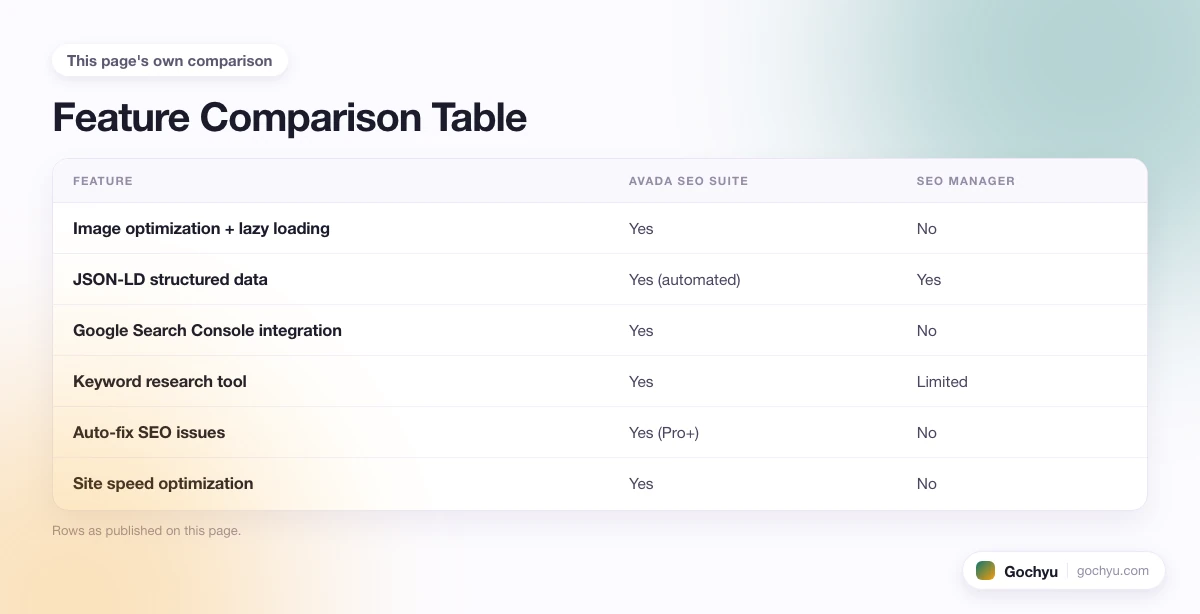
- Avada SEO Suite vs SEO Manager: SEO Manager (from Venntov) focuses on meta tag management and JSON-LD. Avada offers a broader feature set, image optimization, speed tools, and GSC integration, at a similar price point. SEO Manager is lighter and simpler; Avada does more but requires more initial setup.
- Avada SEO Suite vs Plug In SEO: Plug In SEO excels at identifying SEO issues through its audit tool but relies more on manual fixes than automation. Avada auto-fixes many of the same issues, which saves ongoing maintenance time for stores with large catalogs.
- Avada SEO Suite vs Smart SEO: Smart SEO is focused primarily on structured data and sitemap automation. It's a narrower tool at a lower price. Avada covers structured data plus significantly more, image optimization, keyword research, speed tools, making it a better fit for stores that want a single solution.
Feature Comparison Table
| Feature | Avada SEO Suite | SEO Manager | Plug In SEO | Smart SEO |
|---|---|---|---|---|
| Image optimization + lazy loading | Yes | No | Basic only | No |
| JSON-LD structured data | Yes (automated) | Yes | Partial | Yes |
| Google Search Console integration | Yes | No | No | No |
| Keyword research tool | Yes | Limited | No | No |
| Auto-fix SEO issues | Yes (Pro+) | No | No | Partial |
| Site speed optimization | Yes | No | No | No |
| Free plan available | Yes (50 products) | 14-day trial only | Yes (limited) | Yes (limited) |
| Starting paid price | $29/month | $20/month | $29.99/month | $9.99/month |
Avada Shopify Theme Detector
One lesser-known feature worth mentioning: Avada includes a theme-detection component that surfaces speed and SEO issues specific to your active Shopify theme. If you've been searching for an Avada Shopify theme detector, this is it. It audits your theme's CSS, script bloat, and render-blocking resources directly within the app.
Avada SEO Suite Pricing
Avada SEO Suite Pricing Plans
- Free Plan: $0/month, optimizes 50 products/month, instant speed up, SEO checklist, HTML sitemap.
- Pro Plan: $29/month (billed annually at $348/year) or $34.95/month (monthly). Includes: unlimited page speed up, auto-fixed SEO issues, unlimited images and alt tags, meta tag optimization, lazy loading, 14-day free trial.
- Enterprise Plan: $82.50/month (billed annually at $990/year) or $99/month (monthly). Includes: one-on-one consulting, script manager, advanced speed optimization, SEO Academy, 24/7 expert support, 30-day money-back guarantee.
How Avada Pricing Compares
- Budget SEO apps: around $9.99/month, typically cover meta tags and basic image compression only.
- Mid-range apps: $19-$29/month, add structured data and GSC integration, but rarely bundle keyword research.
- Agency tools: $99/month, unlimited store management, but built for developers rather than store owners.
At $29/month on the annual Pro plan, Avada SEO Suite sits competitively in the mid-range while delivering features most competitors reserve for their highest tier. If you're comparing Avada SEO Suite Shopify pricing against alternatives, the Pro plan is hard to beat for solo merchants and small teams.
How Long Does Avada SEO Suite Take to Set Up?
Most Shopify merchants complete the initial setup in under 30 minutes. Here's a rough breakdown of the main steps:
- Installation and account connection: 2-5 minutes. Install from the Shopify App Store, grant permissions, and connect your Google Search Console account.
- Running the initial SEO audit: 5-15 minutes depending on catalog size. Avada scans your store and surfaces issues ranked by priority.
- Reviewing and applying fixes: On the Pro plan, most fixes apply automatically. On the Free plan, you'll manually review and apply suggestions for your 50-product monthly limit.
- Configuring structured data and sitemaps: 5-10 minutes. Most settings use sensible defaults and require minimal customization for standard Shopify stores.
There is no complex onboarding or technical expertise required. The app is designed to surface issues and fix them, not to require you to understand the underlying SEO mechanics.
Keyword Analysis Features
What Avada's Keyword Analysis Includes
- Monthly search volume data: See how often target keywords are searched, so you can prioritize high-traffic terms.
- Competitor analysis: The app surfaces which keywords rivals rank for and how difficult those terms are to compete on.
- Relevance scoring: Keywords are scored for fit against your specific products and categories, not just raw volume.
- Keyword suggestion engine: Discover long-tail variations that can drive targeted traffic with lower competition.
- GSC integration: See your real-world keyword rankings and impressions directly alongside Avada's recommendations.
Most Shopify SEO apps offer surface-level keyword suggestions. Avada goes further by blending competitor data, relevance scoring, and live GSC performance into a single workflow, the kind of insight that previously required a separate, more expensive SEO platform.
Common Questions Before Installing Avada SEO Suite
Before committing to any Shopify SEO app, these questions come up repeatedly from store owners:
- Does Avada slow down my store? No. The app is built to improve speed, not reduce it. The lazy loading feature in particular reduces initial page load time by deferring off-screen images.
- Can I cancel any time? Yes. Monthly plans can be cancelled at any time. Annual plans are prepaid but Avada offers a 14-day free trial on Pro and a 30-day money-back guarantee on Enterprise.
- Does Avada work with all Shopify themes? Yes. Avada SEO Suite works across all Shopify themes. The theme detector component will audit whatever theme you're running and surface SEO issues specific to it.
- Is Avada SEO Suite worth it for a new Shopify store? The free plan is worth installing for any new store. It gets you image optimization and an SEO checklist at no cost. Upgrade to Pro when you have more than 50 active products or want automated fixes.
- Does Avada replace the need for a separate keyword tool? For most small-to-mid-size stores, no additional tool is needed. For stores running aggressive content strategies or targeting highly competitive categories, a dedicated tool like Ahrefs adds depth Avada's built-in research can't fully match.
Should You Install Avada SEO Suite on Your Shopify Store?
Avada SEO Suite is a strong choice for Shopify merchants who want one app to handle image optimization, structured data, technical SEO, keyword research, and speed improvements without toggling between multiple tools. The free plan works well for stores just getting started. The $29/month Pro plan is the sweet spot for most growing stores. If you're running an agency or managing multiple storefronts, the Enterprise plan's consulting and 24/7 support justify the higher price.
The main limitation: Avada's keyword research is useful for in-app guidance but doesn't replace a dedicated tool like Ahrefs or Semrush for deep competitive analysis. Use Avada as your store's operational SEO layer, and supplement with a dedicated keyword tool if you're running a content-heavy strategy.
For a full overview of Shopify's built-in SEO capabilities before adding any app, see our guide to does Shopify have built-in SEO, which covers what Shopify handles out of the box versus where apps like Avada fill genuine gaps.
For a deeper look, see our complete SEO guide for Shopify store owners.
* read the rest of the post and open up an offer