
Product reviews can make or break a Shopify store. Studies consistently show that 93% of buyers read reviews before making a purchase, and product pages with reviews convert at 2.7 times the rate of pages without them. Yet most Shopify store owners either skip reviews entirely during launch or set up a basic system and never optimize it. This guide covers everything you need to collect more reviews, display them effectively, handle negative feedback professionally, and use them to rank higher in search results.
Why Product Reviews Drive Shopify Sales
Product reviews do three distinct things for a Shopify store, and each one compounds the others.
First, they build trust with buyers who have no prior relationship with your brand. A shopper landing on your store for the first time has no reason to believe your product descriptions. Reviews from real customers who bought the product and came back to report their experience carry a credibility that no marketing copy can replicate.
Second, they improve SEO. Review content is user-generated text added directly to your product pages. Customers use natural language when writing reviews, which means phrases like "good for wide feet," "held up after 6 months of daily use," or "runs small, order a size up" appear organically in your page content. These are exactly the long-tail queries real buyers search for. Review apps that add structured data (JSON-LD schema markup) also make your star ratings eligible to show in Google search results as rich snippets, which typically increases click-through rates by 15 to 20% compared to listings without stars.
Third, they provide social proof at the moment of decision. A buyer who is close to purchasing but still uncertain often looks at the review count and average rating as a final check. A product with 127 reviews averaging 4.8 stars is far more compelling than an identical product with no reviews.
How to Collect Product Reviews on Shopify
The most reliable way to collect reviews is a post-purchase email sequence triggered automatically after an order is delivered.
The most important variable is timing. Send your review request 7 to 14 days after the estimated delivery date, not after the shipping date. Sending too early, before the customer has used the product, results in low response rates and shallow reviews. Sending after 21 or more days means the purchase experience has faded. For consumable products such as supplements, coffee, or skincare, extend the delay to 21 to 30 days so the customer has actually had time to try the product.
Subject line matters more than most store owners expect. "How did [Product Name] work out?" consistently outperforms generic subject lines like "Leave us a review." The question format feels personal and is more likely to be opened.
Reduce friction with a two-click review process. Most review apps let you pre-populate the star rating in the email so the customer taps one star (or five), lands on the review form with that rating already selected, and only needs to type a sentence or two. Every additional step costs you completions.
Incentives are allowed under FTC guidelines, but with an important limit: you can offer a discount or gift card in exchange for leaving a review, but not specifically for leaving a positive review. Review gating, which means filtering your customer list so that only buyers who indicate satisfaction get asked for a public review, is also illegal under FTC rules. Ask all customers, accept all reviews.
The Best Review Apps for Shopify in 2026
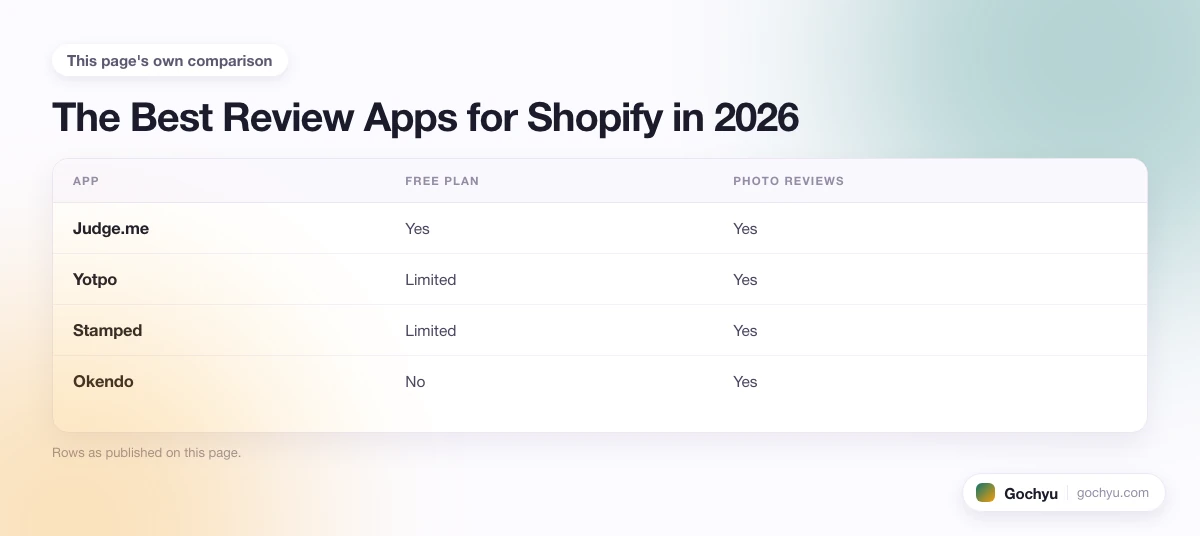
Shopify retired its native Product Reviews app in May 2024, so all review functionality now requires a third-party app. Here are the four most widely used options:
| App | Free Plan | Photo Reviews | Verified Buyer Badge | Google Shopping Integration | Paid Price |
|---|---|---|---|---|---|
| Judge.me | Yes | Yes | Yes | Yes | $15/mo |
| Yotpo | Limited | Yes | Yes | Yes | $29/mo |
| Stamped | Limited | Yes | Yes | Yes | $23/mo |
| Okendo | No | Yes | Yes | Yes | $19/mo |
Judge.me is the most popular choice among Shopify stores under $1 million in annual revenue, primarily because its free plan includes unlimited review requests with no cap on the number of orders. Yotpo is preferred by brands that want user-generated content features beyond basic reviews, including social sharing, Q&A sections, and visual galleries. For a detailed breakdown of each app's strengths, see our best review apps for Shopify comparison.
How to Display Reviews Effectively on Product Pages
Collecting reviews is only half the work. How you display them on your product pages determines how much conversion lift you actually get.
The star rating widget should appear above the fold, meaning a visitor on mobile should see it without scrolling. Pair it with the review count using a format like "4.8 (127 reviews)" rather than stars alone. The number of reviews matters as much as the score; a 4.6 average with 200 reviews typically converts better than a 4.9 average with 8 reviews.
Feature photo reviews prominently. Product pages with photo reviews from customers see a 24% higher conversion rate than pages with text-only reviews. Most review apps include a photo gallery widget you can place below the main review list.
Include a recency signal on each review. A line showing "Purchased 3 months ago" or a visible date tells buyers the product is still being sold and still receiving feedback. Reviews with no date visible feel potentially old.
Add sort and filter options so buyers can find the most relevant reviews quickly. Sorting by "most recent," "most helpful," or filtering by star rating are the three most useful controls.
How Reviews Affect Shopify SEO
Review content contributes to SEO in ways that are often underestimated by store owners.
Every review adds user-generated text to your product page. Customers use natural phrasing that often aligns with real buyer search queries. A buyer searching "are these boots good for wide feet" may find your product page because three customers mentioned wide feet in their reviews.
Review schema markup, output automatically by most major review apps as JSON-LD structured data, tells Google to display star ratings directly in your search result listing. A listing with a yellow star rating and review count in the SERP typically gets 15 to 20% more clicks than the same position without stars, even if your page title and meta description are identical to a competitor's.
Responding to reviews also helps. When you post a public reply, that text is added to the page content and can be indexed. Replies keep the page active with fresh content, which can support crawl frequency on high-volume product pages.
For a step-by-step look at how to access and manage your reviews inside Shopify after the native app deprecation, see how to view product reviews on Shopify.
Handling Negative Reviews
Negative reviews are not a problem to eliminate. They're a signal to manage well.
A product with 100% five-star ratings looks suspicious to experienced online shoppers. Buyers trust a mix of ratings more than a perfect score, especially when the negative reviews show the store responded thoughtfully. A few honest three-star reviews actually increase overall trust, not reduce it.
When a negative review comes in, respond publicly within 24 to 48 hours. Use a consistent format: acknowledge the specific issue without being defensive, address it directly, and offer to resolve it through a private channel ("Send us a message and we'll sort this out"). Avoid generic corporate-sounding responses like "We're sorry you had a less than satisfactory experience." Name the product and the issue specifically.
Never delete negative reviews unless they violate the review platform's terms of service (fake reviews, profanity, reviews for the wrong product). Suppressing real negative feedback destroys trust if buyers notice, and review apps log moderation actions.
Use negative feedback operationally. If five separate reviews mention the same issue, that's a product description problem (the expectation doesn't match reality) or a product quality problem. Fix the underlying issue rather than managing the symptom.
Getting Your First Reviews as a New Store
New stores face a real cold-start problem. Buyers hesitate to purchase from a store with no reviews, but you can't get reviews without buyers first. Here are proven ways to break out of that loop.
Email your first 10 to 20 customers individually, not through an automated sequence. A personal email from the founder asking "Did the [Product Name] work out for you?" has a dramatically higher response rate than an automated template. It also gives you a chance to fix problems before they turn into public one-star reviews.
Import reviews from Amazon if your product also sells there. Apps like Opinew allow you to import Amazon reviews for the same product to your Shopify store. Check Opinew's terms and Amazon's ToS for current limitations before doing this, as policies in this area evolve.
Offer early-access pricing to your launch email list in exchange for honest reviews. This is legal as long as you're asking for honest reviews, not positive ones. Early supporters often leave detailed, helpful reviews because they feel invested in the brand's success.
Once you have your first 10 to 15 reviews, the automated post-purchase email sequence takes over and review volume compounds from there. The goal of the manual early-stage effort is just to get past zero.
* read the rest of the post and open up an offer