If you need a Squarespace event template, these 10 options give you everything an event website requires: built-in ticket sales, scheduling tools, fast load speeds, and designs that work for conferences, concerts, workshops, and corporate events. Squarespace's native ticketing system integrates with most templates, with no third-party plugin needed.
Does Squarespace Have an Event Template?
Yes. Squarespace has multiple templates built for event websites, all compatible with its native scheduling and ticketing add-on. You can sell tickets, manage capacity, accept payments, and display event schedules without leaving the Squarespace platform. The templates below all support this feature.
What to Look for in a Squarespace Event Template
The best Squarespace event template for your business depends on three things: how visually driven your events are, whether you need a Squarespace ticketing system, and how much traffic you expect from search engines. Here's what matters:
- Built-in ticket selling: Squarespace's scheduling add-on works across all templates in this list, letting you sell tickets and manage capacity automatically.
- Visual flexibility: Consumer events (concerts, festivals) need image-heavy designs; corporate events benefit from cleaner, text-focused layouts.
- Page speed: Slow-loading pages lose roughly 7% of visitors per second of delay, directly affecting ticket sales and search rankings.
- Mobile responsiveness: Over 60% of event ticket searches happen on mobile. Every template below is fully mobile-optimized.
- SEO readiness: Squarespace templates vary in their native SEO architecture. Faster, cleaner templates rank better with less customization needed.
Squarespace Event Template Comparison
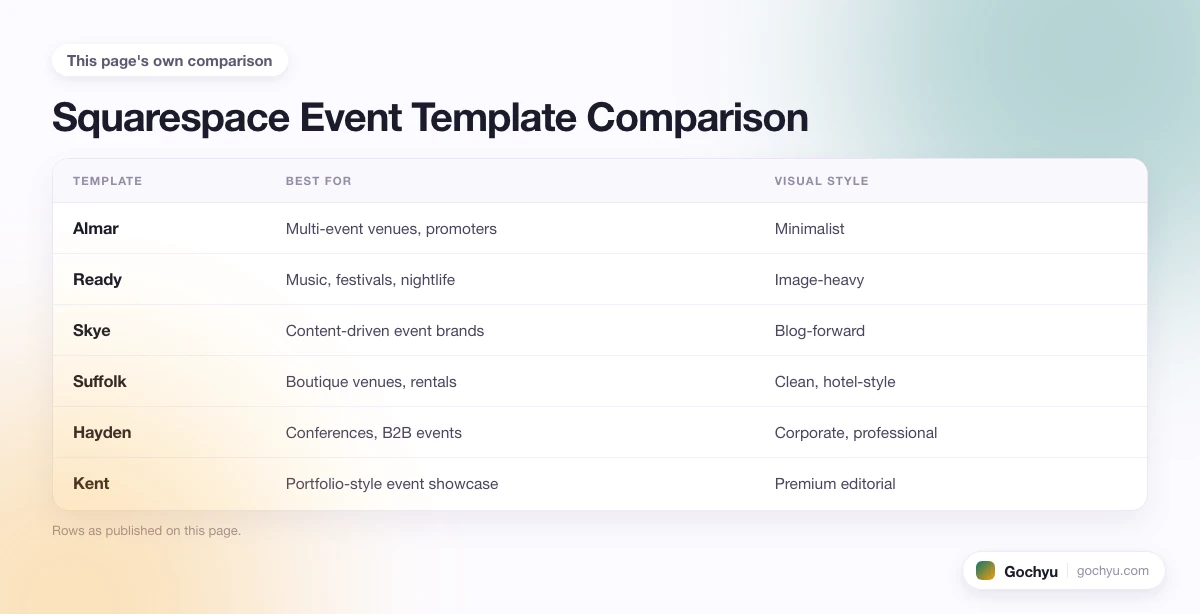
| Template | Best For | Visual Style | Blog/SEO | Ticketing |
|---|---|---|---|---|
| Almar | Multi-event venues, promoters | Minimalist | Moderate | Yes |
| Ready | Music, festivals, nightlife | Image-heavy | Basic | Yes |
| Skye | Content-driven event brands | Blog-forward | Strong | Yes |
| Suffolk | Boutique venues, rentals | Clean, hotel-style | Moderate | Yes |
| Hayden | Conferences, B2B events | Corporate, professional | Strong | Yes |
| Kent | Portfolio-style event showcase | Premium editorial | Strong | Yes |
| Myhra | Content-first, organic traffic | Clean, flexible | Strong | Yes |
| Wells | Visual/photo-heavy events | Image grid | Moderate | Yes |
| Carson | Theatrical, immersive, premium | Interactive, dramatic | Basic | Yes |
| Avenue | Fast launch, any event type | Minimalist | Moderate | Yes |
Almar

Almar is a clean, versatile template built for event businesses that need to sell tickets at scale. Its homepage layout accommodates multiple simultaneous events, each with its own call-to-action and booking link, making it ideal for venues or promoters running several events in a calendar. The built-in scheduling system handles date-specific ticket limits automatically.
Speed-wise, Almar's minimalist structure keeps load times low, which directly supports both conversion rates and search rankings. I've seen it perform well on Google for local event searches without heavy optimization.
Almar Highlights:
- Fast-loading minimalist design, strong for both Google rankings and conversion rates.
- Supports multiple simultaneous event listings with individual booking systems.
- Social media integration built into the footer for audience building.
- Event merchandise can be added for additional revenue streams.
Ready – Freelancer Squarespace Template
.jpg)
Ready is a photography-forward template that works especially well for events where the visual experience is the primary selling point, such as music festivals, art exhibitions, food events, or nightlife. The hidden left-side menu keeps the homepage focused entirely on imagery, reducing visual clutter while still allowing full navigation.
The scheduling system integrates cleanly with the checkout flow, so visitors who arrive via image-driven social media can convert to ticket buyers without friction. Fully mobile-friendly, which matters given how many ticket searches happen on phone.
Ready Highlights:
- Aesthetically striking design built for image-driven event marketing.
- Built-in booking system for direct ticket sales within the site.
- Minimalist load profile, fast on all devices.
- Social media linking for audience retention between events.
Skye – Modern Blog Squarespace Template
.jpg)
Skye is a block-based template that's particularly strong for event companies that want to build organic search traffic alongside direct ticket sales. The template's blog-first architecture means you can publish event recaps, artist profiles, and behind-the-scenes content, all of which rank on Google and feed a consistent traffic pipeline. Pair it with Squarespace's scheduling tool and you have a complete inbound marketing and ticketing engine.
Skye Highlights:
- Blog-centric design supports ongoing SEO content strategy.
- Visual block layout showcases event imagery effectively.
- Fast load speeds and mobile-optimized for high Google visibility.
- Scheduling tool integration for direct ticket sales from blog posts.
Suffolk
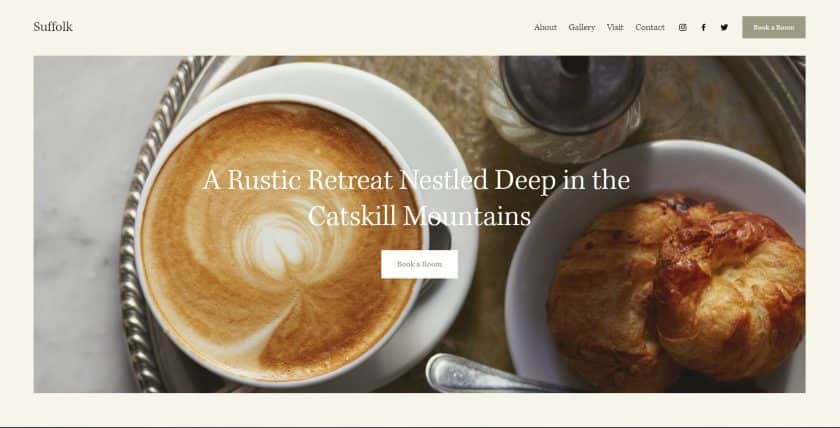
Suffolk takes a clean, hotel-inspired aesthetic and adapts it well to event businesses. The sticky navigation keeps visitors engaged regardless of scroll depth, and the hero image with dual CTAs on the homepage is a strong structure for directing visitors either to a ticket page or an event information page. Works well for rental venues, salons, and boutique event brands.
Suffolk Highlights:
- Sticky navigation reduces bounce rate on long-scroll pages.
- Hero image with dual CTAs, directing traffic to tickets or information simultaneously.
- Merchandise and product sections available for event brands.
- Fast template with low-overhead design for strong ranking performance.
Hayden – Best Squarespace Conference Template
.jpg)
Hayden is the strongest Squarespace conference template in this list. Its professional, corporate-leaning design is built for B2B events, industry conferences, and corporate team days, where credibility and detailed information matter more than lifestyle imagery. The case study and services sections let you showcase past events as social proof, and the sticky menu keeps navigation effortless on content-heavy pages.
For conference organizers specifically, Hayden's layout handles speaker listings, schedule pages, and sponsor sections without requiring custom development. The integrated blog also supports thought leadership content between events.
Hayden Highlights:
- Best Squarespace option for conferences and corporate events.
- Sticky top-right navigation, clean and always accessible.
- Case study sections double as past event showcases.
- Blog section supports content marketing between events.
Kent
.jpg)
Kent is one of Squarespace's highest-rated templates overall, and it translates well to events. Portfolio pages work perfectly for showcasing past events, with each page able to feature video recaps, photo galleries, and links to ticket archives. Kent also supports a clean event calendar layout and has all the hooks needed for Squarespace's ticketing system.
Kent Highlights:
- Top-rated template with strong SEO architecture.
- Portfolio pages ideal for showcasing previous events with video and images.
- Merchandise and product selling built in.
- Ranks well on Google with minimal SEO customization needed.
Myhra
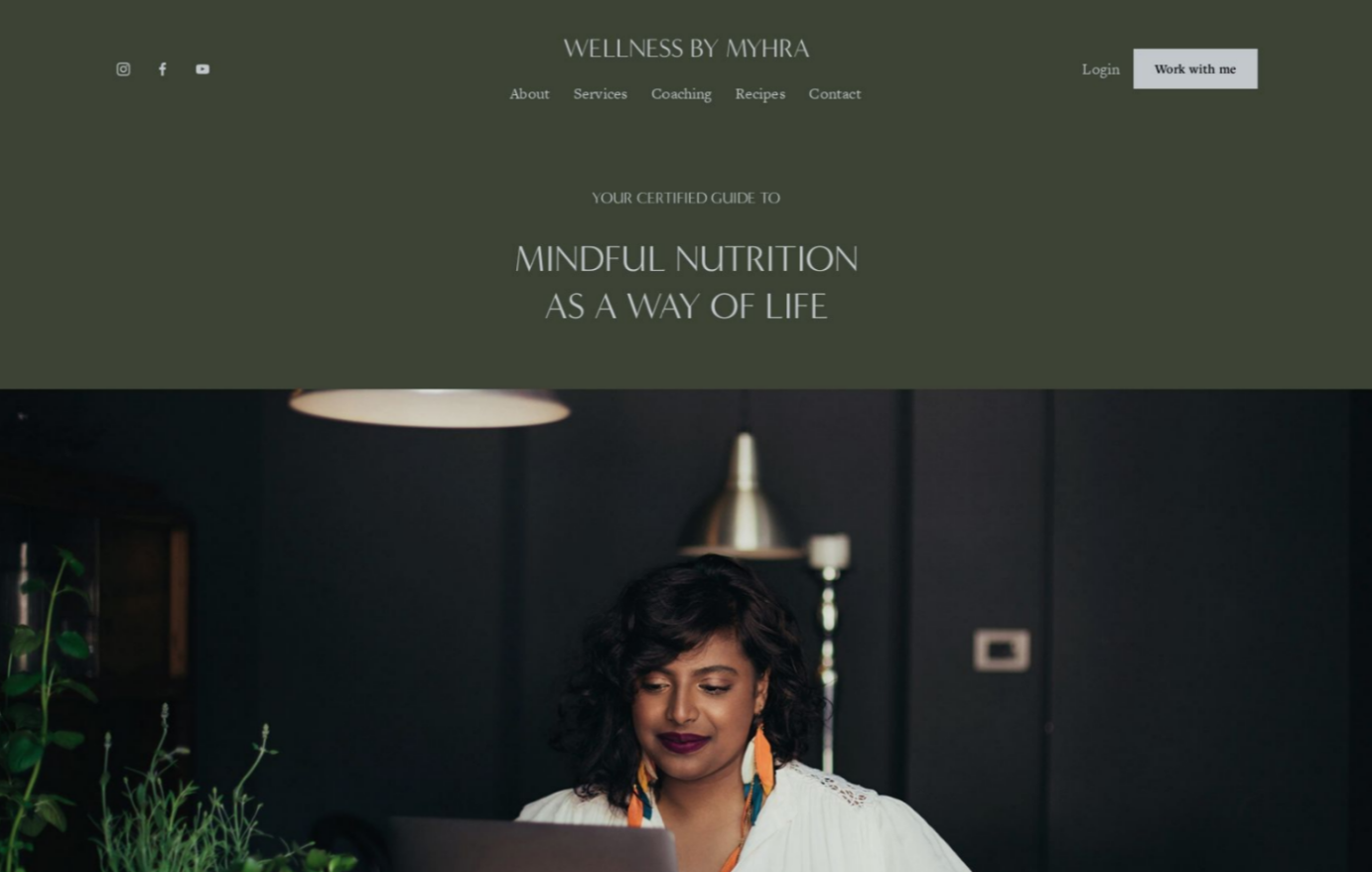
Myhra is an underrated option that consistently gets overlooked in template roundups. It's feature-rich for its simplicity: a strong blogging architecture for event content marketing, multiple engagement points for keeping visitors on-site, and full compatibility with Squarespace's ticketing system. For event businesses that want to build organic traffic while selling tickets directly, Myhra delivers both without compromise.
Myhra Highlights:
- Underrated template with strong organic traffic potential via its blog system.
- Multiple on-page engagement hooks to reduce bounce rate.
- Diverse revenue options: tickets, merchandise, and digital products.
- Customizable for improved Google rankings with minimal effort.
Wells
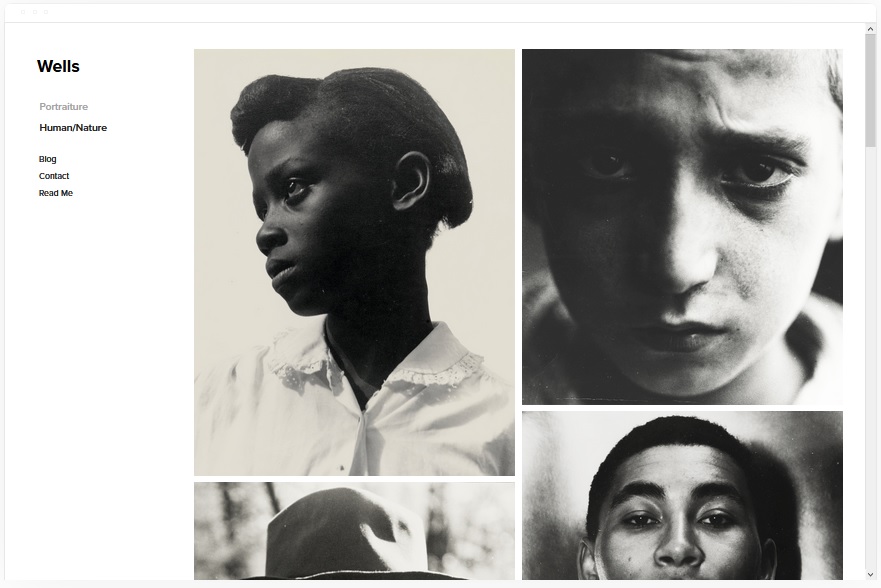
Wells is built for high-volume visual content. If your events are highly photogenic, such as fashion shows, live music, or art fairs, Wells lets you display large, high-resolution image grids that link directly to ticket pages or event landing pages. The template also handles video content natively, which is one of the most effective formats for event marketing. You can embed YouTube URLs and the platform handles everything else.
For showcasing videos from past events, Wells is the strongest option in this list. Learn more about how to showcase videos on your Squarespace website.
Wells Highlights:
- Best template for video-driven event marketing on Squarespace.
- High-resolution image grids link directly to ticket sales pages.
- Multiple product options for merchandise revenue alongside tickets.
- Strong visual conversion design.
Carson – Portfolio Squarespace Template
.jpg)
Carson is the most visually distinctive template in this list. Rather than a standard scroll homepage, it uses a static layout where the background image changes as visitors hover over navigation links. This creates a unique first impression that can significantly reduce bounce rates for events with strong visual identity, such as theatrical productions, immersive experiences, or premium brand events.
Carson Highlights:
- Unique interactive homepage, background changes on link hover.
- Strong first impression for premium or experiential events.
- Hidden menu for clean navigation without visual clutter.
- Full ticket sales integration via Squarespace scheduling.
Avenue – Portfolio Squarespace Template
.jpg)
Avenue is a clean, minimalist template that performs well on Google without heavy optimization. Its stripped-back design loads fast and gives search engines a clear content structure to crawl. Each event can have its own dedicated page with full details, ticket links, and imagery. The minimal design approach keeps the focus entirely on the event content, which typically improves conversion rates.
Avenue Highlights:
- Minimalist design built for fast load speeds and strong search rankings.
- Individual event pages with full detail and ticket integration.
- Easy to maintain, low-overhead template that launches quickly.
- Works on all devices without additional mobile optimization.
How to Set Up Event Ticketing on Squarespace
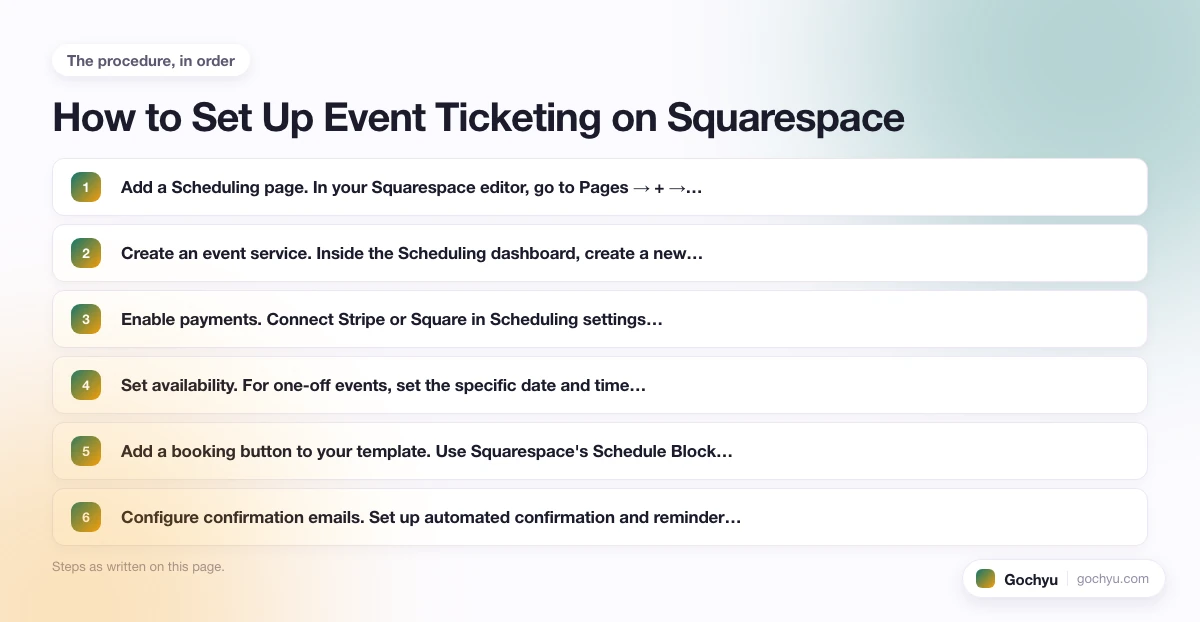
All 10 templates above support Squarespace's native ticketing system. Here's how to set it up once your template is installed:
- Add a Scheduling page. In your Squarespace editor, go to Pages → + → Scheduling. This activates the Acuity Scheduling integration that powers Squarespace's ticketing.
- Create an event service. Inside the Scheduling dashboard, create a new "Appointment Type" for each event. Set the name, duration, capacity limit, and ticket price.
- Enable payments. Connect Stripe or Square in Scheduling settings. Squarespace does not charge a transaction fee beyond the payment processor's standard rate (Stripe: 2.9% + 30¢).
- Set availability. For one-off events, set the specific date and time under "Availability." For recurring events (weekly classes, monthly workshops), use recurring availability blocks.
- Add a booking button to your template. Use Squarespace's Schedule Block in the page editor to embed a booking widget anywhere in your template. Visitors click directly from the event page to the ticket checkout.
- Configure confirmation emails. Set up automated confirmation and reminder emails inside the Scheduling dashboard. These reduce no-shows by 20-30% on average for paid events.
Squarespace Scheduling is included in the Business plan and above. If you're on the Personal plan, you'll need to add it as a standalone add-on starting at $16/month.
| # | Name | Image | |
|---|---|---|---|
| 1 |
|
More Info | |
| 2 |
|
More Info | |
| 3 |
|
More Info | |
| 4 |
|
More Info | |
| 5 |
|
More Info | |
| 6 |
|
More Info | |
| 7 |
|
More Info | |
| 8 |
|
More Info | |
| 9 |
|
More Info | |
| 10 |
|
More Info |
* read the rest of the post and open up an offer
Final Word: The Best Squarespace Event Templates
The best Squarespace event template depends on your event type. For corporate events and conferences, Hayden is the clear choice. For consumer events driven by visuals, Ready or Wells will convert better. If organic search traffic matters to your strategy, Skye and Myhra both support blog-based SEO alongside direct ticket sales. Every template above includes Squarespace's native ticketing system with no third-party integrations required.
If you're an artist or performer building a presence beyond event pages, see our full round-up of Squarespace templates for artists for portfolio-focused layouts. For more on the platform itself, see our complete guide to how to use Squarespace.

