WordPress and Wix both build real websites, but they take opposite approaches to the job. WordPress is open-source software you install on your own hosting and extend with a plugin ecosystem 60,000 strong. Wix is a hosted, all-in-one platform where design, hosting, and every feature live inside one polished editor. The choice between them almost always comes down to one question: do you want more control or less setup?
The short version: pick Wix if you want a good-looking site online this afternoon with zero technical setup and a fixed monthly cost. Pick WordPress if you want to own every file, spend less over three years, or build anything with real depth (membership sites, LMS, big blogs, complex ecommerce). The rest of this guide walks through actual pricing, learning curve, plugin depth, ecommerce trade-offs, SEO strength, and the migration cost most comparisons skip.
WordPress vs Wix: At a Glance
Both platforms ship a professional site, but they target different builders and different long-term outcomes. Here is the honest side-by-side on the axes that actually matter before you commit.
- Type of platform: Wix is a closed, hosted, all-in-one platform. WordPress is open-source software you host yourself.
- Starting cost: Wix Light plan at $17/mo. WordPress software is free, but hosting runs $5 to $30/mo depending on host tier.
- Setup time: Wix gets a decent site live in an afternoon. WordPress takes a weekend to configure properly (host, theme, essential plugins, security, backups, caching).
- Ecosystem size: Wix has around 500 apps in its App Market. WordPress has 60,000+ free plugins in the official directory and 12,000+ themes.
- Design control: Wix gives drag-and-drop freedom with a fixed layout grid on newer templates. WordPress design depends on the theme and builder (Elementor, Bricks, Divi, Kadence).
- Templates: Wix has 900+ built-in templates but locks you into the one you pick on day one. WordPress themes swap freely at any time.
- Blog and content depth: Wix Blog is fine for a small business blog. WordPress remains the default choice for serious content publishing, with unlimited custom post types and no post ceiling.
- Ecommerce: Wix Stores handles a small to medium catalog with a clean checkout. WordPress runs WooCommerce, which powers roughly 22% of all online stores and has no product cap.
- SEO capabilities: Both cover the fundamentals. WordPress pulls ahead on advanced SEO tooling through Yoast, Rank Math, All in One SEO, and SEOPress.
- Ownership and portability: WordPress files, database, and content are yours. You can migrate to any host. Wix projects live inside Wix, and export is basically not possible.
- Best for: Wix is best for small businesses, portfolios, restaurants, and simple online stores where speed and design polish matter most. WordPress is best for blogs, content sites, membership sites, ecommerce past 100 products, and anything meant to grow long-term.
Pricing: What You Actually Pay Each Month
Wix bundles everything into one monthly fee. WordPress lets you assemble the stack yourself, which means you can spend more or less depending on choices. Here is the real breakdown.
Wix Plans (as of 2026)
Wix charges one monthly price that includes hosting, SSL, the editor, forms, and support. Ecommerce features and higher storage sit on the higher tiers.
- Light ($17/mo yearly). Custom domain (free first year), 2 GB storage, basic marketing suite, no ecommerce.
- Core ($29/mo yearly). 50 GB storage, basic ecommerce (0% Wix transaction fee), custom reports, marketing automations.
- Business ($36/mo yearly). 100 GB storage, full ecommerce features including subscriptions and multi-currency.
- Business Elite ($159/mo yearly). Unlimited storage, advanced developer tools, priority support, custom reports.
Wix's price is the full monthly cost. There is no separate hosting bill, no plugin subscriptions, and no upfront theme fee. The all-in-one bundle is the whole appeal for beginners. A detailed cost breakdown of every plan, including what you actually get at each tier and the hidden costs Wix does not put on the pricing page, sits in our Wix pricing breakdown.
WordPress Costs (as of 2026)
WordPress software costs nothing. The rest of the stack is a series of decisions you make, and a real WordPress site runs $10 to $50/mo depending on hosting quality and how many premium extensions you buy.
- Shared hosting ($3 to $15/mo). Bluehost, SiteGround, DreamHost. Fine for new sites under 20,000 monthly visits.
- Managed WordPress hosting ($20 to $50/mo). Kinsta, WP Engine, or Cloudways for sites that grow past 50,000 monthly visits, with daily backups and staging environments.
- Domain ($10 to $15/year). Namecheap, Cloudflare, or GoDaddy.
- Theme ($0 to $89 one-time, or annual subscription). Astra, Kadence, and GeneratePress have strong free versions.
- Plugins ($0 to $300/year in aggregate). Yoast Premium, WP Rocket, and a form builder like Gravity Forms sit in the $50 to $99/year range each.
The Real Cost Comparison
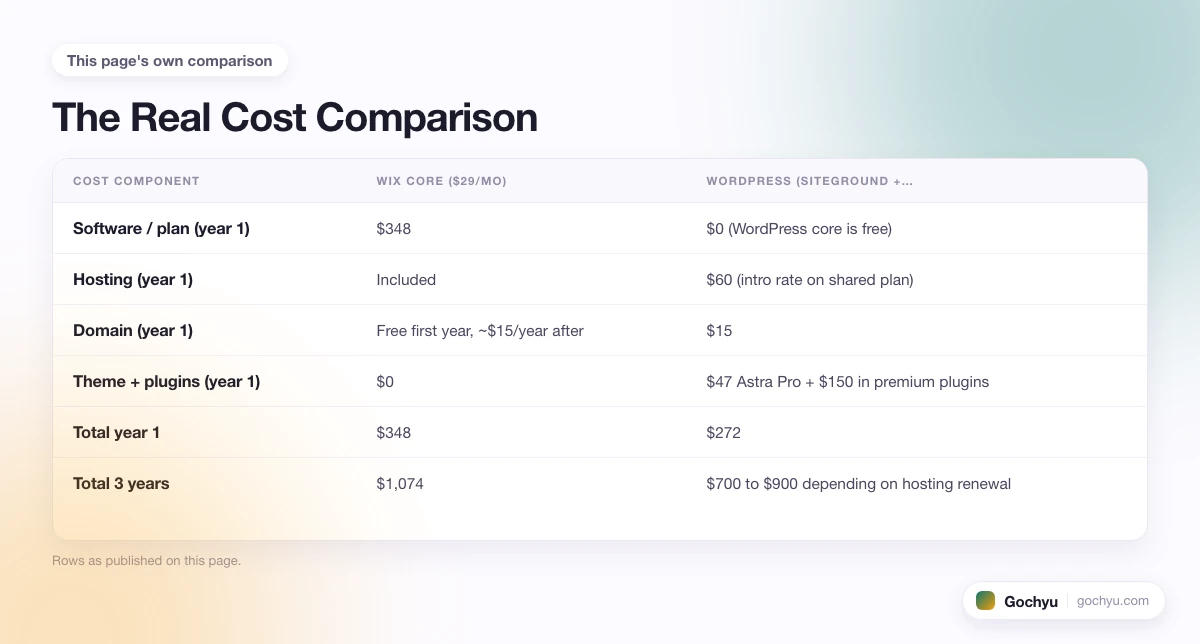
For a comparable content or small-business site with a blog and a contact form, here is what each platform costs over three years.
| Cost component | Wix Core ($29/mo) | WordPress (SiteGround + Astra Pro + 3 premium plugins) |
|---|---|---|
| Software / plan (year 1) | $348 | $0 (WordPress core is free) |
| Hosting (year 1) | Included | $60 (intro rate on shared plan) |
| Domain (year 1) | Free first year, ~$15/year after | $15 |
| Theme + plugins (year 1) | $0 | $47 Astra Pro + $150 in premium plugins |
| Total year 1 | $348 | $272 |
| Total 3 years | $1,074 | $700 to $900 depending on hosting renewal |
Two things stand out. Wix's cost is fixed and predictable, which many small business owners actually prefer. WordPress's three-year total is lower but only if you shop for hosting and use free themes and plugins where possible. The gap widens over five years because managed hosting renewal prices stay close to intro rates on WordPress while Wix keeps its monthly fee steady.
Ease of Use: Wix's Real Edge
This is where Wix wins hard and honestly. The editor is drag-and-drop with visual controls for everything: fonts, colors, spacing, images, animations. You start from a template, swap in your content, and publish. No plugin decisions, no hosting setup, no security configuration. A first-time site owner can go from signup to a live business site in one afternoon. Wix ADI (Artificial Design Intelligence) can even generate the entire site from a short questionnaire, which is genuinely useful for someone who does not know where to start.
WordPress is closer to an assembly job. You pick a host (usually the biggest decision people underestimate), install WordPress (most hosts do this in one click now), pick a theme, then pick a page builder or stick with the native Gutenberg block editor. You then install a security plugin, a caching plugin, a backup plugin, a form plugin, an SEO plugin, and maybe an image optimization plugin. Each of those is a decision. Some come with paid tiers you probably want. This is why "just install WordPress" understates what actually happens on day one.
The learning curve trade-off is real. Wix ships a good-looking site fast because it makes every decision for you. WordPress trades that speed for control: you can build almost anything after the ramp, but the ramp is real. For a small business owner who wants a working site and never wants to think about maintenance, Wix's approach is the honest answer. For a technically curious builder who wants to keep options open, WordPress rewards the extra effort.
A practical test: if the idea of picking between three form plugins sounds annoying rather than fun, Wix is the platform for you. If you enjoy configuring things and want the freedom to swap any component later, WordPress rewards that instinct.
Customization and Design: WordPress Wins on Depth
Wix's editor is more visual, but WordPress has more raw flexibility. Both are true at the same time.
Wix gives you 900+ templates, each of which is fully editable in the visual editor. You can move any element, change any color, upload custom fonts, and add animations. The catch is that once you pick a template on day one, you cannot swap to a different template later without rebuilding the site. That single limit shapes the whole Wix experience: pick carefully, because the design decision is close to permanent.
WordPress themes swap freely. You can install a new theme and preview it against your existing content before activating it. There are more than 12,000 free themes in the official directory and thousands more premium themes across marketplaces. Add Elementor Pro, Bricks, Divi, or Kadence and the design flexibility multiplies. You can rebuild any template on the site, create custom post types with their own layouts, and change the entire look without touching content.
A useful frame: Wix is easier to design with today but harder to redesign later. WordPress is harder to design with today but gives you more options tomorrow. If your site's look will stay recognizably the same for years, Wix's constraint is fine. If you expect to iterate design over time as the business grows, WordPress is the safer bet.
Plugins and Ecosystem: WordPress Dominates
The plugin and theme ecosystem is where WordPress's 20-year head start becomes overwhelming. The official WordPress plugin directory holds more than 60,000 free plugins, plus tens of thousands of premium plugins across marketplaces. Every category you can think of has multiple mature options with active development, community reviews, and integration guides.
Wix's App Market has roughly 500 apps, and while the quality is good and the integration into the editor is clean, the depth is not close. For anything Wix does not natively support, you rely on custom code embeds (allowed on higher plans) or an external Zapier / Make workflow.
Some concrete examples that illustrate the gap:
- Membership sites. WordPress has MemberPress, Paid Memberships Pro, and Restrict Content Pro. Wix has native Member Areas with tiered access, which cover simple cases well but do not match plugin depth.
- Learning platforms. WordPress runs LearnDash, LifterLMS, and TutorLMS. Wix has a small Online Programs feature that handles basic courses but is not built for real LMS depth.
- Forums and community. bbPress or BuddyPress on WordPress. Wix Forum is a native feature that works for small communities but lacks the extensibility of dedicated plugins.
- SEO tooling. WordPress has Yoast, Rank Math, All in One SEO, and SEOPress, each with hundreds of thousands of installs, content scoring, schema builders, and internal link suggestions. Wix ships strong on-page SEO defaults but does not match the depth of dedicated SEO plugins.
- Custom post types. WordPress lets you create any custom content structure with plugins like Advanced Custom Fields. Wix's Data Collections cover simple cases but hit limits fast.
For a standard website (marketing pages, blog, portfolio, small store), both platforms cover the basics. Once the requirements list gets specific, WordPress's plugin depth becomes the deciding factor for most non-simple use cases.
Ecommerce Features: Wix Is Fine, WooCommerce Runs the World
Both platforms sell online, but the depth is not close once you get past small catalogs.
Wix Stores works well for a small to medium store with a clean checkout, native inventory management, subscription support on higher plans, abandoned cart emails, and a decent selection of shipping and tax rules. The store lives inside the same editor as the rest of your site, which is convenient. You get product pages, categories, cart, and checkout without installing anything. Wix takes no transaction fee on top of payment processing (though you still pay the standard 2.9% + $0.30 per transaction to Stripe, PayPal, or the payment gateway of your choice).
WordPress runs WooCommerce, the most-used ecommerce platform in the world by store count. WooCommerce has no product ceiling, no annual sales cap, no platform transaction fee, and an extension ecosystem that covers subscriptions (WooCommerce Subscriptions), memberships, bookings, wholesale, dynamic pricing, multi-currency, and every payment gateway you can name. If you want a fuller picture of what WooCommerce is and where it fits the WordPress stack, our WooCommerce guide for beginners covers the details.
The trade-off is setup effort. WooCommerce needs configuration: shipping zones, tax rules, payment gateway, compatible theme. Wix Stores is more turnkey. If your store is small and design-led, Wix's shorter setup can be worth the ecosystem gap. If you plan to grow past a few hundred products, or you sell subscriptions, memberships, or complex bundles, WooCommerce on WordPress is the stronger long-term platform.
SEO Capabilities: Fundamentals Even, Depth to WordPress
Both platforms produce crawlable HTML with editable meta titles, meta descriptions, canonical URLs, robots.txt, and automatic sitemaps. Both support SSL by default and generate reasonable page speed out of the box. On the fundamentals, they are close.
The differences show up in advanced SEO tooling:
- SEO plugins. WordPress has Yoast, Rank Math, All in One SEO, and SEOPress, each with content scoring, redirect managers, XML sitemap customization, and schema builders. Wix has a native SEO panel per page and an SEO Wiz tutorial for beginners, but no equivalent tool for content scoring or advanced schema.
- Schema markup. WordPress plugins ship article, product, FAQ, breadcrumb, review, and organization schema with UI configuration. Wix handles article and product schema natively but does not match the range of custom schema types.
- URL structure. WordPress permalink control is fully flexible. Wix has improved its URL handling significantly in recent years but still adds trailing slashes and specific path patterns you cannot fully override.
- Redirect management. WordPress has the Redirection plugin (free) with import/export and pattern matching. Wix has a native URL redirect manager that covers standard cases.
- Page speed. Both platforms perform well out of the box. WordPress speed depends heavily on hosting, theme, and caching setup. Wix serves through a global CDN and delivers consistent Core Web Vitals scores without configuration.
- SEO community resources. WordPress has the enormous SEO community advantage. Every question has 20 tutorials. Wix's SEO community is smaller and more marketing-focused.
The net: for a small business site where SEO is one of several priorities, Wix does the job. For a site where SEO is a core function (a content marketing engine, an affiliate site, a niche blog), WordPress's plugin ecosystem gives you tools Wix does not match.
Ownership, Portability, and the Migration Trap
This is the variable most Wix vs WordPress comparisons skip, and it usually decides the choice for anyone thinking past year one.
WordPress files and database are yours. You can back up the site with a plugin, download it, and restore it on any host that supports PHP and MySQL. The theme, plugins, content, and users move together. You can change hosts, hire a different developer, or move to a headless setup without rebuilding the site.
Wix is fully closed. Your content lives inside Wix's platform. There is no meaningful export path: you cannot download your site and host it elsewhere. If Wix raises prices, changes the plan structure, or discontinues a feature you rely on, your options are limited. If you want to leave Wix later, you rebuild the site from scratch on the new platform, manually copying content one page at a time.
Moving from Wix to WordPress typically takes 20 to 60 hours for a small business site, or $1,500 to $5,000 in agency work. You can pull blog posts through the RSS feed and import them into WordPress. Everything else (pages, product data, contact forms, custom sections) is a manual rebuild. This lock-in is not a criticism of Wix's product quality. It is the trade you make when you pick a closed platform, and it is worth knowing before you commit.
Best For: Who Should Pick Which
Wix is best for
- Small business owners who want a good-looking site online this week with no ongoing maintenance work.
- Restaurants, salons, boutiques, and local services that need a simple, professional web presence with basic booking or contact forms.
- Portfolios and creative brands that value polished design templates and drag-and-drop editing more than deep customization.
- Small online stores under 500 products where Wix Stores' feature set is enough.
- Non-technical owners who want a fixed monthly bill and want the platform to handle security, backups, and updates automatically.
WordPress is best for
- Blogs and content sites where publishing volume, editorial workflow, and SEO tooling matter more than design polish.
- Membership and course sites that need tiered access, drip content, or LMS features.
- Ecommerce stores past 100 products that want no product cap, no platform fees, and the depth of WooCommerce extensions.
- Affiliate and niche sites where advanced SEO plugins and schema builders compound over time.
- Any project where portability matters, including client sites where the client might switch developers or hosts later.
- Directory, real estate, restaurant, and specialty vertical sites where WordPress has purpose-built themes and plugins.
For a fuller picture of what WordPress is and what it powers, our WordPress explainer walks through core concepts, plugins, themes, and the free-plus-hosting cost model.
Common Scenarios Quick-Hit
Cases where the choice gets tighter and the right answer flips:
- First-time website builder for a small business. Wix. The learning curve is the whole difference and it matters more than any single feature.
- Serious blog or content site. WordPress. Post ceilings, editorial workflow, and SEO plugins all favor it.
- Restaurant with online menu and reservations. Wix. Native OpenTable-style booking, menu builder, and design polish beat WordPress plus a plugin stack for this specific case.
- Portfolio for a designer. Either. Wix if you want no maintenance work. WordPress with a portfolio theme if you want to blog seriously alongside the work.
- Membership community. WordPress. MemberPress or Paid Memberships Pro give tiered access, drip content, and gated forums that Wix cannot match.
- Small online store with 30 to 100 products. Either. Wix Stores handles this range well. WooCommerce also works and gives more room to grow.
- Online store with 500+ products. WordPress with WooCommerce. Product limits and app depth start to matter.
- Course business. WordPress with LearnDash or LifterLMS. Wix's Online Programs feature is limited compared to dedicated LMS plugins.
- Real estate agency with IDX property feeds. WordPress. Purpose-built themes and IDX plugins handle MLS integration Wix cannot.
- Local service business (plumber, electrician, dentist). Wix. Fast to launch, mobile-friendly templates, and the client will not want to touch the site much anyway.
Verdict: Which Should You Choose?
If you are a small business owner or first-time site builder and want a working, good-looking site online this week with fixed monthly costs and no maintenance overhead, choose Wix. The all-in-one bundle, the visual editor, and the removal of every setup decision are the real value, and they matter more than the extra plugin depth WordPress offers on paper.
If you are building a serious content site, an ecommerce store you expect to grow, a membership site, an affiliate site, or anything that needs to stay flexible over several years, choose WordPress. The plugin ecosystem, the ownership of your files, the lower long-term cost, and the sheer size of the developer pool make WordPress the safer bet for anything that is not primarily a design-first small business site.
If you are still leaning Wix, spend 30 minutes with the Wix editor and try building your homepage. If the drag-and-drop feels natural, that is the honest test. If you are leaning WordPress, install it on a cheap shared host, pick a block theme like Astra or Kadence, and publish one post. Whichever platform feels like less friction after that first hour usually stays the right choice.
Still not sure whether the WordPress or Wix question is even the right platform question? Our guide on how to choose the right platform for your business covers the decision framework in more detail, including where Shopify and Squarespace fit against these two.
Conclusion: WordPress vs Wix
Both platforms build real websites. Wix wins on speed to launch, all-in-one simplicity, and design polish for beginners. WordPress wins on flexibility, ecosystem depth, ownership, and cost at scale. For a small business site where the goal is a professional web presence with minimum fuss, Wix is honestly the better tool. For a content, ecommerce, or membership site meant to grow over years, WordPress is the stronger long-term foundation. If Wix's design is drawing you in, our roundup of the best Wix templates shows the strongest starting points before you commit. Curious how a site you like was built? Our free Theme Detector identifies whether a live site runs on Wix, WordPress, or something else in a few seconds.
* read the rest of the post and open up an offer